
Livraison le jour même ou le lendemain

Qualité garantie

Débloquez vos offres de bienvenue: Livraison GRATUITE | Jusqu'à -80 % | 30 jours d'essai gratuits à JoyPlus
Téléchargez l'application
The gaming mouse market is a jungle. Between spec sheets drowning in jargon and ever-bolder marketing promises, it's hard to navigate and avoid buyer's remorse. As a hardware editor, my job is to cut through the noise for you. This guide gets straight to the point: deciphering what really matters and arming you against misleading arguments.
Before you even start comparing models, let's review the classic mistakes that can be costly. Knowing them is the first step to making the right choice.
Now that the pitfalls are out of the way, let's focus on the features that truly make a difference in-game.
The sensor is the heart of the engine. The presence of tried-and-true models like the PAW3395 is an excellent indicator of reliability and precision, far more so than the DPI number.
The polling rate, measured in Hertz (Hz), is the number of times per second the mouse reports its position to the computer. While 1000 Hz is the standard today, we're seeing the arrival of 4k Hz and even 8k Hz mouse models for the most demanding players. They promise even smoother and more responsive tracking—a notable advantage in competition, provided you have a high-refresh-rate monitor (144 Hz and up) and a processor capable of handling the extra data.
The choice between wired and wireless depends on your priorities:
As for weight, it should match your playstyle and grip. An ultralight gaming mouse (generally under 80g) is perfect for the quick, sweeping movements typical of FPS games. Conversely, a heavier, more ergonomic model will often be more comfortable for long sessions in strategy games (RTS) or MMOs.
Enough theory, let's get practical. Here is a selection of models that check all the right boxes, designed for specific player profiles.
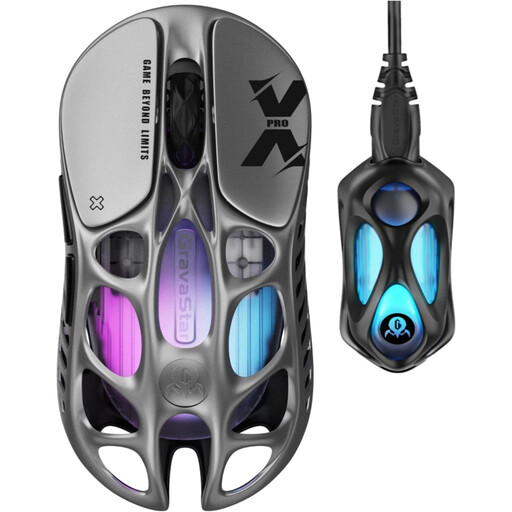
Why we recommend it: Built for pure performance, this mouse combines a feather-light 49g weight (thanks to its robust magnesium alloy shell) with an 8000 Hz polling rate. A true scalpel for gamers chasing every millisecond.
It proves that ultra-lightweight can go hand-in-hand with durability. Its magnesium alloy structure gives it far greater rigidity than plastic, thus avoiding the trap of "ultralight" mice that creak or flex.
PAW3950 sensor (up to 32,000 DPI), 8000 Hz polling rate for absolute smoothness, and a record-breaking weight of just 49 grams.
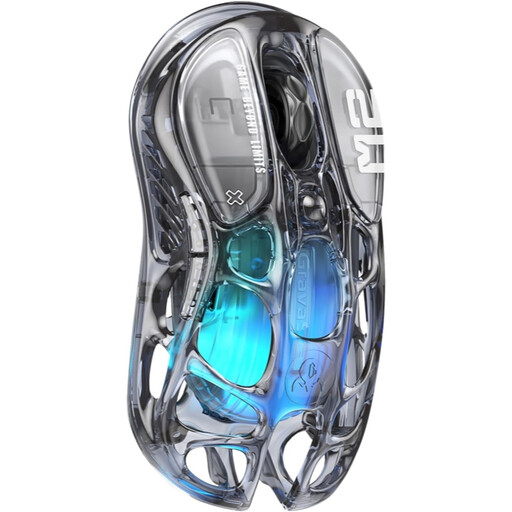
Why we recommend it: For those whose setup is as important as their skill, aesthetics are non-negotiable. This model stands out from the crowd with its transparent design and 5 RGB lighting modes, becoming the centerpiece of any desk.
The looks don't come at the expense of performance. Equipped with the PAW3395 sensor and weighing in at 79g, it delivers in-game and avoids the classic trap of stylish mice with cut-rate components.
Unique transparent design, 5 customizable RGB modes, and tri-mode connectivity (2.4 GHz/Bluetooth/Wired) for ultimate versatility.
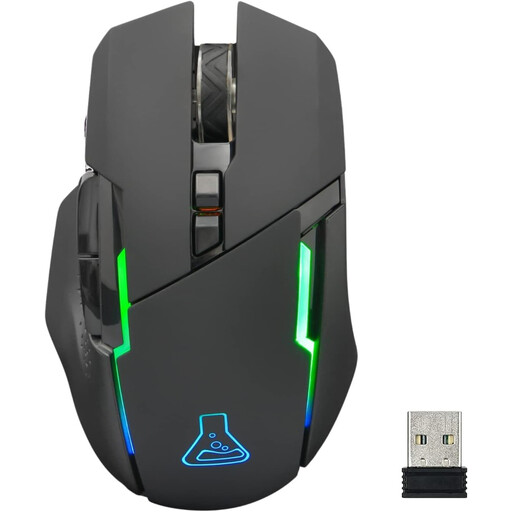
Why we recommend it: This is the ideal entry point into the world of wireless gaming. It gets the essentials right (adjustable sensitivity, RGB, good battery life) at an affordable price point, without sacrificing the reliable 2.4 GHz connection that's crucial for gaming with peace of mind.
It doesn't fall for the trap of inflated DPI, offering a realistic and more than sufficient sensitivity range (up to 7200 DPI). The focus is on a wireless experience that works, not on flashy marketing numbers.
Stable 2.4 GHz wireless connection, up to 32 hours of battery life (with lighting off), and broad compatibility (PC, PS4, Xbox, Mac).
Discover our full selection of mice that meet our criteria for performance and reliability.
1. What is the lifespan of a gaming mouse? A mouse's longevity primarily depends on the durability of its switches (under the clicks), which is rated in millions of clicks (e.g., 50 million). The quality of materials and basic maintenance are just as crucial. On average, a well-made and well-maintained mouse will easily last you 3 to 5 years, sometimes much longer.
2. Is a 4k or 8k Hz mouse really useful? For a casual gamer, the difference from a standard 1000 Hz mouse will be almost imperceptible. However, for a competitive FPS player with a high-refresh-rate monitor (144 Hz or higher), a high polling rate translates to a feeling of increased smoothness and responsiveness. It's a feature for purists seeking absolute performance, but be warned: it is more demanding on CPU resources.
3. How do you clean a gaming mouse, especially a "honeycomb" model? Always unplug the mouse before handling it. For the exterior, a simple dry microfiber cloth is sufficient. For models with a perforated shell (known as "honeycomb"), a can of compressed air is your best friend for dislodging dust from the cavities. Never use liquids or harsh cleaning products, as you risk damaging the electronics.