
Livraison le jour même ou le lendemain

Qualité garantie

Débloquez vos offres de bienvenue: Livraison GRATUITE | Jusqu'à -80 % | 30 jours d'essai gratuits à JoyPlus
Téléchargez l'application
Precision, responsiveness, comfort?: a good gaming mouse is the essential ally of any self-respecting gamer. But with an overwhelming number of options on the market, how do you find your way?? This guide is here to break down the features that truly matter and help you find that hidden gem—the one that will perfectly suit your hand, your playstyle, and your budget.
Before diving into our top picks, let's go back to basics. What really sets a gaming mouse apart from a standard office mouse?? Several technical criteria make all the difference and deserve your attention to ensure a successful purchase.
The choice between a wired gaming mouse and a wireless gaming mouse is often the first question that arises.
These three elements are at the core of the experience and directly shape how the mouse feels in-game.
Always check for compatibility with your gaming rig. The majority of models are "plug-and-play" on PC and work seamlessly on consoles like the PS5 or Xbox. Be aware, however, that the dedicated software for advanced customisation (macros, lighting effects) is almost always exclusive to the PC ecosystem.
As for RGB lighting, it has become nearly standard. More than just an aesthetic gimmick, it can be useful for indicating the active DPI profile or the remaining battery level.
Enough theory, let's get practical?! We've selected three models with a particularly interesting price-to-performance ratio, each tailored to a specific type of gamer.
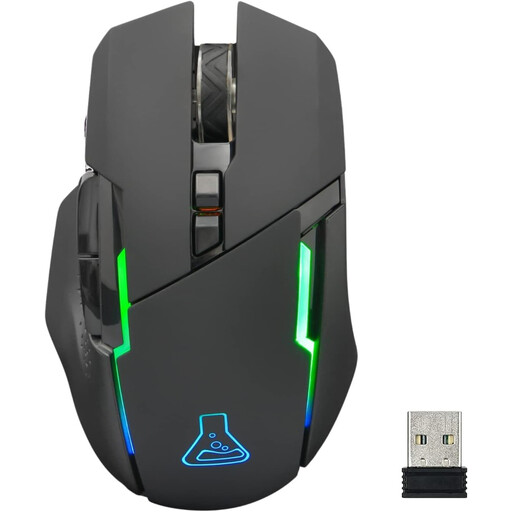
Why It Stands Out
The Kult Caesium is an excellent entry point into the world of wireless gaming. It checks all the essential boxes?: a responsive 2.4?GHz connection, a solid battery life, and sensitivity up to 7200 DPI, all housed in an ergonomic and beautifully illuminated chassis.
Pros
Who Is It For??
For gamers who want to cut the cord without sacrificing responsiveness, and who are looking for a versatile model that can switch between PC and consoles.
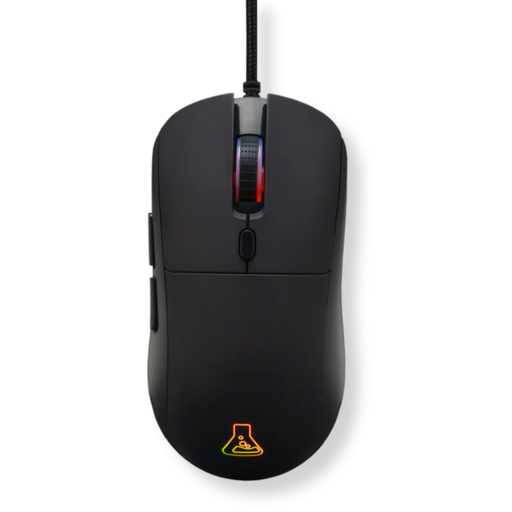
Why It Stands Out
This is all about pure performance. The Kult Cobalt is built for competition?: an optical sensor reaching 12800 DPI and a feather-light weight of 80?g. It's aimed at demanding gamers seeking surgical precision and maximum execution speed. Its wired connection guarantees flawless responsiveness.
Pros
Who Is It For??
For competitive players on PC, PS4, or PS5 for whom zero latency is non-negotiable. Those looking for a lightweight and highly customisable mouse to shave off every millisecond of performance.
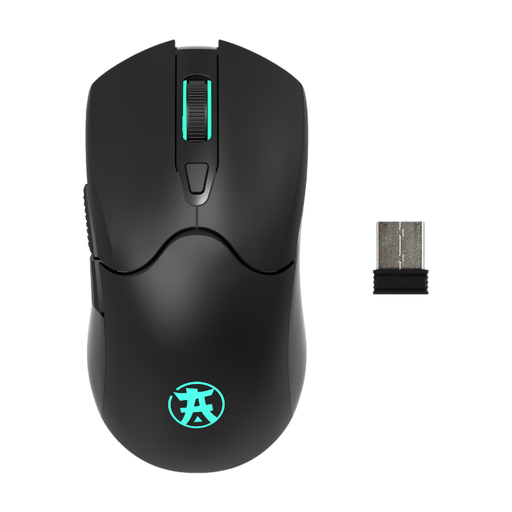
Why It Stands Out
The OTAKU M04 WL from AKUMA GAMING is all about delivering the best value for money. This rechargeable wireless gaming mouse gets straight to the point and does it well?: sensitivity up to 3200 DPI, 6 buttons, and 7-colour RGB backlighting.
Pros
Who Is It For??
For beginner or casual gamers who want to get their first reliable, stylish, and effective wireless gaming mouse without breaking the bank.
Our selection is just a glimpse of what's possible. The gaming peripheral market is a universe in itself?! To discover an even wider range of mice and accessories, and to find the model that's a 100% match for you, take a look at our full catalogue.
There are multiple differences?! A gaming mouse stands out with a much higher-performance sensor (high and precise DPI), far more durable switches, the presence of programmable buttons, and an ergonomic design specifically engineered for comfort during long gaming sessions.
For the vast majority of gamers, the answer is yes. Modern wireless technologies (led by 2.4?GHz) offer such low latency that it's undetectable in-game. The choice has therefore become a matter of personal preference?: the absolute freedom of wireless or the peace of mind of a wired connection that never needs recharging.
Absolutely. Most USB mice (wired or wireless via their dongle) are natively recognised by PS4, PS5, and Xbox consoles. You can navigate menus and use them in all games that support keyboard/mouse input. The only downside?: advanced customisation software (for macros, RGB management) remains almost exclusively a PC feature.