
Livraison le jour même ou le lendemain

Qualité garantie

Débloquez vos offres de bienvenue: Livraison GRATUITE | Jusqu'à -80 % | 30 jours d'essai gratuits à JoyPlus
Téléchargez l'application
The gaming peripheral market is a real jungle. Between spec sheets filled with jargon and flashy marketing promises, it's hard to know where to start. Our mission at Joybuy is to cut through this noise to give you clear, honest advice. The goal: to help you find THE perfect gaming mouse for you, without breaking the bank.
In this guide, we break down the criteria that truly matter and reveal the most common marketing traps, ensuring you can make a 100% confident purchase.
Marketing loves to highlight impressive-sounding numbers and features that are often useless in daily use. Here are three points to check so you don't get fooled.
Now that you know how to avoid the traps, let's focus on the three technical characteristics that really make a difference.
The sensor is the engine of your mouse. It's what guarantees its precision and reliability. Forget the maximum DPI figure and focus instead on the reputation of the sensor itself (PixArt models, like the PAW3395, are undisputed benchmarks). Above all, check that the mouse allows you to set several DPI levels—an essential feature for adjusting your sensitivity on the fly, whether you're switching from a fast-paced FPS to a phase requiring pinpoint sniping.
Expressed in Hertz (Hz), the polling rate indicates how quickly the mouse sends information to your PC. Today, the standard for gaming is 1000?Hz, which translates to a response time of 1 millisecond (ms). Below 500 Hz, a slight lag can be felt, which is a deal-breaker in competitive gaming. Aim for 1000 Hz: it's the bare minimum for serious play.
Weight is a very personal matter, but the current trend is clearly towards featherlight models, with many weighing less than 80 grams. The advantage? Less fatigue during long sessions and quicker movements in fast-paced FPS games. Finally, whether you opt for a wired connection for its rock-solid reliability or 2.4 GHz wireless for its low latency, choose the technology that best suits your desk and your habits.
Rather than an endless list, we've selected three models that perfectly meet the criteria above, each tailored to a specific type of gamer.
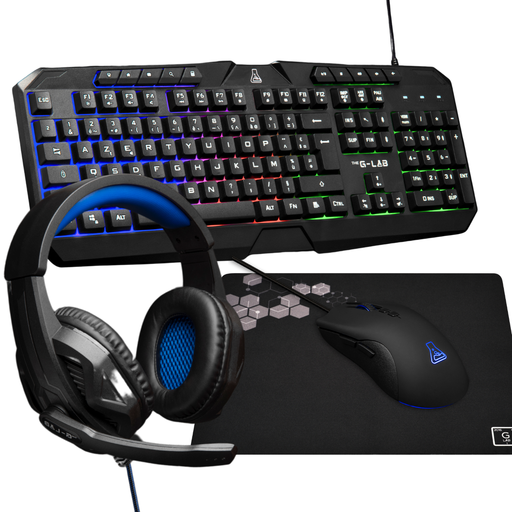
Why we chose it: To get started without breaking the bank, this gaming keyboard and mouse pack is an ideal entry point. It provides the essentials for a good gaming experience, with an AZERTY keyboard and a mouse with solid specs.
This pack gets straight to the point. The mouse features a 3200 DPI sensor, a sensitivity range perfectly suited for most games, without unnecessarily driving up the price.
A keyboard and mouse solution that guarantees perfect compatibility and a cohesive look, all with the reliability of a wired connection.
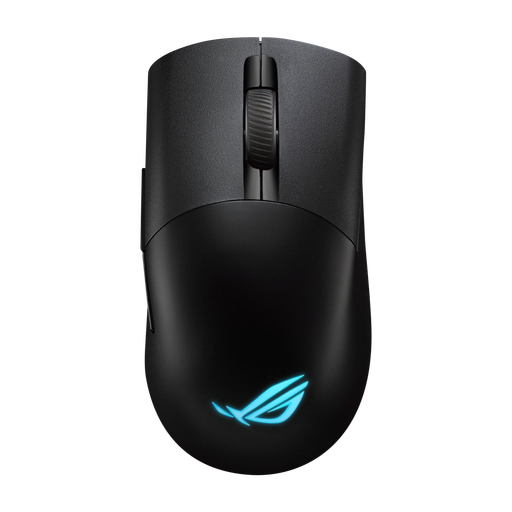
Why we chose it: Built for competition, this mouse is a technology powerhouse: a featherlight 75g weight, an ultra-precise ROG AimPoint optical sensor, and a very low-latency ROG SpeedNova wireless connection. A true beast designed for pure performance.
Here, the 36,000 DPI isn't just a marketing gimmick. It's backed by a state-of-the-art sensor and flawless wireless technology that ensure top-tier performance. Its tri-mode connectivity (2.4 GHz, Bluetooth, wired) makes it incredibly versatile.
Esports-grade precision thanks to the AimPoint sensor, and swappable micro switches to customise the click feel. A must-have.

Why we chose it: For anyone who spends long hours on their PC, whether for gaming or work. This vertical ergonomic mouse is designed to reduce wrist fatigue by promoting a more natural forearm posture.
This model prioritises comfort and health over the aggressive 'gamer' look—a point that's too often overlooked. Yet it doesn't sacrifice performance, with its 30,000 DPI sensor and comprehensive connectivity.
Its vertical shape protects your wrist health, making it perfect for mixed gaming and office use without compromising on technical specs.
We have curated a wide selection of models that meet our quality criteria and current standards.
Yes, and it's actually an excellent choice! The advantages of a gaming mouse are perfectly transferable to office use. Its precise sensor is a delight for photo editing or 3D modelling. Its programmable buttons can be assigned to shortcuts that will boost your productivity. Finally, its often well-researched ergonomics provide far superior comfort over a standard office mouse in the long run.
The lifespan depends on the build quality. One of the best indicators is the durability of the switches (the mechanisms under the buttons), measured in millions of clicks (20, 50, or even 100 million). Generally, a well-maintained mouse from a reputable brand can easily last for several years, even with heavy use.
The first rule: always unplug it before you start. Use a slightly damp microfibre cloth to clean the shell and buttons. For hard-to-reach areas (crevices, scroll wheel, etc.), a can of compressed air or a small, soft brush will work wonders. Most importantly, never use harsh chemical products and ensure no liquid seeps inside.