
Livraison le jour même ou le lendemain

Qualité garantie

Débloquez vos offres de bienvenue: Livraison GRATUITE | Jusqu'à -80 % | 30 jours d'essai gratuits à JoyPlus
Téléchargez l'application
Choosing a new gaming mouse can quickly become a headache. Between cryptic spec sheets, flashy designs, and marketing jargon, it's easy to get lost and end up regretting your purchase. Our mission? To help you see things more clearly. Let's break down the pitfalls to avoid and the criteria that truly matter to find the perfect mouse for you, far from the unnecessary marketing claims.
Peripheral marketing is a jungle of claims that often don't translate into a better in-game experience. Here are the three classic mistakes that cost gamers dearly.
To make the right choice, forget the marketing and focus on what truly impacts your gameplay and comfort.
The grip and feel are the number one criterion. A lightweight gaming mouse (often under 80 grams) is favoured for fast-paced games like FPS, as it facilitates wide, quick movements. Conversely, a heavier model can provide a better sense of control and stability.
The ideal ergonomics will depend on your hand size and grip type (the famous palm, claw, or fingertip grip). For click marathoners concerned about wrist fatigue, a vertical mouse is an option not to be overlooked: it forces your hand into a much more natural posture.
Beyond DPI, true precision comes down to two other factors:
The choice between a wired gaming mouse and a wireless gaming mouse is primarily a matter of priorities.
Rather than an endless list, here is our selection of models that excel in their category, paired with player profiles to best guide you.
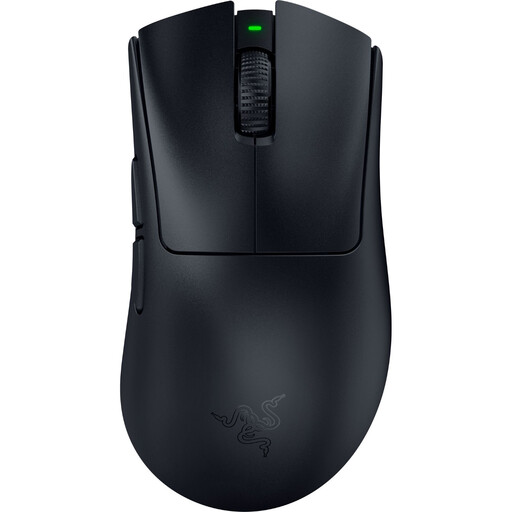
Why we chose it: Ultra-lightweight (56g) for lightning-fast direction changes, it's the king of FPS mice. Its state-of-the-art sensor and near-zero latency wireless technology are built for competition.
It doesn't bet everything on a stratospheric DPI. It combines a featherlight weight with wireless technology (HyperSpeed) designed for maximum responsiveness, far from the latency issues of low-end models.
Featherlight 56g weight, 2nd generation HyperSpeed wireless technology, up to 8000 Hz polling rate.
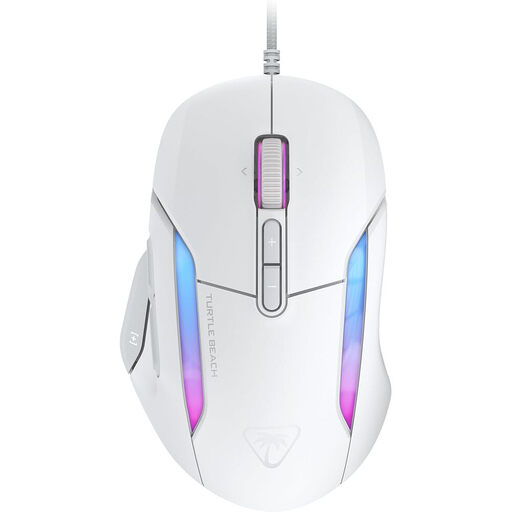
Why we chose it: Its proven ergonomic shape guarantees comfort for long sessions. Its arsenal of programmable buttons makes it a prime ally for MMOs, MOBAs, and even for work.
Here, ergonomics and comfort take precedence over flashy design. The result: less hand fatigue, even during gaming marathons.
Ergonomic shape for right-handers, Easy-Shift[+] technology for up to 23 programmable functions, 4D wheel.
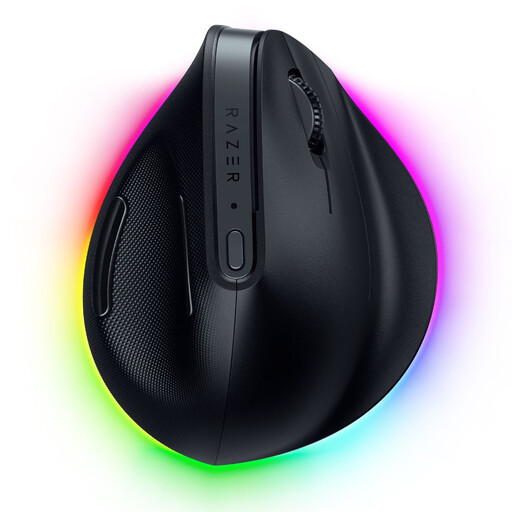
Why we chose it: Designed for those who spend their days at a PC, its vertical mouse design forces the wrist into a more natural "handshake" position to reduce strain and fatigue.
It tackles the ergonomics problem head-on with a radical solution, ideal for anyone who experiences discomfort with a classic mouse after several hours.
Vertical design for a natural posture, triple connectivity (2.4 GHz wireless, Bluetooth, wired).
Our selection is just a starting point. Discover other models that have passed our tests and meet our criteria for performance and comfort.
The lifespan depends on the build quality and your usage. The number to watch for is the durability of the switches, expressed in millions of clicks (20, 50, or even 100 million). A well-made, properly maintained mouse can easily last you for several years.
Absolutely not. It's mostly a marketing gimmick. While a high-DPI mouse offers a wide range of settings, most gamers (including pros) use sensitivities between 400 and 1600 DPI. The quality of the sensor (its ability not to spin out) and a high polling rate are infinitely more important for performance than an oversized DPI number.
To ensure its longevity and for hygiene, regular cleaning is a must. Always unplug the mouse before handling it. A simple dry microfibre cloth is sufficient for the body. For nooks, crannies, and stubborn marks, a cotton swab lightly dipped in isopropyl alcohol will do the trick. Be careful not to let any liquid seep inside, especially near the scroll wheel and buttons.