
Livraison le jour même ou le lendemain

Qualité garantie

Débloquez vos offres de bienvenue: Livraison GRATUITE | Jusqu'à -80 % | 30 jours d'essai gratuits à JoyPlus
Téléchargez l'application
The gaming monitor market can feel like a jungle. Between spec sheets filled with jargon and marketing claims that can be misleading, it's easy to make the wrong choice. Our mission at Joybuy is to help you see things more clearly and invest in a monitor that truly fits your needs—without breaking the bank.
But before we dive into our top picks, let's review the most common pitfalls to watch out for.
The 1ms Response Time Myth: Many manufacturers proudly advertise a "1ms MPRT" (Moving Picture Response Time). While this metric isn't false, it's often achieved using motion blur reduction techniques (known as strobing) that can degrade brightness or create visual artefacts. The truly reliable metric is GTG (Grey-to-Grey), which indicates the actual speed of pixel transition. A good 1ms GTG IPS monitor is therefore a much better performance indicator.
Paying for a Refresh Rate You'll Never Use: A 240Hz gaming monitor or higher sounds tempting. But what's the point if your graphics card struggles to push past 100 frames per second (FPS) in your favourite games? Make sure your PC has enough horsepower to keep up, especially at high resolutions (1440p or 4K). For most gamers, a 144Hz or 180Hz gaming monitor already provides an exceptionally smooth experience.
The "HDR" Label Without Certification: HDR (High Dynamic Range) can transform your gaming experience, but be warned: not all HDR is created equal. A monitor that is merely "HDR compatible" without an official certification (like VESA DisplayHDR 400, 600, or 1000) is likely to disappoint with washed-out colours and weak contrast. Here, the peak brightness (in nits or cd/m?) is the ultimate deciding factor.
To get it right, focus on this technical trio. It determines 90% of your gaming experience.
Size and resolution are an inseparable pair. A large screen with a low resolution is a recipe for a pixelated mess. Here are the combinations that work best:
The refresh rate (in Hertz, or Hz) is the number of images the screen displays per second. The higher it is, the smoother the motion. It's as simple as that.
To eliminate screen tearing, adaptive sync technology is simply essential. Its job is to synchronise the monitor's refresh rate with the number of frames sent by the graphics card. Check for compatibility: FreeSync Premium for AMD cards, and G-Sync Compatible for NVIDIA cards.
Each panel technology has its strengths and weaknesses:
Here are a few models that tick all the boxes of our strict criteria, designed for specific needs.
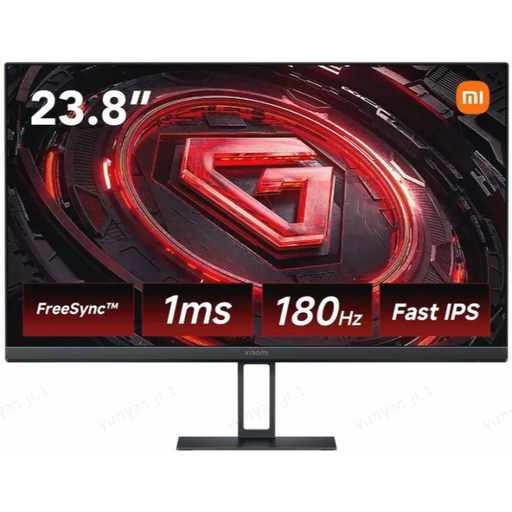
Why this one? It combines a high refresh rate (180Hz) and a lightning-fast response time (1ms GTG) on a snappy Fast IPS panel. All in a compact 24-inch format perfect for FPS games, without breaking the bank.
It advertises a GTG (Grey-to-Grey) response time, the gold standard, not MPRT. Its affordable price point means you're not paying for specs your PC couldn't leverage anyway.
A 180Hz Full HD Fast IPS panel: an unbeatable price-to-performance ratio for demanding gamers.
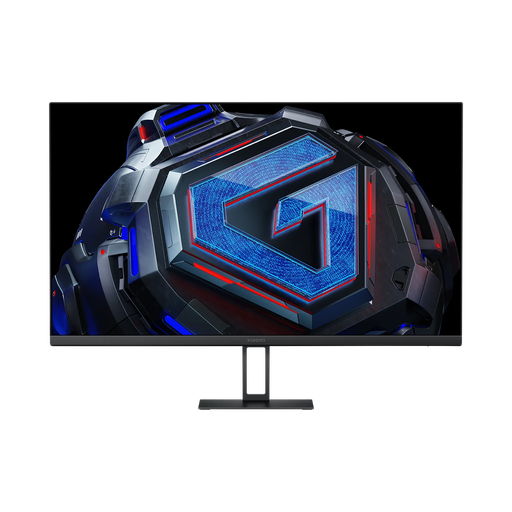
Why this one? The perfect ally for those who juggle gaming, content creation, and multimedia. Its QHD (1440p) resolution on a 27-inch screen provides a real sharpness boost, while its Fast IPS panel ensures faithful colours (covering 95% of the DCI-P3 space).
Instead of over-promising on subpar HDR, it focuses on solid fundamentals: a high resolution, a wide colour gamut, and G-Sync/FreeSync compatibility. A quality visual experience, without the smoke and mirrors.
1440p resolution on a 27-inch, 180Hz Fast IPS panel: the perfect compromise between smoothness and display sharpness.
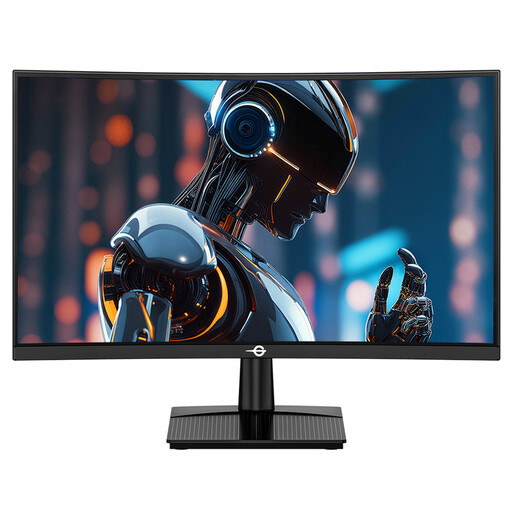
Why this one? Built for pure performance with its 240Hz refresh rate, this monitor is a weapon for gaining a competitive edge. Its 1500R curve and high-contrast VA panel enhance immersion during intense gaming sessions.
Its knockout feature is its 240Hz refresh rate. This is an objective metric aimed directly at high-level FPS and MOBA players. It doesn't try to be a jack-of-all-trades; it bets everything on speed.
A 240Hz refresh rate for ultimate competitive fluidity, paired with a high-contrast VA panel to better spot enemies in the shadows.
We have selected a full range of monitors for you that meet our strict specifications and European safety standards.
Yes, and we can't stress this enough: it's practically essential. These technologies prevent screen tearing and micro-stuttering, delivering unparalleled smoothness. Just make sure it's compatible: G-Sync for NVIDIA cards, FreeSync for AMD. The good news is that most recent FreeSync monitors are also "G-Sync Compatible," making them universally compatible.
It's primarily a matter of taste and screen size. On a 27-inch screen or larger, a gentle curve (1500R or 1800R) enhances immersion by wrapping around your field of view. It can also reduce eye strain, as the eye-to-screen distance becomes more consistent. On a 24-inch monitor, however, the benefit is more debatable.
A good monitor is a long-term investment. Most LED panels are designed to last between 30,000 and 60,000 hours. In practical terms, for 8 hours of use per day, that's over 10 years of service before the brightness begins to noticeably fade. Build quality and good heat dissipation are the keys to its longevity.