
Livraison le jour même ou le lendemain

Qualité garantie

Débloquez vos offres de bienvenue: Livraison GRATUITE | Jusqu'à -80 % | 30 jours d'essai gratuits à JoyPlus
Téléchargez l'application
Choosing a gaming monitor can quickly become overwhelming when faced with a jungle of spec sheets: refresh rate, response time, resolution, panel type... Yet, these features are crucial for smooth visuals, responsive controls, and full immersion in your favourite games. Whether you're a hardcore competitor chasing pure performance, a fan of breathtaking visual experiences, or a next-gen console gamer, this guide is here to shed some light and help you find the perfect monitor.
Before diving into our selection, let's review the essential criteria for making the right choice.
The refresh rate, expressed in Hertz (Hz), is the number of images your screen displays per second. The higher it is, the smoother and clearer the image—a critical advantage in fast-paced games.
Response time, measured in milliseconds (ms), indicates how quickly pixels change colour. A 1ms gaming monitor (or less) is essential to limit the infamous ghosting effect and ensure perfect clarity in the heat of battle.
Resolution determines the level of detail in the image. Your choice will directly depend on the power of your graphics card and your in-game priorities.
A curved gaming monitor can amplify immersion by wrapping around your field of view, an effect that is particularly striking on models 27 inches and larger.
Here are a few models that stand out from the crowd, designed for different budgets and player profiles.
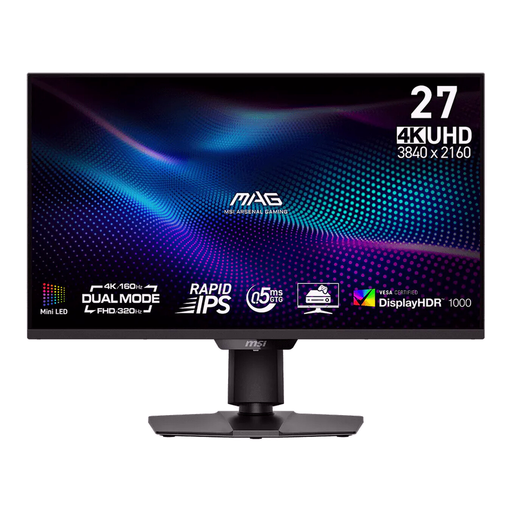
Why it stands out
This monitor shines with its versatility. Its "Dual Mode" is a true game-changer: it lets you switch on the fly between a 4K UHD at 160Hz resolution for total visual immersion, and an FHD (1080p) at 320Hz resolution for extreme fluidity in competitive play. Its Mini-LED technology and 1,152 local dimming zones ensure striking contrast and vibrant brightness (DisplayHDR 1000 certified).
Highlights
Who is it for?
For gamers who want the best of both worlds: the splendour of 4K for single-player games and the responsiveness of an esports monitor for competition. It's the ultimate all-in-one solution, equally at home on a PC, PS5, or Xbox Series X.
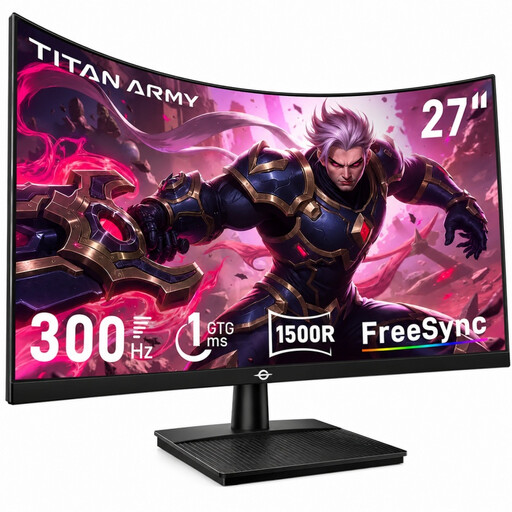
Why it stands out
The TITAN ARMY C27A1H is all about speed and immersion. With its 300Hz frequency and pronounced 1500R curve, this 27-inch curved gaming monitor is built to pull you right into the action. Its VA panel guarantees a high native contrast ratio (4000:1), delivering much deeper blacks than IPS panels.
Highlights
Who is it for?
For fans of FPS and racing games who prioritise performance and immersion above all else. Its incredible fluidity makes it a weapon of choice for esports, while its curve makes it very enjoyable for all types of games.
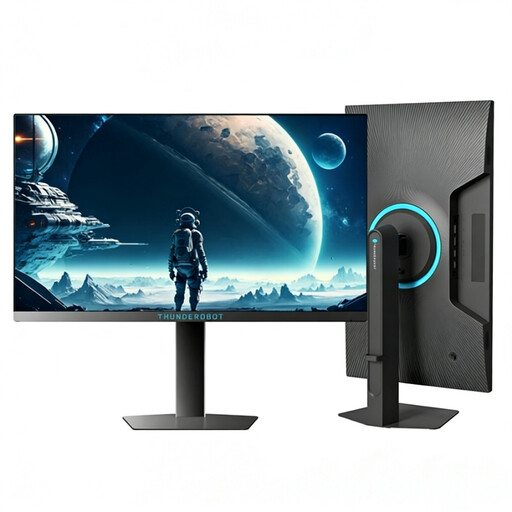
Why it stands out
This THUNDEROBOT monitor is a pure performance beast, fully geared for competition. Its compact 24.5-inch format, favoured in the esports scene, allows you to scan the entire play area at a glance. Its trump card: a stratospheric 320Hz refresh rate for ultimate responsiveness and motion clarity.
Highlights
Who is it for?
For competitive gamers and esports pros for whom every millisecond counts. If your sole objective is pure performance in games like Valorant, CS:GO, or Apex Legends, this monitor is the ultimate weapon.
Not convinced by this selection? No problem—your dream monitor might be waiting among our other models. Every gamer is unique, and the selection is vast!
? Explore our full collection of PC monitors to find the model that's right for you.
1. Is a 240Hz gaming monitor really necessary? For a casual gamer or a fan of adventure games, a 144Hz or 160Hz monitor already offers excellent comfort and fluidity. However, for competitive FPS players, a 240Hz gaming monitor (or higher) provides a real advantage in terms of clarity, making it much easier to track moving targets.
2. Can I use a 4K gaming monitor with a PS5 or Xbox Series X? Absolutely! It's actually the ideal combo to unlock the full potential of these consoles. To enjoy 4K at 120Hz, you will absolutely need a 4K gaming monitor equipped with an HDMI 2.1 port. Only this standard can handle that amount of data.
3. Curved or flat screen for gaming? It's primarily a matter of personal preference. A curved gaming monitor enhances immersion, especially on larger screens (27 inches and up), by wrapping around your field of view for a much-appreciated "cockpit" effect. However, the flat screen remains the standard in esports because it guarantees an image without any distortion, a non-negotiable criterion for absolute precision.