Joybuy Insights

Gaming Monitor Buyer’s Guide: How to Choose the Right One

Choosing a new gaming monitor can quickly become a daunting task. Between complex spec sheets and aggressive marketing, it's easy to make a poor investment. As a product expert at Joybuy, my mission is to help you decipher the jargon so you can choose a monitor that fits your actual needs, not the siren song of advertising.

Before we present our top picks, let's review the most common pitfalls that cost gamers dearly.

The 3 Pitfalls to Avoid When Buying a Gaming Monitor

  1. The "1ms" Response Time Myth. Many brands highlight a 1ms (MPRT) response time. This figure, which measures image persistence, is often more flattering than the GtG (grey-to-grey) response time, which measures the actual speed of pixel transition. A high GtG can lead to "ghosting" (image trails), even with a good MPRT. Don't rely solely on this often-misleading marketing claim.
  2. Paying for 4K on a Small Screen. A 4K resolution on a 27-inch gaming monitor or smaller offers a barely perceptible increase in sharpness at a normal gaming distance. However, it demands a very powerful and expensive graphics card to maintain smooth frame rates. For most gamers, a QHD monitor (or 2K) offers a much better balance between image quality and performance.
  3. The "HDR" Label with No Performance Guarantee. HDR (High Dynamic Range) promises stunning contrast and richer colors. However, many entry-level monitors display this label without reaching the peak brightness (measured in nits) required for a proper rendering. Instead, trust official certifications (like DisplayHDR 400 at a minimum), which are far more reliable than a simple "HDR compatible" mention.

The Essential Criteria for an Informed Choice

To avoid these traps, focus on the specifications that have a direct impact on your gaming experience.

Refresh Rate (Hz) and Resolution: The Great Trade-Off

This is the first major trade-off you'll have to make. There's no single right answer; it all depends on your preferred games.

  • For Competitive Games (FPS, Battle Royale): Smoothness is king. A high refresh rate is essential for maximum responsiveness. Aim for a 144Hz monitor as a solid baseline. The most demanding players will look for a 240Hz monitor or higher, often in Full HD (1080p) or QHD (1440p) resolution to ensure a very high frame rate (FPS). A 165Hz Full HD monitor represents an excellent compromise.
  • For Adventure Games and RPGs: Visual immersion is key. A higher resolution like a QHD monitor (2560x1440) or 4K (3840x2160) will deliver more detailed and spectacular worlds. A refresh rate of 120Hz or 144Hz is generally sufficient for a smooth and enjoyable experience.

Panel Type: IPS, VA, or TN?

The panel technology directly affects colors, contrast, and viewing angles.

  • IPS (In-Plane Switching): Known for its faithful color reproduction and wide viewing angles. Modern "Fast IPS" panels have significantly reduced their response times, making them a very versatile choice for both gaming and content creation.
  • VA (Vertical Alignment): Offers far superior contrast to IPS panels, producing deeper blacks. This is a major asset for immersion in dark scenes. A curved gaming monitor often uses this technology to enhance the enveloping effect.
  • TN (Twisted Nematic): Historically the fastest, but with less accurate colors and narrower viewing angles. It is now largely superseded by Fast IPS panels, which offer a much better overall package.

Monitor Picks for Every Gamer

Rather than drowning you in spec sheets, we've matched each monitor to a gamer profile to help you find the one that's right for you.
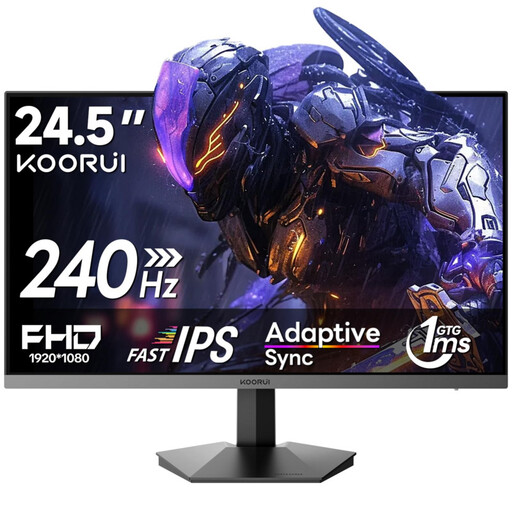
IDEAL PROFILE: THE FOCUSED COMPETITOR
KOORUI G2511X 24 Inch Gaming Monitor

KOORUI G2511X 24 Inch Gaming Monitor

Why it's the right choice: This profile seeks raw performance for FPS games. The compact 24.5-inch size and Full HD resolution help maintain a very high frame rate, while the 240Hz refresh rate offers maximum fluidity for precise aim.

How It Avoids the Pitfalls

It skips 4K, which is unnecessary on this screen size, to go all-in on speed. Its Rapid IPS panel ensures an excellent response time (1ms) without sacrificing color quality, unlike older TN panels.

Its Key Strength

A 240Hz refresh rate for esports-grade responsiveness. HDR400 certification and Adaptive Sync compatibility for a smooth, high-contrast image.
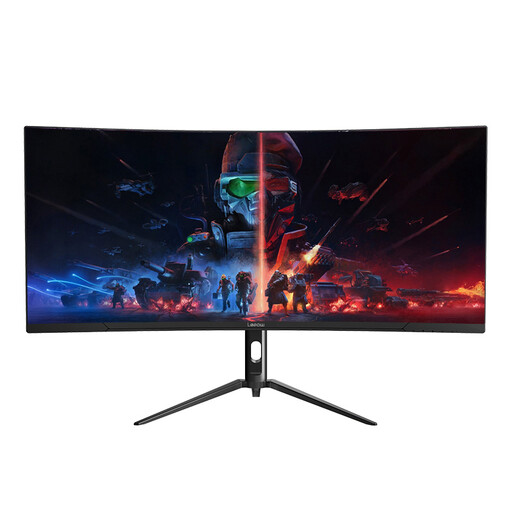
IDEAL PROFILE: THE IMMERSION ENTHUSIAST
Lepow 34-Inch Ultrawide Curved Desktop Monitor

Lepow 34-Inch Ultrawide Curved Desktop Monitor

Why it's the right choice: Perfect for players of RPGs, simulation, or racing games who want to be at the heart of the action. The 21:9 ultrawide format and curved screen create a panoramic field of view that engages peripheral vision for total immersion.

How It Avoids the Pitfalls

Instead of aiming for 4K on a standard format, it opts for a WQHD (3440x1440) resolution on an ultrawide format. This provides more horizontal screen real estate and superior immersion without requiring a prohibitively expensive graphics card.

Its Key Strength

21:9 ultrawide format and a curved VA panel for high contrast and an enveloping experience. The 165Hz refresh rate ensures excellent fluidity.
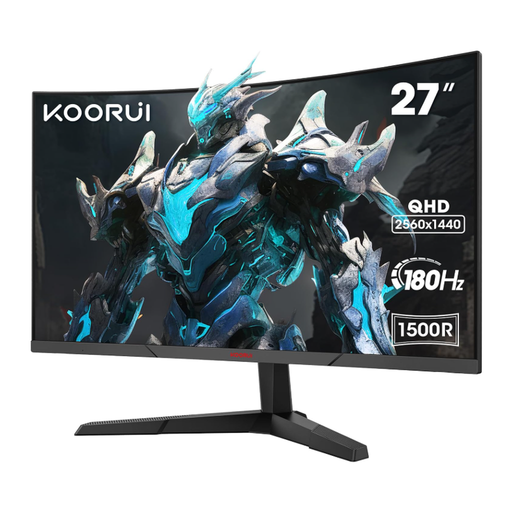
IDEAL PROFILE: THE VERSATILE USER (GAMING & REMOTE WORK)
KOORUI 27-Inch QHD Curved Gaming Monitor

KOORUI 27-Inch QHD Curved Gaming Monitor

Why it's the right choice: This user needs a high-performance monitor for gaming at night and a comfortable one for working during the day. The combination of a 27-inch gaming monitor and QHD (1440p) resolution is the ideal sweet spot for sharp text in office apps and detailed graphics in-game.

How It Avoids the Pitfalls

It sacrifices neither resolution nor smoothness. The 180Hz refresh rate is well above average and perfect for gaming, while the QHD resolution is a real productivity boost compared to Full HD.

Its Key Strength

The perfect balance: 27-inch QHD, 180Hz, and an immersive 1500R curve. The 85% DCI-P3 color space coverage ensures vibrant colors.

Looking for other options?

Our complete product selection meets strict criteria for performance and reliability.

Frequently Asked Questions

Is a 144Hz monitor still good enough for gaming in 2026?

Yes, absolutely. For the vast majority of gamers, a 144Hz monitor provides a very smooth and responsive gaming experience. It's a well-established standard that represents an excellent price-to-performance ratio. Only top-tier competitive players will feel a tangible advantage from upgrading to a 240Hz monitor or higher.

Should I choose a flat or a curved gaming monitor?

This depends on your preferences and usage. A curved gaming monitor can enhance immersion, especially on models 27 inches and larger, by wrapping the image around your field of view and reducing distortion at the edges. For office work and multitasking, however, some users prefer the straight lines of a flat screen. There is no objectively superior choice; it's a matter of personal comfort.

How do I know if my graphics card is compatible with my new gaming monitor?

Check two main things: connection ports and power.

  1. Connectivity: Make sure your graphics card has a port (DisplayPort or HDMI) that matches the monitor's. To achieve the highest refresh rates (e.g., 144Hz at QHD or 240Hz at FHD), you often need to use a DisplayPort cable.
  2. Power: A high resolution and refresh rate put more demand on your graphics card. Check online benchmarks for your specific graphics card model with games similar to yours to see if it can achieve a frame rate (FPS) close to the refresh rate of the monitor you're considering.