
Livraison le jour même ou le lendemain

Qualité garantie

Débloquez vos offres de bienvenue: Livraison GRATUITE | Jusqu'à -80 % | 30 jours d'essai gratuits à JoyPlus
Téléchargez l'application
A gaming mouse should not be chosen based on its appearance or the number displayed on the box. A 24,000 DPI sensor, RGB lighting or a wireless connection do not automatically guarantee a better experience. Whether you play on PC, console or spend several hours in front of a screen for work, the real priorities are comfort and control, connection stability and the features you genuinely need.
Three common mistakes often crop up when choosing:
DPI measures movement sensitivity. A precise mouse with several sensitivity levels lets you adapt cursor speed to gaming or graphic design work. In an FPS, many players prefer moderate sensitivity for better aim control. A mouse designed for shooting games can therefore be an excellent choice, even if its maximum setting is never used.
Optical sensors are generally valued for their consistency, provided they are used on a suitable mouse mat. The models in this selection range from 3,600 to 32,000 DPI, with several adjustable levels. Measured in hertz, the polling rate indicates how often the mouse sends its position to the computer. A rate of 1,000 Hz is sufficient in most cases. 4,000 or 8,000 Hz modes are more suited to systems and players capable of making the most of them. You should then check compatibility between the software, receiver and computer.
A lightweight mouse often makes fast movements easier, while a heavier model can provide a welcome sense of stability. Weight should not, however, be considered on its own. Also look at the length, width, height and position of the side buttons.
An ergonomic mouse designed for right-handed use will not meet the same needs as an ambidextrous or vertical model. For prolonged professional use, consider your wrist angle, palm support and freedom of movement for your fingers. Even the best mouse can never replace good posture and regular breaks.
A wired gaming mouse connects directly via USB and does not need recharging. It is ideal for a fixed desk setup or for players who want to minimise adjustments and potential sources of trouble. However, its cable can restrict movement if it is too short or poorly positioned.
A wireless gaming mouse may combine a 2.4 GHz connection, Bluetooth and a wired mode. 2.4 GHz is generally preferred for gaming, while Bluetooth makes it easier to connect to several devices. Check that the receiver is included in the box, review the advertised battery life and make sure you can continue playing while the mouse is charging.
Programmable buttons and RGB mouse lighting are often managed through proprietary software. Before ordering, check which operating systems are supported and whether your profiles can be saved to the built-in memory.
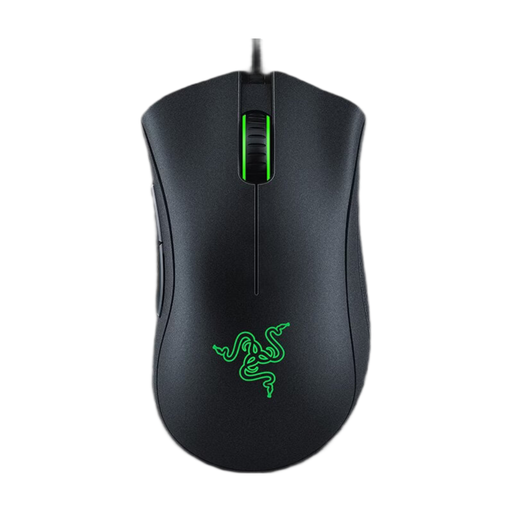
Why it suits this profile : This wired USB gaming mouse keeps things simple, with a 6,400 DPI optical sensor and five programmable buttons. It is a practical first PC accessory, with no battery to monitor.
The USB connection eliminates battery-life worries and interruptions caused by a flat battery. The different DPI settings also prevent you from being stuck with a single sensitivity level.
6,400 DPI optical sensor, five programmable buttons, rubber-coated notched scroll wheel and a shape described as ambidextrous.
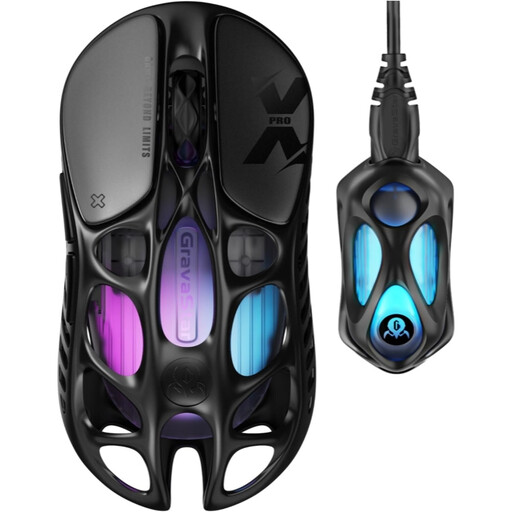
Why it suits this profile : Its open magnesium-alloy chassis, advertised weight of 49 g and triple connectivity are designed for users looking for an ultra-lightweight, customisable gaming mouse.
The product details clearly set out the three connection modes, the included 8K receiver and the advertised battery life, which can reach 110 hours. However, with an open chassis, it is best to keep liquids well away.
PAW 3950 sensor up to 32,000 DPI, advertised 8,000 Hz polling rate, five programmable buttons and customisable RGB lighting.
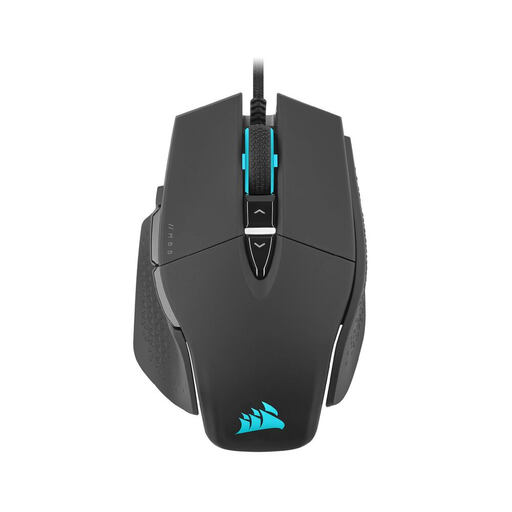
Why it suits this profile : FPS players and users who like plenty of shortcuts can make the most of a button that temporarily lowers DPI, along with eight programmable controls.
The USB cable prevents the battery from running out halfway through a game. The precision button lets you temporarily reduce sensitivity without having to change all your settings.
Optical sensor up to 26,000 DPI, advertised weight of 97 g, eight programmable buttons, aluminium construction and settings via Corsair iCUE.
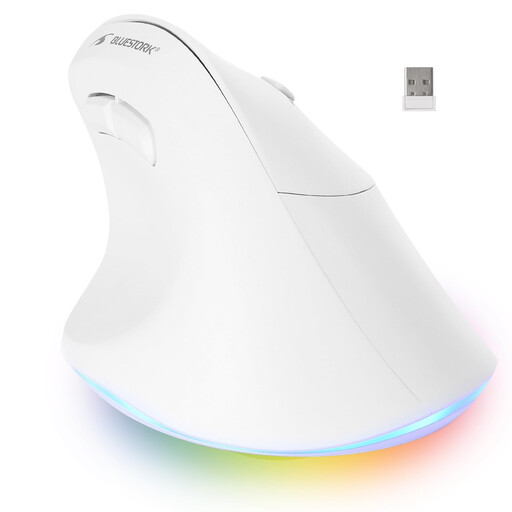
Why it suits this profile : Its vertical right-handed shape, 2.4 GHz or Bluetooth connectivity and USB-C charging make it suitable for everyday work as well as leisure across several devices.
The product details clearly distinguish between the two wireless connections and USB-C charging. Its adjustable sensitivity from 800 to 2,400 DPI is also suitable for office tasks.
Vertical right-handed shape, Bluetooth, 2.4 GHz receiver, built-in rechargeable battery and RGB lighting that can be disabled depending on the configuration.
We have put together a comprehensive, real-time updated selection of products that meet these demanding criteria, while also taking European safety regulations into account.
Before ordering a gaming PC mouse, review the following points:
For RGB lighting, check whether it can be adjusted directly from the mouse or requires software to be installed. For programmable buttons, make sure the macros suit your needs and comply with the rules of the games concerned. Finally, measure your hand and compare its dimensions with those stated: this simple check reduces the risk of choosing a mouse that is not a good fit.
For office work, a few hundred to a few thousand DPI may be sufficient. In gaming, the setting depends on the screen resolution, the amount of desk space available and personal preference. A model offering several levels will be more versatile than a mouse limited to a single sensitivity setting.
Yes, provided it has a stable 2.4 GHz receiver, sufficient battery life and, ideally, a wired backup mode. Bluetooth is mainly useful for versatility and connecting to different devices. For uses that demand a fast response, it does not necessarily replace 2.4 GHz.
It all depends on how intensively it is used, as well as the clicks, cable, feet, scroll wheel and maintenance. Manufacturers sometimes state a theoretical number of clicks, but this figure alone cannot predict the actual lifespan. Keeping the mouse dry, cleaning its surfaces with a soft cloth and avoiding pulling on the cable will help prolong its reliable operation.