
Livraison le jour même ou le lendemain

Qualité garantie

Débloquez vos offres de bienvenue: Livraison GRATUITE | Jusqu'à -80 % | 30 jours d'essai gratuits à JoyPlus
Téléchargez l'application
A gaming mouse can transform the comfort of your PC sessions, but spec sheets don’t always tell the full story. A high DPI count, RGB lighting or a wireless connection don’t guarantee a great experience on their own. To avoid a purchase that doesn’t fit, focus on the shape, tracking stability, connectivity and the features you’ll actually need.
A 36,000 DPI mouse naturally catches the eye, but most gamers use a much lower sensitivity. DPI refers to the sensor’s maximum sensitivity, not its real-world accuracy in-game. To make the right choice, look at:
An adjustable sensitivity between 800 and 12,800 DPI is already enough for many games. A sensor that can reach 36,000 DPI is mainly for users who want to fine-tune their settings very precisely.
An RGB mouse can match your desk setup with a backlit keyboard, but the lighting drains more power on a rechargeable model and does nothing to improve control. For the THE G-LAB Kult Caesium, the spec sheet claims up to 10 hours of battery life with RGB on, compared to 32 hours with the lighting switched off. That’s a difference worth keeping in mind if you regularly play without a cable.
A lightweight gaming mouse makes sweeping movements easier, while a heavier model can offer a sense of stability that some players appreciate. An asymmetrical shape designed for right-handed users won’t necessarily suit a left-handed person or someone who uses a claw grip. Also consider the length, width, thumb rest and the position of the side buttons.
A well-sized ergonomic mouse helps reduce strain during long sessions, though it doesn’t replace the need for regular breaks.
A wired gaming mouse plugs directly into USB and needs no battery or charging. It’s particularly suited to a fixed setup, for gamers who want to avoid any interruptions, or for those looking for a simple configuration on PC, PS4 or PS5, when compatibility is stated.
A wireless gaming mouse typically communicates via a 2.4 GHz USB receiver. Some models add Bluetooth and a USB-C mode, making it easy to switch between a computer, console or mobile device. Check the following points:
For strategy games, role-playing games or creative software, a programmable mouse lets you assign shortcuts to the side buttons. Models with customisable buttons are also handy for everyday tasks, such as moving forward or back in your browser history.
However, customisation sometimes requires proprietary software that’s only compatible with Windows. If you use macOS or Linux, check which features are available before ordering. For shared use across multiple machines, a plug-and-play mouse is often the simplest solution.
An optical sensor provides consistent tracking on a suitable mouse mat. The surface also affects smoothness, especially with a lightweight gaming mouse fitted with low-friction feet. Don’t rely solely on the phrase “high precision”: compare the concrete data, such as the DPI range, polling rate and weight.
On wireless models, the weight usually includes the battery. A mouse weighing 54 to 65 g favours fast movements, while a model between 79 and 88 g gives a more planted feel.
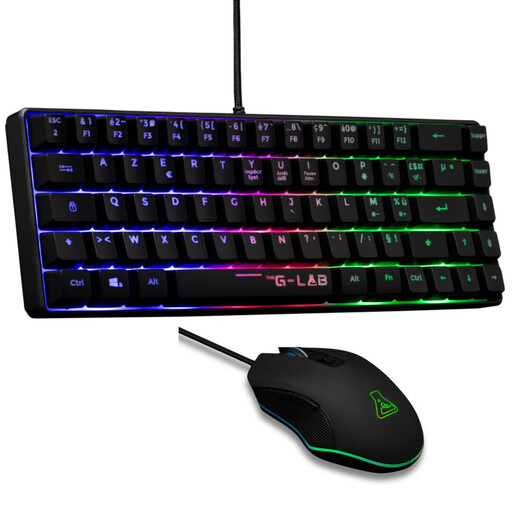
Why this choice suits this profile: this set bundles a mouse, a compact AZERTY keyboard and RGB lighting so you can start gaming without buying items separately.
The spec sheet states a USB connection, a French AZERTY keyboard layout and six customisable buttons, with no battery to recharge.
Optical mouse adjustable up to 7200 DPI, 60% keyboard and compatibility stated with PC, PS4 and PS5.
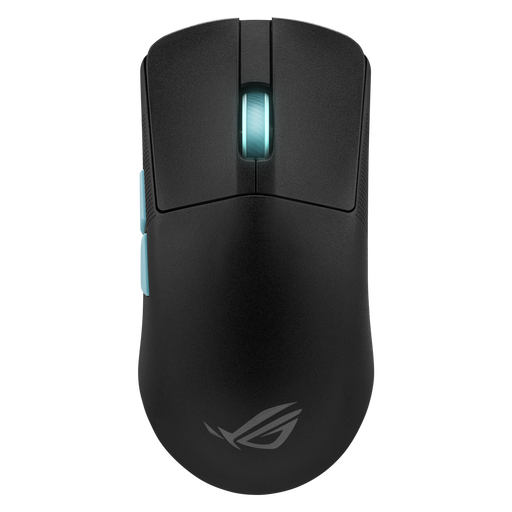
Why this choice suits this profile: its three connection modes adapt to advanced setups that switch between wireless, Bluetooth and wired use.
The 36,000 DPI figure comes with software adjustments, five programmable buttons and a USB-C mode so you can keep playing when the battery is low.
Stated weight of 54 g, 36,000 DPI optical sensor and battery life of up to 119 hours in 2.4 GHz mode.
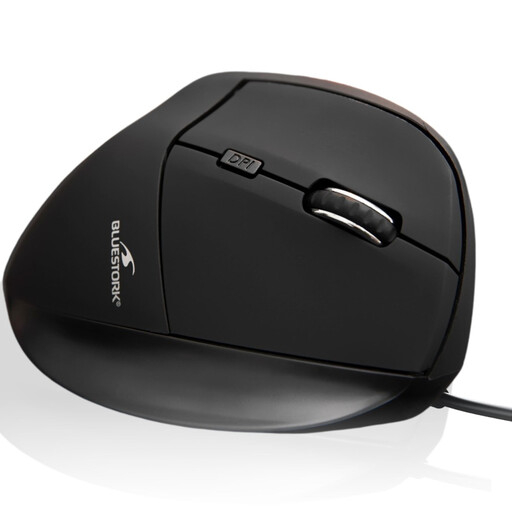
Why this choice suits this profile: its right-handed shape and USB connection are ideal for a workstation used for several hours of work, browsing and occasional gaming.
The cable means no recharging is needed, and the spec sheet states plug-and-play installation with no driver required for essential functions.
Ergonomic right-handed shape, adjustable DPI up to 7200 and compatibility stated with Windows, macOS and Linux.
We’ve put together a full, real-time updated selection of products that meet these strict criteria, while complying with European safety regulations.
Yes, provided it uses a stable 2.4 GHz receiver and its battery life matches your play schedule. To avoid interruptions, choose a model that can be used via USB while charging. Bluetooth is handy for versatility, but it isn’t always the best mode for PC gaming.
There’s no universal answer. Start with a moderate setting, then adjust the sensitivity in-game and in the mouse software. A model offering multiple levels lets you switch quickly between an FPS, a strategy game or office work.
Its lifespan depends on click intensity, connection type, the battery and how well you look after it. Keep liquids away, clean it with a soft cloth and insert the receiver gently. For a rechargeable model, watch for any signs of overheating or swelling and stop using it immediately if something seems wrong. At the end of its life, dispose of the mouse and its battery at a suitable collection point for waste electrical and electronic equipment.