
Livraison le jour même ou le lendemain

Qualité garantie

Débloquez vos offres de bienvenue: Livraison GRATUITE | Jusqu'à -80 % | 30 jours d'essai gratuits à JoyPlus
Téléchargez l'application
A gaming mechanical keyboard can improve typing comfort while giving your mouse more room to move. But product listings do not always tell the whole story. Spectacular RGB lighting will not make an impractical QWERTY layout any more suitable for France, just as an ill-chosen wireless connection will not feel reliable during an intense match.
Before placing an order, three mistakes come up time and again:
The right size depends primarily on the space available on your desk and the keys you actually use.
For accounting, entering figures or using certain professional applications, the absence of a numeric keypad can quickly become frustrating. Conversely, gamers who use low mouse sensitivity can gain valuable space with a compact layout and reduce the risk of hitting the keyboard.
Linear switches provide a smooth, consistent keystroke and are often appreciated in fast-paced games. Tactile switches offer a more noticeable bump at the actuation point. Clicky switches produce a more pronounced sound: the ET 60% keyboard with blue switches, for example, can be extremely satisfying to use, but far less suitable for a shared bedroom or open-plan office.
Actuation force also deserves attention. Many models quote approximately 45 g, but this figure alone is not enough to predict how a keyboard will feel. Total travel, lubrication, stabilisers and keycap materials all play an important role.
The Hall Effect keyboard uses magnetic sensing. Some models let you adjust the actuation point with precision. Rapid Trigger can reduce the time needed for a key to reset, making it particularly appealing to FPS players. These features do, however, require compatible software and careful configuration; they are not essential for working or writing.
A tri-mode mechanical keyboard generally combines USB-C, Bluetooth and 2.4 GHz. Bluetooth is convenient with a laptop, tablet or phone. 2.4 GHz lets you play wirelessly while maintaining low latency, whereas USB remains the simplest option for gaming, recharging the keyboard or avoiding battery management altogether.
You should also check:
A model such as the AJAZZ AK820 MAX, listed with a German QWERTZ layout, may suit someone accustomed to that arrangement. It is not, however, an obvious choice for anyone looking for French AZERTY legends. Before ordering, examine the key photos and technical specifications carefully.
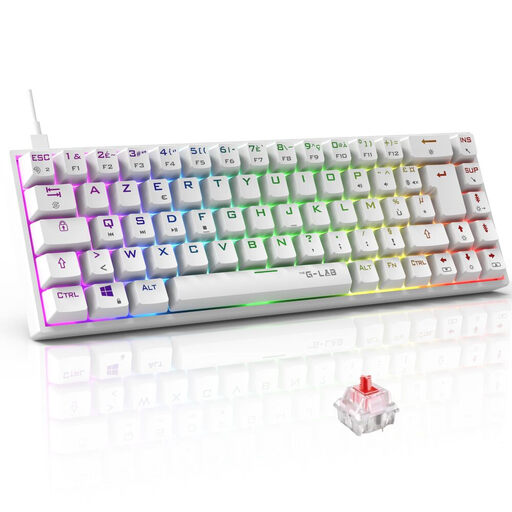
Why it fits the bill: Its 65% AZERTY layout is aimed at French gamers who want to save desk space without giving up the arrow keys.
The AZERTY layout is clearly specified, while the USB connection eliminates the constraints of recharging and pairing.
Outemu red switches rated at 45 g, RGB backlighting, programmable macros and compatibility with PC, PS4, PS5 and Xbox.
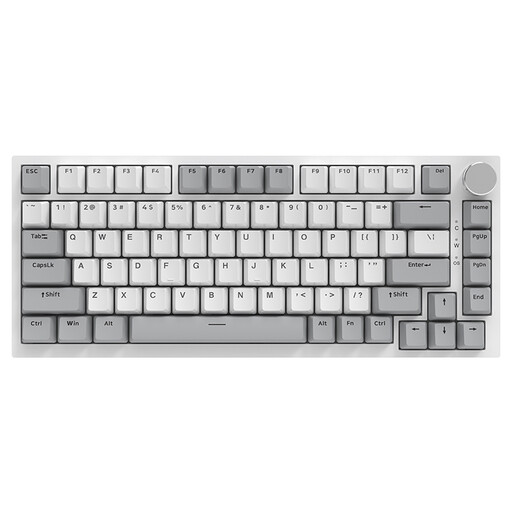
Why it fits the bill: Its compact layout, volume knob and PBT keycaps suit anyone who switches between gaming, work and creative tasks.
The listing clearly states the USB-C connection and 3/5-pin hot-swap compatibility, allowing switches to be replaced without soldering.
Gasket-mounted construction, five layers of sound dampening, PBT keycaps, RGB lighting and an aluminium volume control knob.

Why it fits the bill: Its 68-key layout frees up room for mouse movements and is designed for FPS players who like to fine-tune actuation.
The listing clearly mentions magnetic switches, an adjustable actuation point from 0.2 to 4 mm and Rapid Trigger functionality.
Wired connection, polling rate of up to 8,000 Hz, PBT keycaps and an aluminium top case.
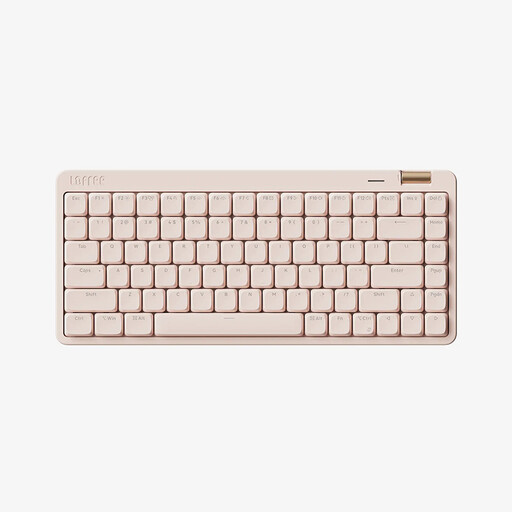
Why it fits the bill: Its 84-key layout and three connection modes make it easy to switch between a computer, tablet and phone.
The listing clearly distinguishes between Bluetooth 5.4, 2.4 GHz and USB-C. It also specifies a 2,000 mAh battery and adjustable white lighting.
Low-profile Kailh linear switches, double-shot PBT keycaps and an aluminium volume knob.
We have brought together an up-to-date selection of mechanical keyboards suited to different sizes, layouts and use cases in France.
Yes, provided you choose switches and a layout suited to your needs. Linear or moderately tactile switches are generally quieter than clicky models. In a shared workspace, you should also consider the presence of sound-dampening materials, the keycap profile and whether the RGB backlighting can be switched off.
It depends on the switches, stabilisers, keycaps, cable and conditions of use. Product listings sometimes state a theoretical lifespan, such as 30 or 50 million keystrokes. This figure does not guarantee the longevity of the keyboard as a whole. A hot-swap model is nevertheless easier to maintain, since compatible switches can be replaced without soldering.
Bluetooth is convenient when switching between devices or connecting mobile equipment. For fast-paced games, USB or a 2.4 GHz receiver is generally preferable when the keyboard supports it. Also check compatibility with your console, the distance between the keyboard and receiver, and the stated battery life with and without backlighting.