
Livraison le jour même ou le lendemain

Qualité garantie

Débloquez vos offres de bienvenue: Livraison GRATUITE | Jusqu'à -80 % | 30 jours d'essai gratuits à JoyPlus
Téléchargez l'application
Looking for a gaming mechanical keyboard for PC gaming, working from home or creating more space on your desk? Product listings often highlight RGB lighting, battery life or the number of connection modes. However, these features are not always enough to tell two models apart.
The risk is choosing a keyboard that looks appealing on paper but is impractical for everyday use: missing keys, an unsuitable QWERTY layout, optimistic battery-life claims or noise that is difficult to tolerate in a shared space. Here are the criteria to consider before placing your order, along with a selection of models suited to different types of user.
A compact gaming keyboard frees up space for your mouse, but reducing the number of keys inevitably changes how you use it. A 60% keyboard generally removes the F key row, arrow keys and several navigation keys. These functions remain accessible via the Fn key, but the combinations can quickly slow down office work or make certain games more complicated.
A 75% keyboard keeps the arrow keys and F key row in a shorter chassis. The 80% format, often associated with 87 keys, retains most of the features of a standard keyboard without a numeric keypad. It is therefore better to check the actual number of keys rather than relying solely on the advertised percentage.
Battery life depends on the backlighting, how often the keyboard is used and the connection mode. A high-capacity battery is a useful indicator, but the stated figures should always be considered in context: whether the lighting is switched off or on, and whether the connection is via Bluetooth or 2.4 GHz.
For a wireless mechanical keyboard, also check that a USB-C cable allows you to use it in wired mode. This means you can continue gaming or working while it charges, without being interrupted at the worst possible moment.
A US QWERTY keyboard does not use the AZERTY layout commonly found in France. You should therefore consider the position of letters, symbols and shortcuts, particularly for professional typing. You can browse our selection of QWERTY keyboards to compare the different formats available.
The type of switch also has a direct impact on sound and comfort:
In a shared office, a 75% or 80% keyboard is often the best compromise. The 75% format retains the arrow keys and F keys while taking up less space. If you regularly use Excel, accounting software or number-based shortcuts, a 96% or 100% model with a numeric keypad will be more suitable.
Adjustable feet, the key profile and the presence of a dampened structure matter more than simply seeing the word ‘ergonomic’ in the product description. A gasket-style construction combined with sound-dampening foam can improve the typing feel and reduce certain resonances, although it will not eliminate noise completely.
A tri-mode keyboard with Bluetooth, 2.4 GHz and USB-C will generally allow you to switch between a desktop computer, laptop, tablet or compatible console. 2.4 GHz with a USB receiver prioritises a responsive wireless connection, while wired USB-C is suitable for long sessions and charging.
Check the stated compatibility with Windows and macOS. However, some shortcuts or customisation software may still be limited to Windows. For a mechanical keyboard intended for use with both a PC and a Mac, the ability to remap keys or save settings to integrated memory is a genuine advantage.
A hot-swap mechanical keyboard allows you to replace compatible switches without using a soldering iron. Check whether they are compatible with 3- or 5-pin switches, as not all keyboards accept every type of switch.
PBT keycaps generally resist developing a polished, shiny surface better than ABS keycaps, although their durability also depends on the manufacturing quality and how they are used. For an RGB mechanical keyboard, focus mainly on the type of lighting, the settings available and how easy the characters are to read, rather than simply the number of colours advertised.
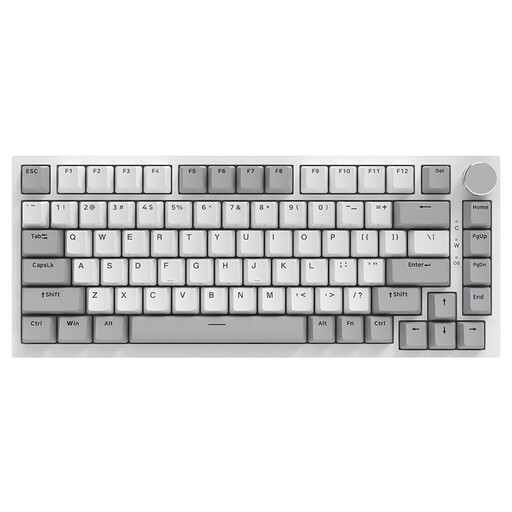
Why this model suits this type of user : with 82 keys and a straightforward USB-C connection, it is a good first gaming mechanical keyboard, compatible with Windows and macOS.
It keeps both the arrow keys and the F key row, unlike many 60% models. The wired connection also removes any concerns about battery life.
75% format, PBT keycaps, RGB lighting, volume knob and 3/5-pin hot-swap switches, according to the product listing.

Why this model suits this type of user : its 97 keys and tri-mode connectivity provide a complete foundation for gaming, working and customising your setup.
The model combines Bluetooth, 2.4 GHz and wired connectivity, so you are not reliant on a single connection. The listing also distinguishes battery life depending on whether the TFT display is switched on or off.
Gasket structure, hot-swap PCB, metal dial, south-facing LED lighting and five-layer sound-dampening foam.

Why this model suits this type of user : its programmable controls and decorative lighting are aimed at content creators and users who regularly switch between devices.
Its 87-key layout retains the main functions. Connectivity supports Bluetooth, 2.4 GHz and USB-C, with a stated 4000 mAh battery capacity.
5-pin linear switches, PBT keycaps, programmable dial and compatibility with Windows, macOS, iOS and Android, according to the information provided.

Why this model suits this type of user : with 61 keys and a light weight, it is suitable for small desks, travel and players who want to maximise the space available for their mouse.
The listing clearly states that it has no numeric keypad, F key row or navigation block. This allows you to assess the compromises before buying.
Bluetooth, 2.4 GHz and USB-C connectivity, 16 advertised RGB modes and clicky blue switches. Best avoided in a shared office if you are sensitive to noise.
We have put together a complete, real-time updated list of products that meet these selection criteria and European safety requirements.
Yes, provided you choose a switch with a noise level suited to your surroundings. A linear or moderately tactile switch will generally be quieter than a clicky switch. A dampened structure and well-stabilised keycaps can also help reduce unwanted noise.
This depends on the switches, the quality of the stabilisers, maintenance and how intensively the keyboard is used. Some product listings claim several tens of millions of keystrokes, but these figures reflect the manufacturer’s specifications and do not guarantee the lifespan of the keyboard as a whole. A hot-swap model makes it easier to replace worn switches.
Yes, backlighting reduces the battery life of a wireless keyboard compared with using it without lighting. To extend the time between charges, reduce the brightness, disable animated effects or switch to wired mode during long sessions.