
Livraison le jour même ou le lendemain

Qualité garantie

Débloquez vos offres de bienvenue: Livraison GRATUITE | Jusqu'à -80 % | 30 jours d'essai gratuits à JoyPlus
Téléchargez l'application
A gaming mechanical keyboard can improve typing comfort, command precision and desk organisation. However, product listings often bring together features that are difficult to compare: RGB lighting, the number of keys, durability claims and wireless connectivity. To avoid buying a keyboard that does not meet your needs, focus on the technology used, the format, the key layout and compatibility with your devices.
Some models use a membrane with a manufacturer-added “mechanical feel”. Their design is nevertheless completely different from that of a keyboard fitted with genuine mechanical switches. The feel may be pleasant for occasional use, but it generally does not allow you to replace the switches or achieve the same response from every key.
Before ordering, look for a precise description of the switch type: linear, tactile or clicky. If the listing refers to “mechanical feeling” or “mechanical imitation”, you may not be looking at a mechanical keyboard in the strictest sense.
A compact gaming keyboard frees up space for your mouse and is easy to carry around. However, a 60% keyboard generally has no number pad, dedicated function row or navigation cluster. A 65% keyboard retains the arrow keys and a few additional keys. A 75% keyboard, meanwhile, usually adds a function row within a more compact chassis.
For accounting, spreadsheets or professional shortcuts, a 98% or full-size format may be much more practical. Saving space should not come at the expense of your usual workflow.
An RGB mechanical keyboard may offer a wide range of modes, colours and brightness levels. However, this does not change the switch type or key layout. Also check whether it features per-key RGB lighting, zone-based backlighting or simple white illumination.
Brightness, character legibility and the option to disable effects matter more than the number of modes advertised. To compare other solutions, also see our selection dedicated to backlighting.
A compact model is suitable for small desks, travelling or gamers who use a wide range of mouse movement. However, a 60% keyboard requires you to memorise certain combinations using the Fn key. The 65% format retains the arrow keys, while the 75% offers an appealing balance between size and functionality.
The US QWERTY layout deserves particular attention in France. It does not match the French AZERTY layout: the position of letters, accents and certain symbols is different. It may suit users who are accustomed to it, content creators working with software in English or anyone who wants to customise their keyboard. For office use in French, check the software configuration and shortcuts before buying.
Linear switches offer a consistent press and are often appreciated both for gaming and smooth typing. Tactile switches add noticeable feedback without producing a pronounced click. Clicky switches, meanwhile, produce a clearly audible sound and may not be suitable for shared spaces.
A hot-swap keyboard allows you to replace switches without soldering, provided you follow the manufacturer’s stated 3-pin or 5-pin compatibility. This feature makes future upgrades easier, but it does not mean that every switch on the market will work automatically.
A wired mechanical keyboard sends commands via USB-C or USB and eliminates the need for recharging. It is suitable for fixed workstations, PC gaming and users who prioritise a stable connection. A wireless mechanical keyboard offers greater freedom, especially when it supports both Bluetooth and 2.4 GHz connectivity. In this case, check the advertised battery life, charging time and whether the keyboard can be used while charging.
Also check actual compatibility with Windows, macOS, Android, iPadOS and consoles. On PS4, PS5 or Xbox, an adapter may be required and is not always included. Secondary functions may also vary between PC and Mac.
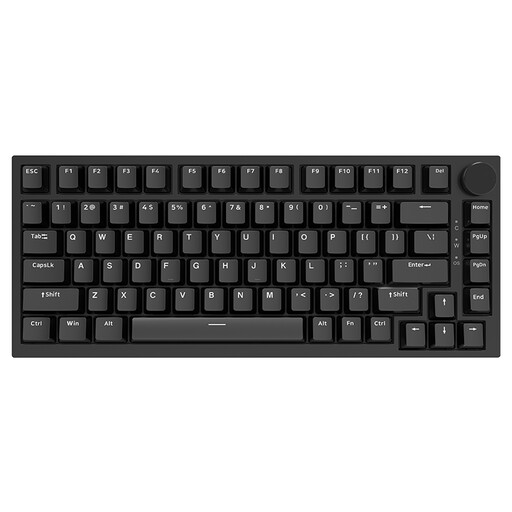
Why this choice suits this profile : With 82 keys, this format remains compact while retaining a function row and essential controls. The USB-C wired connection makes set-up easy on both a Windows PC and a Mac.
The listing specifies genuine linear switches, a hot-swap system and a 75% layout, rather than simply claiming a mechanical feel.
OEM-profile PBT keycaps, CNC volume knob, gasket mount and RGB backlighting advertised with 20 modes.
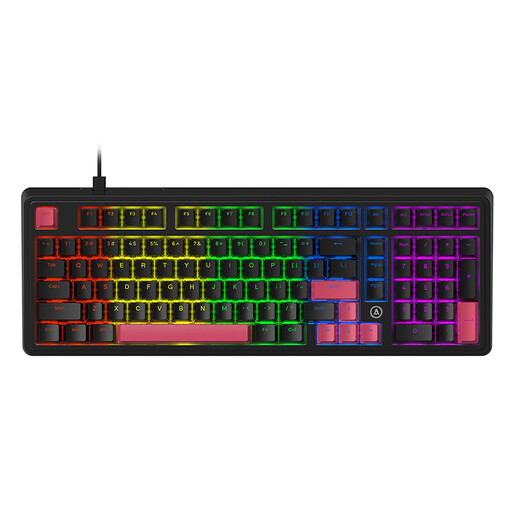
Why this choice suits this profile : Its 98% format retains the number pad while taking up less space than a full-size keyboard. It is suitable for gamers and remote workers who switch between gaming controls and number entry.
The listing distinguishes the pre-lubricated linear switches from the keycap material and mentions hot-swap compatibility with both 3-pin and 5-pin formats.
Double-shot PBT keycaps, gasket structure and five advertised layers of sound-absorbing foam.
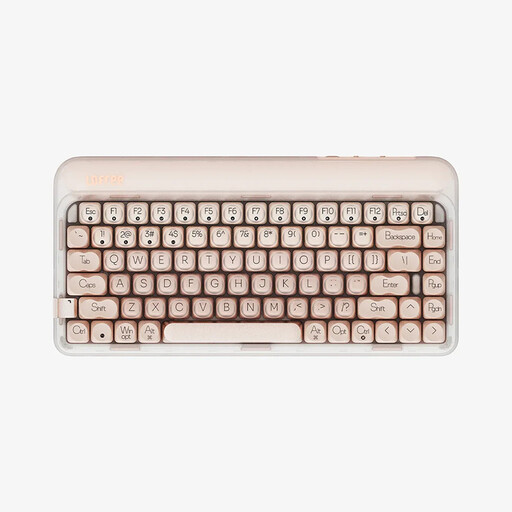
Why this choice suits this profile : The USB-C wired mode, Bluetooth 5.3 and 2.4 GHz make it easy to switch between a computer, tablet and phone. With 84 keys, this model is designed for mobile workspaces and multi-device set-ups.
All three connection modes are detailed, along with the 4,000 mAh battery and advertised charging time. This makes it easier to plan for battery management.
Pre-lubricated linear switches, an advertised polling rate of 1,000 Hz, seven warm LED effects and four brightness levels.

Why this choice suits this profile : With 61 keys, this 60% keyboard frees up space for your mouse and is easy to carry. Wired, Bluetooth and 2.4 GHz connectivity make it equally suitable for a fixed workstation or a mobile set-up.
The listing clearly states the US QWERTY layout, the two Bluetooth profiles, the 2.4 GHz receiver and the option to use the keyboard in wired mode while charging.
Blue clicky switches, 16 RGB modes, a 1,600 mAh battery and automatic sleep mode after ten minutes, as advertised.
We have put together a complete, real-time updated list of products that fully meet these strict selection criteria and European safety regulations.
First, connect the keyboard via USB-C or pair it over Bluetooth, depending on the mode selected. On both Windows and macOS, check the keyboard language so that the US QWERTY layout matches the characters displayed. For a console, consult the list of compatible devices and have a converter ready if recommended in the product listing.
To extend its lifespan, unplug the keyboard before cleaning it. Use a dry cloth or one slightly dampened with a product suitable for electronic surfaces, and avoid immersing it in water. Models fitted with a lithium battery should be protected from moisture and heat. If you notice swelling, leakage or overheating, stop using the keyboard immediately.
Yes, provided you choose a switch and noise level suited to your environment. Linear switches are generally quieter than clicky switches, but noise also depends on the keycaps, keyboard construction and typing force. In a shared space, choose a model that mentions vibration reduction or opt for quieter switches.
Many manufacturers advertise a lifespan of several tens of millions of keystrokes, but this figure remains a theoretical estimate. Longevity depends on usage, maintenance, humidity and component quality. A hot-swap keyboard can make it easier to replace worn switches without replacing the entire keyboard, provided the circuit board is still in good condition.
A wired keyboard eliminates the need for recharging and is ideal for a desktop computer or console. Wireless connectivity makes it easier to move around and connect to several devices, but means keeping an eye on battery life and the supplied receiver. For mixed use, a tri-mode model is a practical solution, provided the devices you use support the advertised connections.