Joybuy Insights

Gaming Mechanical Keyboard Guide: How to Make the Right Choice

The market for gaming mechanical keyboards is a real jungle. Between marketing promises, flashy RGB designs, and often opaque technical jargon, it's easy to get lost and regret your purchase. As a product expert at Joybuy, my role is to help you cut through the noise. To save you from buyer's remorse, let's review the three most common pitfalls.

  1. The Form-Over-Function Trap: A spectacular backlight is no guarantee of durability. Too many models focus everything on lighting effects at the expense of material quality, which leads to premature wear and tear.
  2. The "One-Size-Fits-All" Switch Fallacy: You may have been told that "Red" switches are for gaming and "Blue" switches are for typing. The reality is far more nuanced. Choosing a switch type that's ill-suited to your favorite games or daily use can quickly become a nightmare and hinder your performance.
  3. Overlooking the Keyboard Layout: A full-size keyboard can clutter a gaming-focused desk and limit your gaming mouse movements. Conversely, an ultra-compact layout might deprive you of keys that are essential for productivity.

The Essential Criteria for a Successful Purchase

To sort through the overwhelming number of gaming peripherals, focus on the features that truly make a difference in daily use.

Mechanical Switches: The Heart of Your Experience

The switch is the mechanism under each keycap. It defines the feel, sound, and responsiveness of your keyboard. There are three main families:

  • Linear (e.g., Reds, Blacks): The keystroke is smooth and consistent, with no tactile feedback or audible click. They allow for rapid, repeated actuation, making them a top choice for fast-paced games (FPS, action).
  • Tactile (e.g., Browns): You feel a slight bump at the actuation point, but without the audible "click." This is a popular compromise between gaming and typing, offering clear feedback without being noisy.
  • Clicky (e.g., Blues): In addition to the tactile bump, these switches produce a distinct, audible "click." The sensation is very satisfying for typing but can be disruptive to those around you or during streaming.

Form Factor: TKL, 75%, 60%... Finding the Right Size

The size of your keyboard determines the ergonomics of your gaming setup.
  • Full-size (100%, ~104 keys): The classic layout with a number pad. A logical choice if you frequently use spreadsheets or numeric shortcuts.
  • TKL (Tenkeyless, 80-87 keys): Identical to a full-size but without the number pad. It frees up valuable space for mouse movement, a clear advantage in gaming. The TKL keyboard is a very versatile format.
  • Compact (75%, 65%, 60%): These layouts further reduce the footprint by rearranging or removing the function and navigation keys (accessible via an "Fn" key). They are perfect for minimalist desks or for on-the-go gamers.

Connectivity: Wired, Wireless, or Both?

  • Wired: The simplest and most stable connection. No battery to charge, no risk of interference. Latency is virtually zero, which remains the gold standard for competitive play.
  • Wireless (2.4 GHz): Offers freedom of movement with very low latency, nearly imperceptible to the majority of gamers. Requires a USB dongle and means keeping an eye on battery life.
  • Bluetooth: Ideal for versatility, allowing the keyboard to connect to multiple devices (PC, tablet, etc.). Latency is slightly higher than 2.4 GHz, making it less suitable for ultra-competitive games but perfectly fine for mixed use.
  • Tri-mode: The ultimate in versatility. The most flexible wireless mechanical keyboard, combining wired, 2.4 GHz, and Bluetooth to adapt to any situation.

Options for Different Gamer Profiles

IDEAL FOR: THE BEGINNER GAMER
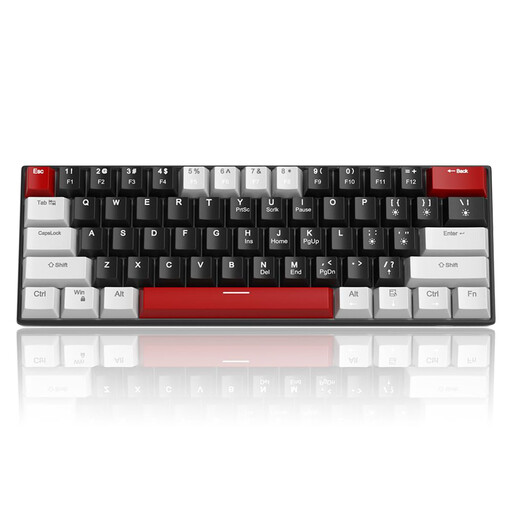
Clavier gaming filaire MageGee STAR 61 60 %, format QWERTY US, clavier filaire compact rétroéclairé LED bleu avec c?ble USB Type-C détachable, clavier gaming portable anti-ghosting complet - Gris & Noir/Switch Rouge

MageGee STAR 61 60% Wired Gaming Keyboard - Grey & Black/Red Switch

Why it's a great choice: Compact, affordable, and equipped with versatile linear (Red) switches, it delivers the core mechanical experience without costly frills. It's an excellent entry point for discovering the benefits of a gaming keyboard.

How it avoids the pitfall

It focuses on raw performance (mechanical switches, anti-ghosting) rather than complex RGB lighting, thus avoiding the trap of aesthetics at the expense of typing quality. Its 60% layout frees up maximum space for the mouse.

Key Advantage

Ultra-compact 60% form factor ideal for small desks and wide mouse movements. Linear Red switches are well-suited for fast-paced games.
IDEAL FOR: THE DEMANDING COMPETITOR
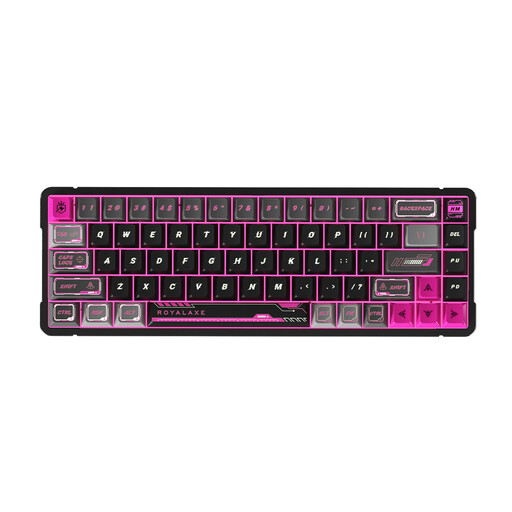
Clavier Royalaxe X68 tout en aluminium | Switchs magnétiques Gateron Jade | Clavier mécanique filaire 68 touches QWERTY US | Gaming FPS Esports RT pour Valorant CS2

Royalaxe X68 Full Aluminum Keyboard | Gateron Magnetic Jade Switch

Why it's a great choice: Engineered for pure performance, its aluminum chassis ensures perfect stability, and its magnetic switches allow for adjustable responsiveness (Rapid Trigger)—a decisive advantage in competitive FPS games like Valorant or CS2.

How it avoids the pitfall

It bypasses the "one-size-fits-all" switch myth by offering cutting-edge technology (magnetic) specifically designed for speed and precision in-game, where every fraction of a second counts.

Key Advantage

Gateron magnetic switches for ultra-fast and customizable actuation. Full aluminum chassis for maximum durability and stability.

IDEAL FOR: THE VERSATILE ENTHUSIAST & CUSTOM KEYBOARD FAN
Clavier mécanique sans fil AJAZZ AK980 V2, format 98 % QWERTY, clavier gaming Hot-Swap avec molette de volume et écran TFT, batterie 10000 mAh, Filaire/Bluetooth/2.4G, éclairage RGB - Switch Gift V2/Gris Nuit ?toilée

AJAZZ AK980 V2 Wireless Mechanical Keyboard with TFT Display

Why it's a great choice: This keyboard is a true Swiss Army knife. It features tri-mode connectivity, a 98% layout that retains the number pad in a compact chassis, and most importantly, hot-swap sockets to change switches without soldering. The TFT screen is a welcome bonus for customization.

How it avoids the pitfall

It solves the layout dilemma by offering a smart 98% arrangement. Its hot-swap capability means the user isn't locked into one switch type and can adapt the keyboard to their preferences, turning a single purchase into an upgradable platform.

Key Advantage

Tri-mode connectivity (Wired, 2.4G, Bluetooth) for total flexibility. Hot-swap sockets allow for easy switch customization.

Complete Your Gaming Setup

A high-performance keyboard is fundamental. For absolute precision, pair it with an equally responsive gaming mouse. Discover our selection of wired models built for performance.

Frequently Asked Questions About Mechanical Keyboards

What is the lifespan of a gaming mechanical keyboard?

Longevity is one of the main advantages of a mechanical keyboard. It's primarily measured by the lifespan of its switches, usually expressed in millions of keystrokes. Most standard switches (Cherry MX, Gateron, Kailh) are rated for 50 million keystrokes or more. With normal use, this translates to many years of service, far beyond the lifespan of a typical membrane keyboard.

How do I clean my mechanical keyboard?

Regular maintenance ensures the longevity and cleanliness of your keyboard.

  1. Always unplug the keyboard before any cleaning.
  2. For a surface clean, use a slightly damp microfiber cloth.
  3. For dust and debris between the keys, a can of compressed air is very effective.
  4. For a deep clean, you can remove the keycaps using a keycap puller. You can then clean the keycaps separately (in soapy water, letting them dry completely) and wipe down the keyboard's plate.

Is a wireless mechanical keyboard as responsive as a wired one for gaming?

Technology has made enormous strides. Today, a wireless mechanical keyboard using a 2.4 GHz connection offers latency so low (often 1ms) that it's indistinguishable from a wired keyboard for almost all gamers, even at a high level. A Bluetooth connection has slightly higher latency and can be prone to interference, making it more suitable for casual gaming or office work. For pure competition, wired remains the guarantee of a flawless connection.