
Livraison le jour même ou le lendemain

Qualité garantie

Débloquez vos offres de bienvenue: Livraison GRATUITE | Jusqu'à -80 % | 30 jours d'essai gratuits à JoyPlus
Téléchargez l'application
A gaming mechanical keyboard can transform typing comfort, command accuracy and desk organisation. You still need to choose the right model, though. Between promises of responsiveness, lighting effects and the wide range of formats, some purchases can quickly lead to disappointment. A keyboard that is too noisy in a flat, an impractical QWERTY layout for writing in French, or claimed battery life without clearly stated testing conditions are common examples.
Here are the criteria to consider before you buy, along with a selection suited to a range of uses in France.
A compact mechanical keyboard frees up space for your mouse, but some formats remove the arrow keys, function row or number pad. A 60% keyboard with 61 keys is easy to carry around, but it often requires combinations using the Fn key. A 75% keyboard, on the other hand, generally retains the arrow and function keys in a more compact chassis.
The number of keys should therefore match how you use the keyboard. If you want to game while working every day, a 75% or 80% format helps minimise compromises. On a small desk or with a laptop, a 60% or 65% model may be more practical, however.
An AZERTY model makes writing in French and accessing accented characters easier. A QWERTY keyboard may nevertheless suit gamers who are used to English-language shortcuts, users who switch between systems, or anyone who wants to remap the keys themselves.
Also check the physical standard stated in the technical specifications. A German QWERTZ keyboard, such as the AJAZZ AK820 MAX, is not a French AZERTY keyboard, even though its keys can be remapped with software or replaced with a compatible set of keycaps.
A wireless mechanical keyboard may work via Bluetooth, 2.4 GHz or both technologies. Bluetooth is particularly convenient with a tablet, phone or laptop. The 2.4 GHz connection, via a USB receiver, is aimed more at desktop setups and gaming. As for the USB-C cable, it remains useful for charging the keyboard or enjoying a wired connection with no latency.
Also check the conditions under which battery life was measured. RGB lighting, its brightness and how frequently the keyboard is used can significantly affect the time between charges.
Compare the keyboard’s actual dimensions, not just the percentage highlighted by the manufacturer. A 75% model generally retains the arrow keys and a function row while taking up less space than a full-size keyboard. The 96% or 98% formats keep almost all the keys, with a number pad positioned closer to the rest of the keyboard.
On a desk shared with a home-working monitor, measure the available depth and the space needed to move your mouse. A chassis that is too tall may also make a wrist rest essential.
For a fixed gaming PC, a wired USB-C connection remains the simplest solution and means you do not have to monitor the battery level. A tri-mode keyboard offers greater flexibility through wired, Bluetooth and 2.4 GHz connections. Check the stated compatibility with Windows, macOS, Android, iPadOS or consoles. On PS4, PS5 or Xbox, an adapter may be required and is not necessarily included.
A keyboard for PC and Mac should also allow you to modify keys or profiles if you regularly switch between operating systems.
Linear switches provide a consistent press without a pronounced click. Tactile models offer more noticeable feedback beneath your finger, while clicky switches produce a clearly audible sound. For a bedroom, library or open-plan office, a silent mechanical keyboard will generally be more suitable than a model fitted with blue switches.
The hot-swap function lets you replace switches without using a soldering iron. This is a genuine advantage if you want to adjust the typing feel, sound level or actuation force over time. However, check compatibility between the sockets and 3- or 5-pin switches before buying. To discover more components and switches, also explore our selection of keyboard switches.
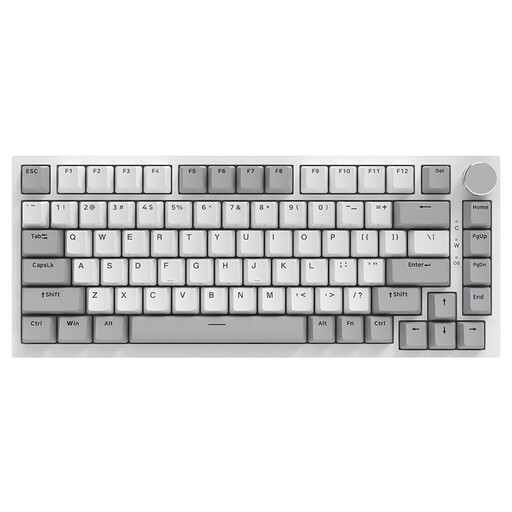
Why this choice suits this profile : Its 75% format and USB-C connection make it a strong first compact keyboard for gaming and work, without having to manage a battery.
The product details mention hot-swap functionality, a volume dial and an 82-key layout, so essential controls have not been sacrificed to save space.
75% format, RGB backlighting, PBT keycaps and stated compatibility with Windows and macOS.

Why this choice suits this profile : It is designed for enthusiasts who want to customise the typing feel, lighting and controls across multiple devices.
The tri-mode connection, 5-pin hot-swap functionality and programmable software reduce the risk of ending up with a keyboard that is difficult to upgrade.
87 keys, stated 4 000 mAh battery capacity, PBT keycaps and programmable dial.
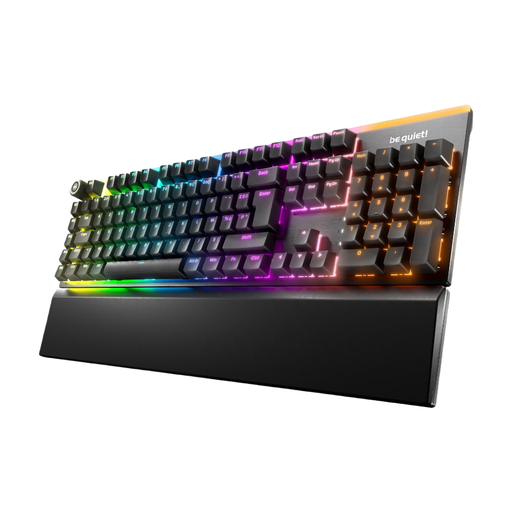
Why this choice suits this profile : Its FR AZERTY layout and switches advertised as silent make it suitable for both long gaming sessions and working in a shared space.
The product details specify the French layout, three-layer acoustic insulation and 5-pin hot-swap sockets.
PBT keycaps, multimedia dial, five dedicated keys and a stated polling rate of 1 000 Hz.
We have put together a complete, real-time updated selection of products that meet these demanding criteria as well as European safety standards.
Yes, provided you choose the right switches. Linear or silent models help minimise audible clicks. Also check the AZERTY layout, whether there is a volume dial and the height of the chassis. A wrist rest can improve comfort, but it is no substitute for keeping your hands in a neutral position or taking regular breaks.
It depends on the switches, electronics, usage and maintenance. Technical specifications sometimes claim several tens of millions of keystrokes, but this figure generally refers to switches tested under specific conditions. A hot-swap model makes it easier to replace a faulty switch. PBT keycaps, meanwhile, generally withstand shine better than some ABS keycaps.
RGB lighting reduces the battery life of a wireless keyboard compared with using it without backlighting. Its impact varies according to brightness, the number of illuminated zones and the connection mode. To preserve battery life, reduce the intensity or disable the effects when you do not need them.