
Livraison le jour même ou le lendemain

Qualité garantie

Débloquez vos offres de bienvenue: Livraison GRATUITE | Jusqu'à -80 % | 30 jours d'essai gratuits à JoyPlus
Téléchargez l'application
The world of gaming mechanical keyboards is a real minefield. Between marketing promises and opaque technical jargon, a misstep is always just around the corner. A keyboard might look perfect on paper, only to be a disappointment once it's on your desk. My role, as a product expert at Joybuy, is to cut through the noise for you. Let's break down the pitfalls to avoid and the criteria that truly matter for making the right choice.
Before we even get into the technical specs, let's learn how to spot the common misconceptions that can turn a purchase into a regret.
To ensure you make the right choice, focus on these three pillars that truly define your daily experience.
Your keyboard's form factor is not a minor detail: it determines your ergonomics and your desk setup.
The way the switch plate is mounted in the chassis directly affects the feel and acoustics of your typing. The gasket mount keyboard design is establishing itself as the current gold standard. Silicone or Poron gaskets are placed between the plate and the case to isolate vibrations. The result?: a softer typing feel, a deeper and more muted sound (the famous "thock" enthusiasts love), and significantly reduced long-term fatigue.
To illustrate our point, here are three models that perfectly meet our selection criteria, each tailored to a specific user profile.

Why we chose it : Ideal for those who juggle gaming and work. Its 98% layout retains the number pad, which is invaluable for office tasks, while being more compact than a standard keyboard. The volume knob and TFT screen are real day-to-day bonuses.
It doesn't just rely on the "gamer" label. Its Gasket Mount structure and multiple sound-dampening layers ensure superior typing comfort, perfect for long hours of coding or writing without fatigue.
Tri-mode connectivity (Wired, Bluetooth, 2.4G) for ultimate versatility. Gasket Mount structure for a premium acoustic and tactile experience.
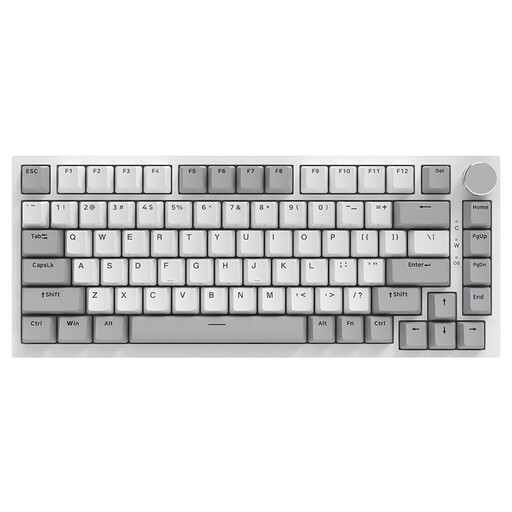
Why we chose it : An excellent starting point for anyone who wants to get their hands dirty. The 75% keyboard layout is very popular, and its internal structure (Gasket, hot-swap PCB) lets you experiment with different switches and keycaps to craft a keyboard that's uniquely yours.
It goes beyond a simple "hot-swappable" mention on the spec sheet. The PCB is designed to support both 3-pin and 5-pin switches, ensuring broad compatibility and durability that can withstand repeated switch changes.
Gasket Mount structure with a PC plate for a muted sound and soft typing feel. Hot-swappable PCB (3/5-pin) for complete customisation freedom.
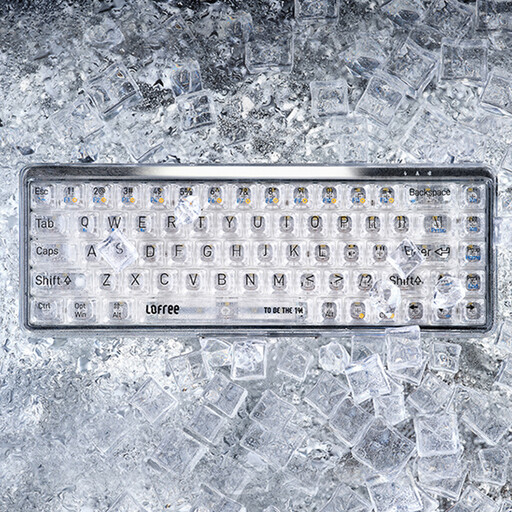
Why we chose it : For lovers of clean desks and objects that stand out from the ordinary. This 68-key compact mechanical keyboard frees up considerable desk space. Its transparent design and dual-mode connectivity (Bluetooth/wired) make it a true design piece that's as pleasing to look at as it is to use.
Its spectacular aesthetic isn't just for show. It's equipped with linear MX Jellyfish switches, known for their smooth and consistent keystrokes, ensuring a user experience that lives up to its avant-garde look.
Iconic transparent design. Ultra-compact 65% layout for a minimalist desk. Reliable Bluetooth 5.1 connectivity.
We've compiled a complete selection of keyboards that meet our quality charter and current standards.
That's the million-dollar question! It's all about the feel?:
Absolutely, as long as you choose a quality model. For a newcomer, it's the perfect gateway to experimenting with different switch types without having to invest in multiple keyboards. It's also a real plus for durability?: a faulty switch? Replace it in seconds for a modest fee, and your keyboard is good to go for years to come.
Regular maintenance is the key to longevity. A blast of compressed air or a brush between the keys is enough for daily upkeep. For a deep clean, use the provided keycap puller to remove the keycaps, wash them with soapy water (and dry them thoroughly!), then wipe the frame with a slightly damp microfibre cloth. And of course, the golden rule?: keep coffee mugs and other drinks at a safe distance?