
Livraison le jour même ou le lendemain

Qualité garantie

Débloquez vos offres de bienvenue: Livraison GRATUITE | Jusqu'à -80 % | 30 jours d'essai gratuits à JoyPlus
Téléchargez l'application
A gaming keyboard can completely transform your comfort at your desk. First, though, you need to know how to decode the specifications, which can sometimes list figures that are difficult to put into context. RGB backlighting, mechanical switches, wireless connectivity, compact formats… The risk is choosing a model that looks impressive on paper but is poorly suited to your everyday use.
Before comparing models, here are the most common pitfalls and the criteria that really matter to gamers in France.
A polling rate of 8 000 Hz or an adjustable actuation point of 0.1 mm may appeal to competitive gamers. However, these figures alone do not determine how the keyboard feels when typing or gaming. Your computer’s configuration, the game you play, your monitor’s refresh rate and the quality of the configuration software all play a part too.
For versatile use, a programmable gaming keyboard running at 1 000 Hz already offers more than enough responsiveness. Very high figures are mainly relevant to players who regularly play competitive shooters.
An AZERTY gaming keyboard is not identified solely by the appearance of its keys. Make sure it has the FR/AZERTY layout, particularly if you write, use lots of shortcuts or switch between gaming and working from home. Several imported models are sold with a QWERTY or US layout.
The format and layout should therefore be checked separately. Some compact keyboards retain a French layout, while others require you to use combinations involving the Fn key.
A wireless gaming keyboard helps keep your desk clearer, but battery life varies depending on RGB backlighting, the integrated display and the connection mode selected. The stated battery life usually applies to very specific test conditions. Also check whether a 2.4 GHz receiver is included, whether Bluetooth is supported and whether you can continue gaming via USB-C while the keyboard is charging.
A mechanical gaming keyboard uses individual switches. Linear models, such as red switches, offer a consistent press and feedback without a pronounced click. Tactile or clicky switches provide more feedback under your fingers, but can also be noisier.
Magnetic switches, also known as Hall effect switches, detect changes in a magnetic field. Some models let you adjust the actuation point and use the Rapid Trigger function. These settings require compatible software and a little time to get used to.
Membrane or semi-mechanical keyboards can suit beginners looking for quieter typing at a reasonable price. There is no need to pay for advanced features if you do not intend to configure them.
For a PC and console gaming keyboard, check the stated compatibility with Windows, macOS, PlayStation and Xbox. On consoles, certain features — macros, RGB lighting or proprietary software — may be limited.
Anti-ghosting and NKRO refer to the keyboard’s ability to register several keys simultaneously. This is useful in games that require key combinations, but the number of keys supported varies between products.
Finally, an RGB keyboard can improve visibility in a dimly lit room. However, it cannot replace a suitable layout, a cable that is long enough or a comfortable typing position.
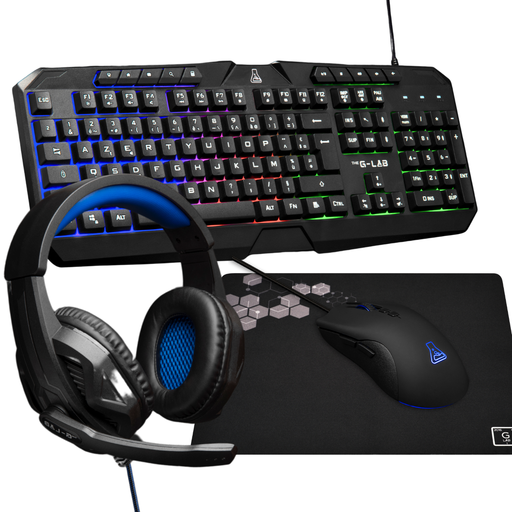
Why this choice suits this profile : This kit includes a backlit AZERTY keyboard, a mouse adjustable up to 3 200 DPI, a headset with microphone and a non-slip mouse mat. A well-rounded solution for getting set up without having to buy multiple items.
The French layout and stated compatibility with PCs and consoles help prevent unpleasant surprises when you first plug it in.
A ready-to-use wired solution with four accessories and a mouse with adjustable sensitivity.
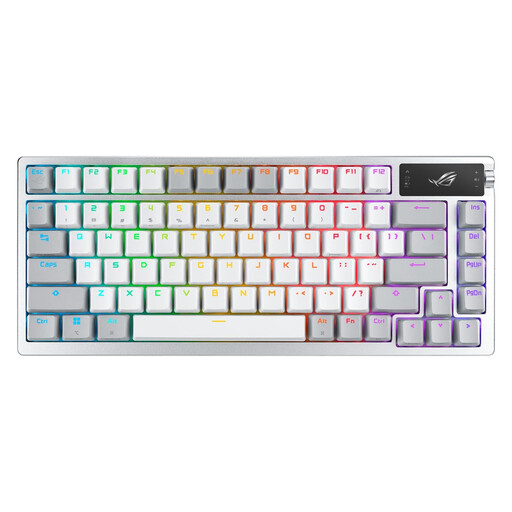
Why this choice suits this profile : Its 75% format, 2-inch OLED display, multifunction dial and triple connectivity — 2.4 GHz, Bluetooth 5.1 or USB — meet the needs of a flexible gaming setup.
Triple connectivity means you are not dependent on a single mode, while the mechanical switches can be replaced without soldering.
Per-key RGB lighting, double-shot PBT keycaps and stated battery life of up to 2 000 hours with RGB lighting and the OLED display switched off.
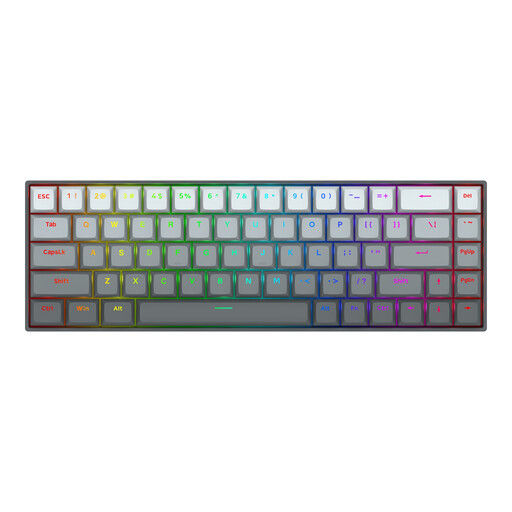
Why this choice suits this profile : With 68 keys, magnetic switches with an adjustable actuation point from 0.2 to 4.0 mm and a Rapid Trigger function, it is aimed at FPS players who like to fine-tune their controls.
The settings are clearly documented. You can therefore adapt actuation to the game, rather than relying solely on a polling-rate figure.
A 65% format, an aluminium top plate, a detachable USB-C cable and an advertised polling rate of up to 8 000 Hz.
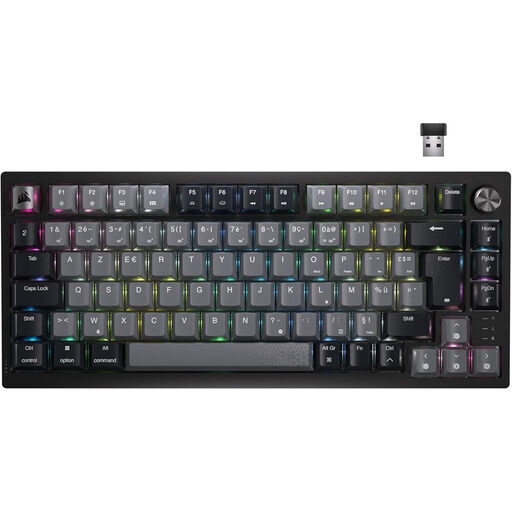
Why this choice suits this profile : This 75% model combines linear switches, per-key RGB backlighting, a volume dial and Bluetooth, USB-C and wireless connectivity.
The product details specify the AZERTY layout, number of keys and different connection modes : three details often missing from generic listings.
An integrated battery, linear red MLX switches and a dedicated volume control for gaming or working without taking your eyes off the screen.
We have put together a complete, real-time-updated list of products that meet these demanding selection criteria and European safety regulations.
A wired gaming headset with a 3.5 mm jack remains easy to use with a PC, PlayStation, Xbox or Nintendo Switch, provided the appropriate port is available. The JBL Quantum 100P, for example, features a detachable microphone, volume control and memory foam ear cushions.
To store your headset, an RGB gaming headset stand with a non-slip base helps free up space and prevents you from placing the device on your keyboard. The THE G-LAB K-STAND HYDROGEN offers two USB 2.0 ports and one USB-C port. The K-Stand RGB Neon adds a vertical structure with RGB lighting and USB-C power.
TKL and 75% formats suit many players who want to retain the arrow keys and function keys. 60% and 65% formats free up more space for your mouse, but require you to master Fn shortcuts.
It depends on the switches, build quality, maintenance and intensity of use. Some product details quote a theoretical number of keystrokes, but this figure does not guarantee the same lifespan for every user. Keep your keyboard away from liquids and clean it regularly with a dry cloth.
Yes. Backlighting can reduce the stated battery life. To compare two models properly, check the measurement conditions : RGB switched on or off, connection type used and selected brightness level.