
Livraison le jour même ou le lendemain

Qualité garantie

Débloquez vos offres de bienvenue: Livraison GRATUITE | Jusqu'à -80 % | 30 jours d'essai gratuits à JoyPlus
Téléchargez l'application
A gaming keyboard isn’t just about its lighting or looks. The key layout, size, connection type and noise level all have a direct impact on your day-to-day comfort. A model that looks appealing can quickly become frustrating to use if it doesn’t suit your desk, your computer or your gaming habits.
Before you place an order, here are the main pitfalls to avoid and the criteria to examine so you can compare different models with greater confidence.
In the UK, a QWERTY gaming keyboard is the standard for everyday typing, symbols and shortcuts. However, many imported mechanical keyboards use a US QWERTY layout, or even a German QWERTZ one. Changing the language in Windows won’t alter the physical keycaps.
So always check:
A mechanical gaming keyboard can offer precise, satisfying typing, but the type of switch makes all the difference. Linear, tactile and clicky models each produce a different sound and feel under your fingers. A very loud keyboard isn’t necessarily the best choice for a shared space, a student bedroom or when working from home.
The hot-swap feature is also worth a close look. It lets you replace switches without soldering, but you need to check compatibility with 3-pin or 5-pin formats. As for the lifespans quoted by manufacturers, these are product specifications and don’t guarantee an identical experience under all usage conditions.
An RGB keyboard improves visibility in a dark room and lets you personalise your desk, but it won’t magically speed up your typing or in-game reactions. Backlighting should be weighed against other criteria: anti-ghosting, programmable keys, connection stability and the comfort of adjustable feet.
A full-size keyboard, with its 105 keys, keeps the numeric keypad. It remains practical for spreadsheets and heavy number entry. A TKL keyboard does away with this keypad to free up space on the right. The compact 60% keyboard reduces the footprint even further, but some functions become accessible via the Fn key. The 75% keyboard generally keeps the arrow keys, the function row and a compact navigation cluster.
For a versatile desk setup, the 75% or 80% size offers a particularly practical compromise. However, if you regularly work with numbers, a full-size office keyboard will be more comfortable.
A wired USB or USB-C keyboard avoids recharging and works immediately after plugging in. A wireless gaming keyboard offers more freedom, but take the time to check the connection method used:
On consoles, compatibility may depend on the port used, any converter required, or the specific game. Some models are advertised as compatible with PC, PlayStation or Xbox, but it’s best to check the product specifications before buying.
PBT keycaps generally resist shine better than ABS keycaps, although the result depends on their design and how intensively they’re used. A gasket-mounted construction, multiple layers of sound-dampening or adjustable feet can also change the typing feel. However, these features won’t compensate for an unsuitable layout or poor posture.
Avoid liquids, high temperatures and harsh cleaning products. Unplug a wired keyboard before cleaning it, then use a soft brush or a dry cloth.
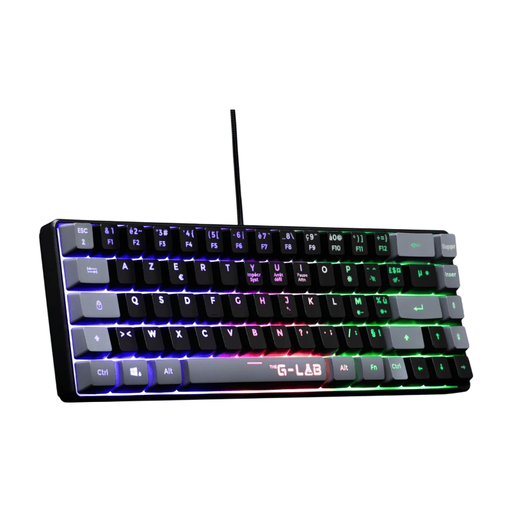
Why this choice suits this profile: This wired 60% model is ideal for a first setup on PC or console. It combines an AZERTY layout, USB connection and immediate usability without requiring any drivers.
The product page clearly states the 60% size, AZERTY layout, wired operation and no mandatory software.
Fixed multi-colour backlighting, 19-key anti-ghosting, reinforced cable and compatibility with PC, PS4, PS5 and Xbox.

Why this choice suits this profile: Customisation enthusiasts will appreciate the hot-swap capability, PBT keycaps, programmable button and three connection modes.
The advertised features are detailed: interchangeable 5-pin switches, Bluetooth, 2.4 GHz and USB-C connections, plus a 4,000 mAh battery.
80% size, programmable wheel, RGB lighting with detachable light bar and compatibility with Windows, macOS, iOS and Android.
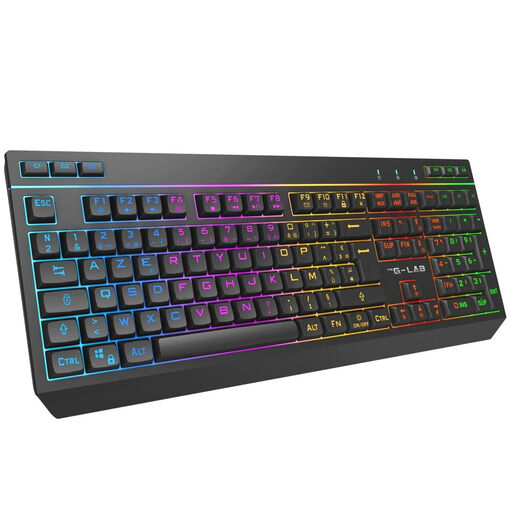
Why this choice suits this profile: Its full-size layout suits gamers who also use multimedia shortcuts. Its wireless connection also makes it easy to switch between PC and console.
The product page distinguishes between 2.4 GHz, Bluetooth and USB-C connections, as well as the stated battery life with and without RGB.
105 AZERTY keys, 12 multimedia shortcuts, 32 programmable macros, 19-key anti-ghosting and a 2,000 mAh battery.
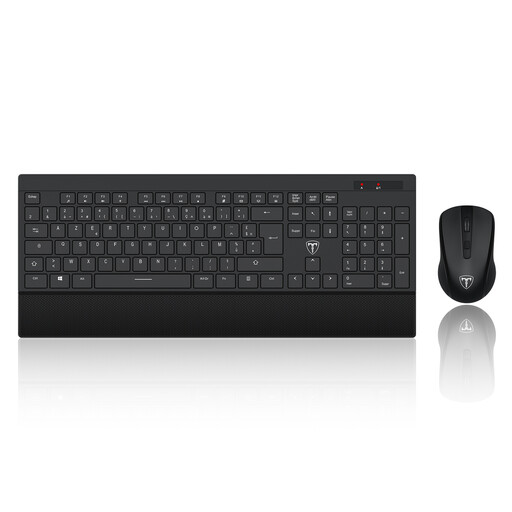
Why this choice suits this profile: This keyboard and mouse duo focuses on everyday typing, quiet operation and the simplicity of a single wireless receiver.
The French layout is clearly stated, along with the advertised 10-metre range and extended battery life.
105 keys, wrist rest, optical mouse with adjustable resolution and shared connection via a 2.4 GHz receiver.
We’ve put together a comprehensive list, updated in real time, of products that meet these demanding selection criteria and European safety standards.
Your keyboard should be consistent with the rest of your setup. A 180 Hz gaming monitor, such as the 27-inch Ochama model in 2K resolution, can find its place on a versatile desk used for both gaming and work. A 250 Hz gaming monitor, like the MSI MAG 32C6X, requires you to check the video source, the cable used and the overclocking settings mentioned in its product specifications.
A high refresh rate will never compensate for a graphics card that can’t produce enough frames per second. So compare the resolution, screen size, HDMI or DisplayPort ports and the actual space available on your desk.
For everyday typing, go for a UK QWERTY layout. A full-size keyboard suits administrative work, while a 75% size frees up desk space without sacrificing the arrow keys or the main function keys.
Yes, as long as you choose switches that are quiet enough and check the keycap height. In a shared space, a membrane keyboard or a mechanical model with sound-dampening elements will generally be more discreet.
Power consumption depends on the battery, RGB backlighting and connection mode. A rechargeable model will need to be charged regularly. A battery-powered keyboard may offer longer battery life, but you’ll need to replace the batteries eventually. Before comparing prices, check the stated capacity and the measured battery life with the lighting turned on.