
Livraison le jour même ou le lendemain

Qualité garantie

Débloquez vos offres de bienvenue: Livraison GRATUITE | Jusqu'à -80 % | 30 jours d'essai gratuits à JoyPlus
Téléchargez l'application
A gaming keyboard is about more than just its RGB lighting or the number of keys listed on the spec sheet. Between compact sizes, mechanical keyboards, wireless models and QWERTY or AZERTY layouts, the wrong choice can quickly become uncomfortable, impractical or even incompatible with your setup.
Here are the main pitfalls to avoid and the criteria to consider before buying a keyboard for your PC, console, Mac or iPad.
Some membrane keyboards mimic the typing feel of a mechanical model. For occasional use, this can be perfectly fine. However, their design generally doesn't allow you to replace the switches or customise the typing experience precisely.
A mechanical keyboard relies on an independent switch beneath each key. It often delivers a crisper response and is easier to maintain, especially when it features a hot-swappable design. So before you decide, check the actual technology used in the product listing – the simple term "gaming" isn't enough.
Switching from QWERTY US to French AZERTY, or vice versa, takes time to get used to. Accents, symbols and certain shortcuts aren't in the same places.
Before buying, check the layout printed on the keys and its compatibility with your system. A keyboard designed for Mac may also arrange the Command, Option and Function keys differently compared to a model intended for a PC.
The term "spill-resistant" doesn't mean you can submerge it or wash it under the tap. An electronic board certified IPX4, for example, can handle some splashes, but the USB port and other components remain vulnerable.
If you spill liquid on it, unplug the keyboard immediately, let it dry completely and consult the manufacturer's recommendations. This precaution applies to backlit models and RGB gaming keyboards too.
The size directly determines how much desk space it takes up and your typing habits.
A USB keyboard doesn't need charging and offers a direct connection. It's ideal for gamers who want a straightforward setup and for desktop PCs.
A Bluetooth keyboard connects easily to a laptop, Mac, phone or iPad. However, it requires initial pairing and regular charging. Wireless models with a 2.4 GHz receiver often add near-instant connection, provided you have a free USB port.
For gaming on a console, check the exact compatibility of the model and whether you might need an adapter. Compatibility announced with Windows doesn't guarantee the keyboard will work on PlayStation or Xbox.
"Blue" switches offer a tactile keystroke with an audible click. They can be enjoyable for gaming and typing, but are less suited to a shared office or a library. Linear switches are generally quieter, while a membrane keyboard often produces less noise.
Also look at the key height, adjustable feet, the presence of a wrist rest and the rigidity of the chassis. An ergonomic keyboard alone won't fix poor posture – keep your wrists in a neutral position and place your screen at the right height.
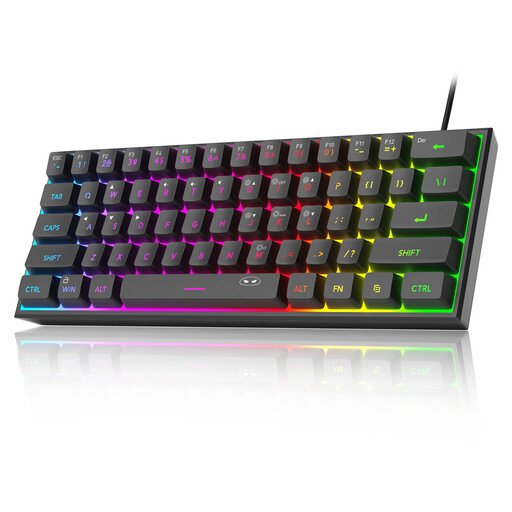
Why this choice suits this profile: Its 60% size and wired connection make it an appealing compact first keyboard for a PC or certain console uses.
The listing specifies it's a membrane model with a mechanical feel, not a mechanical keyboard with replaceable switches. The IPX4 certification also doesn't make the keyboard fully waterproof.
61-key format, adjustable RGB backlighting and stated dimensions of 29.2 × 10.1 × 3.8 cm.
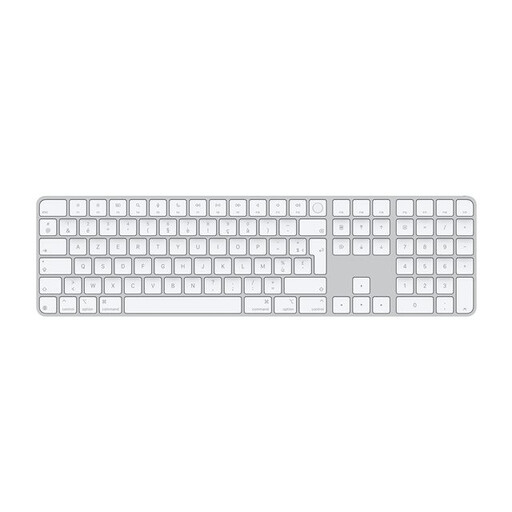
Why this choice suits this profile: This Mac keyboard is aimed at users who want quiet typing, a numeric keypad and deep integration with Touch ID.
The listing clearly states a French AZERTY layout, Bluetooth connection and compatibility with Macs featuring an Apple chip running a compatible version of macOS.
Touch ID, numeric keypad, rechargeable battery and USB-C port, with a stated range of up to 10 m.
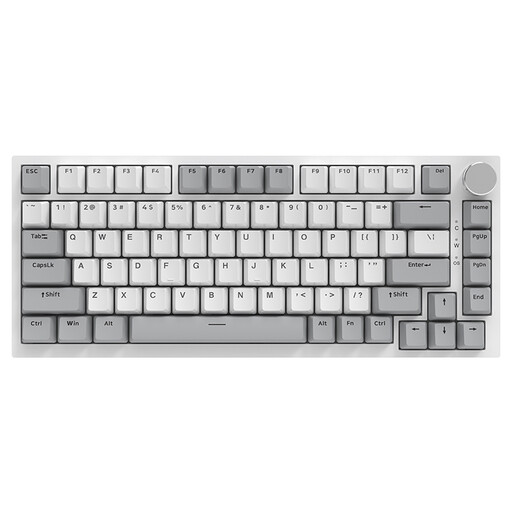
Why this choice suits this profile: Its intermediate size suits both gamers and users who regularly type text, without sacrificing the arrow keys or the volume wheel.
The listing details the wired USB-C connection, PBT keycaps, gasket mount structure and hot-swappable switches. However, please note: the layout is QWERTY US.
82 keys, volume wheel, RGB backlighting and stated compatibility with Windows, macOS and Android.
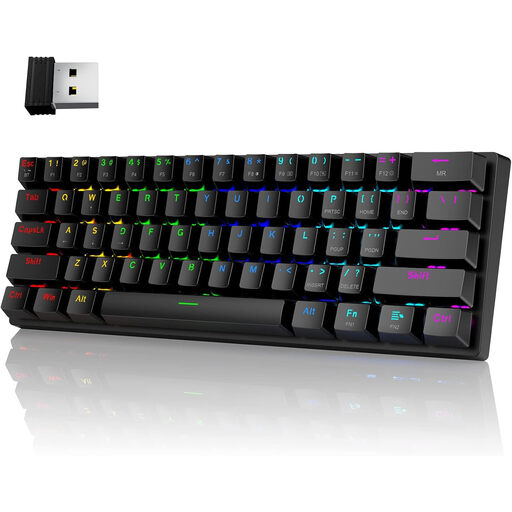
Why this choice suits this profile: Compact and versatile, this keyboard slips easily into a bag and can connect to a PC, laptop, iPad, phone or certain gaming devices.
The three connection modes are clearly stated: wired USB-C, 2.4 GHz receiver and Bluetooth. However, the stated battery life remains theoretical – it depends on the lighting and intensity of use.
61 keys, 1,600 mAh rechargeable battery, 16 RGB modes and stated compatibility with PCs, Macs, iPads and phones.
We've put together a comprehensive, real-time updated selection of products that meet these selection criteria, while complying with European safety regulations.
No. It all depends on the size, the type of switch, the key layout and overall comfort. A mechanical keyboard can offer a pleasant tactile response during gaming, but a membrane model will be more suited to certain multi-purpose uses and is often quieter.
For everyday use in France, AZERTY makes typing accents and common characters easier. QWERTY US can be appealing for gamers used to that layout or for users working with a particular setup. In any case, check the actual position of the symbols before buying.
It all depends on how it's powered. A battery-powered model needs regular battery changes, while a rechargeable Bluetooth keyboard needs to be charged with a USB-C cable or another compatible cable. Turning on the backlighting can also reduce battery life.