
Livraison le jour même ou le lendemain

Qualité garantie

Débloquez vos offres de bienvenue: Livraison GRATUITE | Jusqu'à -80 % | 30 jours d'essai gratuits à JoyPlus
Téléchargez l'application
A gaming keyboard is about more than a few lighting effects. Depending on your setup, operating system and habits, the wrong model can quickly become uncomfortable, take up too much space or simply prove incompatible. Whether you play on PC or console, work from home or use your computer for everyday tasks, it’s worth checking a few things before you place your order.
An RGB or backlit keyboard makes it easier to see the keys in a dark room, but lighting effects tell you nothing about key accuracy or connection quality. Some models focus entirely on lighting, while skimping on programmable keys or genuinely effective anti-ghosting.
In France, the AZERTY layout makes it easier to type accents and commonly used characters. A QWERTY keyboard can work perfectly well for gamers who are used to it, or people who switch between devices, but it takes time to adapt to for everyday typing in French.
Also check the layout printed on the keys: changing the language in Windows or macOS will never change the physical key labels.
A wireless keyboard gives you more freedom, but latency, connection modes and battery life vary considerably between models. Bluetooth is handy with a tablet or when you’re on the move. For PC gaming, a 2.4 GHz connection with a dedicated receiver is often a better choice.
If your keyboard will stay in one place, a USB keyboard saves you having to recharge it and reduces the risk of it cutting out at the wrong moment.
A mechanical keyboard has a dedicated switch beneath each key. It generally provides more distinct feedback, and lets you choose between linear, tactile or clicky typing. Blue switches, found on some QWERTY keyboards, make a clearly audible click. In a shared office or room, that can quickly become irritating.
A membrane keyboard is often quieter and works very well for everyday tasks and casual gaming. Be wary of the phrase ‘mechanical feel’: it doesn’t mean the keyboard is genuinely mechanical. Check the technology listed in the product details.
Anti-ghosting helps prevent missed commands when you press several keys at once. For action, racing or strategy games, check how many keys are actually supported. A specification such as ‘26 anti-ghosting keys’ tells you far more than a simple ‘gaming’ logo.
Complex shortcuts, macros and multimedia controls can also make a difference. However, check whether they need to be programmed using software, and whether that software works with your operating system.
A full-size 104-key keyboard includes a numeric keypad, which is handy for entering numbers, working with spreadsheets or using certain applications. Compact layouts — 60%, 65% or 75% — free up space for your mouse, but some functions then require the Fn key.
For a keyboard that can do a bit of everything, check that it’s listed as compatible with PC and Mac, as well as the consoles you use. Bluetooth is handy with a tablet or iPad, while a USB model will usually be recognised straight away by a compatible computer or console.
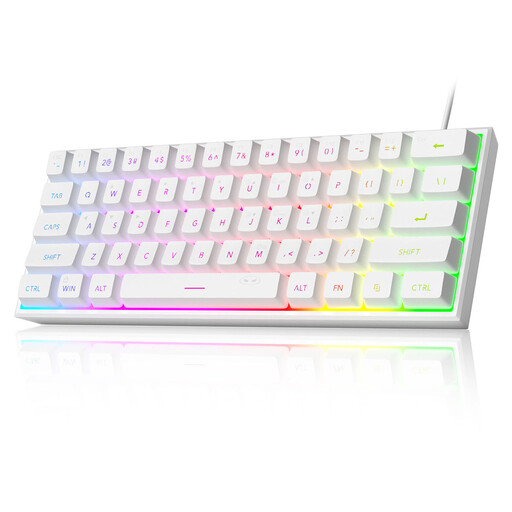
Why it suits this user: Its 60% layout fits easily on a small desk, while the USB cable means you don’t have to keep an eye on the battery level. It’s a good choice if you want to try a compact gaming keyboard, with compatibility for Windows and Mac.
The product details specify a wired connection and an IPX4-certified circuit board, while noting that the USB interface isn’t waterproof. Think of it as a spill-resistant keyboard, not one you can rinse under the tap.
60% layout, adjustable RGB backlighting and a membrane design with a mechanical feel.
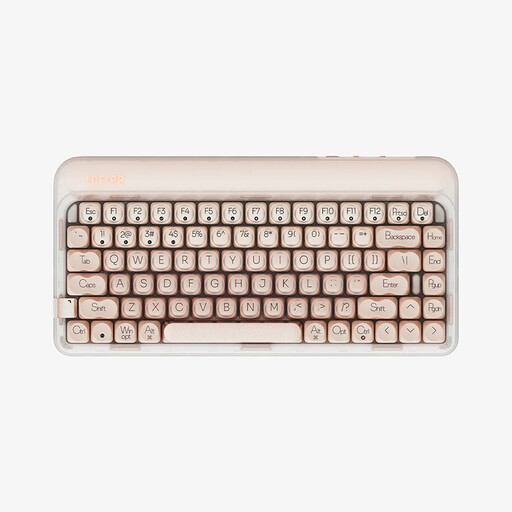
Why it suits this user: This 84-key model combines replaceable linear switches with three connection modes: USB-C, Bluetooth 5.3 and 2.4 GHz. It’s designed for anyone who regularly switches between a computer and tablet, or moves between workspaces.
You’re not tied to a single connection mode. If the 4,000 mAh battery runs flat, you can keep using the keyboard while it charges via the USB-C cable.
Hot-swappable switches that don’t require soldering, a claimed 1,000 Hz polling rate and warm-toned monochrome LED backlighting.
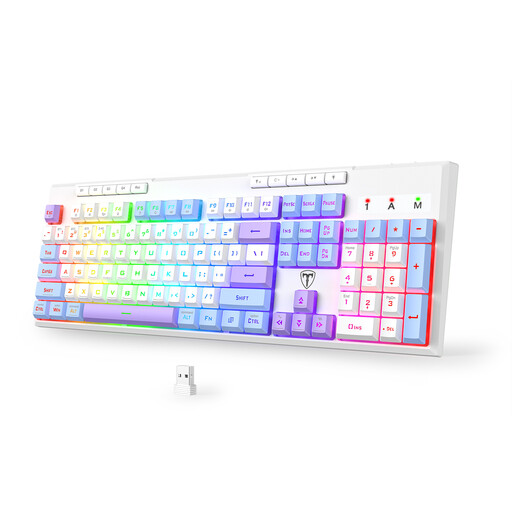
Why it suits this user: With 104 keys, this full-size keyboard is ideal for gamers who also use a numeric keypad, multimedia shortcuts and macros, whether they’re playing or working.
The product details clearly set out the three connection modes, 26 anti-ghosting keys and six programmable macro keys. That makes it easier to judge what the keyboard can actually do, rather than focusing only on its RGB lighting.
Bluetooth 5.0, 2.4 GHz connection, USB-C, 4,000 mAh battery and PBT keycaps with laser-engraved legends.
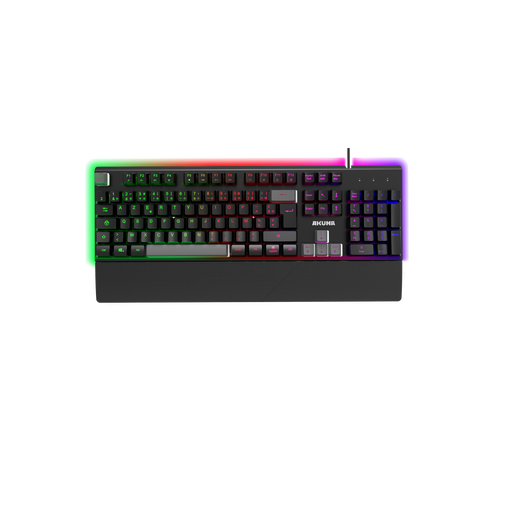
Why it suits this user: Its French AZERTY layout makes it easy to switch between gaming and everyday typing. The USB connection suits a permanent setup with a PC, Mac or compatible console.
The product details list 26 anti-ghosting keys, so its gaming features go beyond keyboard lighting.
AZERTY layout, customisable RGB lighting, magnetic wrist rest and programmable macro keys.
Before starting a game, check which keyboard layout is active in Windows, macOS or on your console. With a wireless keyboard, pair it via Bluetooth or plug in the 2.4 GHz receiver, following the manufacturer’s instructions. Avoid placing the receiver behind a metal case or too far away from the keyboard.
To help your keyboard last longer:
No. A mechanical model can offer more pronounced tactile feedback and more ways to customise your setup, but a membrane keyboard is perfectly adequate for many games. Focus on the layout, key stability, anti-ghosting and noise level.
For everyday typing in France, AZERTY saves you from frequent language changes and awkward shortcuts. QWERTY is still a good choice if you already use it, play across several platforms or use software configured for that layout.
Bluetooth can work well for casual gaming and general use. To reduce latency and avoid extra connection steps, choose a USB cable or 2.4 GHz connection if the product supports it. Also check the stated battery life and whether you can use the keyboard while it’s charging.