
Livraison le jour même ou le lendemain

Qualité garantie

Débloquez vos offres de bienvenue: Livraison GRATUITE | Jusqu'à -80 % | 30 jours d'essai gratuits à JoyPlus
Téléchargez l'application
Choosing a new gaming keyboard can quickly become a headache. Between promises of absolute responsiveness, switches with intimidating names, and hypnotic RGB lighting, it's easy to get lost and regret your purchase. The goal of this guide is simple: to help you decode the marketing jargon to make an informed choice that's perfectly suited to your playstyle and budget.
Before diving into the spec sheet, let's review the most common pitfalls that can cost you dearly (and ruin your games):
To avoid falling for the hype, let's focus on the three criteria that truly define whether a gaming keyboard is right for you.
The technology under each keycap determines the typing feel, noise, and responsiveness.
Finally, a detail that's anything but minor: for comfortable use in most English-speaking regions, ensure the keyboard has a QWERTY layout.
The size of your keyboard has a direct impact on your ergonomics and performance.
The choice between wired and wireless depends on your priorities.
To illustrate our points, here are a few models that perfectly meet the criteria we've just discussed, for different types of gamers.
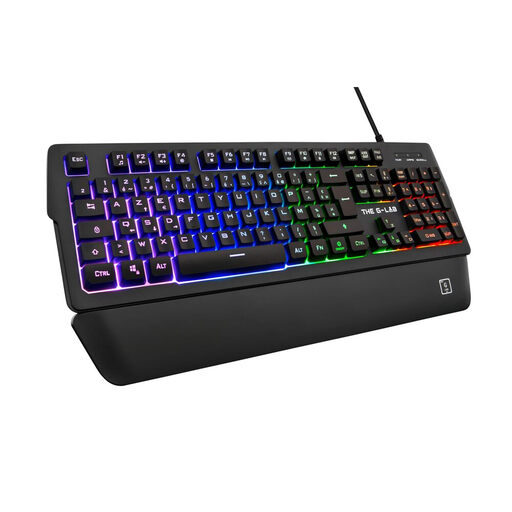
Why this model? Ideal for those who want a full, comfortable keyboard that's as at home in gaming as it is in the office, without breaking the bank on a mechanical model. Its magnetic wrist rest is a real bonus for comfort during long sessions.
It doesn't hide behind the "mechanical" label. It embraces its ultra-responsive membrane technology, offering a quiet and precise typing experience while integrating useful gaming features (anti-ghosting, macros) and well-implemented RGB lighting.
The detachable magnetic wrist rest provides ergonomic comfort that's rare at this price point. Its keystrokes promise to be quieter than the average membrane keyboard, a great feature for late-night sessions.
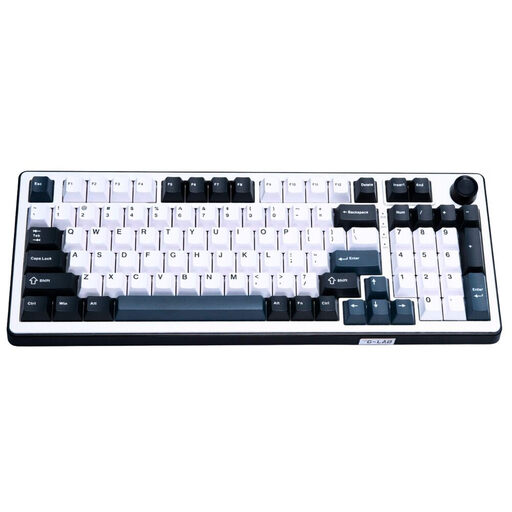
Why this model? Built for gamers who leave nothing to chance. Its Hall effect technology and 8000 Hz polling rate aim for near-zero latency, a decisive advantage in competitive FPS games.
It doesn't just settle for flashy RGB lighting. Its added value lies in its cutting-edge technology: the magnetic switches allow for fine-tuning of sensitivity, a tangible performance feature that's far from being a marketing gimmick.
Its 8000 Hz polling rate lowers latency to a fraction of a millisecond. The icing on the cake is that the switches are hot-swappable, allowing for maximum customisation and lifespan.
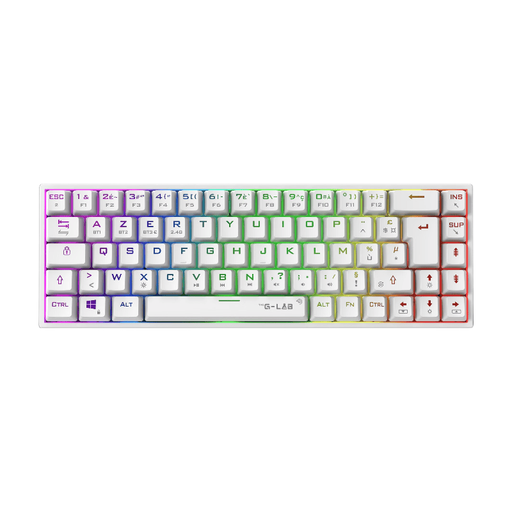
Why this model? Perfect for gamers who want maximum space for their mouse, or for those who swear by a minimalist, cable-free desk. Its 65% form factor and wireless connectivity meet both of these needs.
It avoids the pitfall of the wrong form factor. Instead of a cumbersome full-size keyboard, its compact 65% design frees up precious space—a direct advantage for in-game performance—while retaining the essential arrow keys.
Its triple connectivity (wired, Bluetooth, 2.4 GHz) ensures maximum versatility. The red (linear) mechanical switches guarantee the responsiveness needed for competitive gaming, all in an ultra-compact format.
Explore our complete selection of gaming peripherals, chosen by our experts for their performance and value.
A membrane keyboard uses a rubber dome under each key. The keystroke is softer and quieter. A mechanical keyboard, on the other hand, uses an individual switch for each key, offering more distinct and precise feedback, better durability, and greater accuracy. The feel varies greatly depending on the switch type (linear, tactile, clicky).
Yes, provided you choose wisely! For gaming, you should absolutely prioritise a 2.4 GHz wireless connection (via a USB dongle). This technology offers very low latency, virtually indistinguishable from a wired connection. Models that only use Bluetooth may have slightly higher latency, which is a handicap in fast-paced games.
If you're an avid gamer (especially FPS) and the number pad is just gathering dust on your desk, a TKL (tenkeyless) format is a perfect choice to free up space for your mouse. If you're aiming for an ultra-minimalist setup, aren't afraid of juggling a few keyboard shortcuts, and space is your absolute priority, a 60% or 65% format will be an even better fit.