
Livraison le jour même ou le lendemain

Qualité garantie

Débloquez vos offres de bienvenue: Livraison GRATUITE | Jusqu'à -80 % | 30 jours d'essai gratuits à JoyPlus
Téléchargez l'application
Choosing a gaming keyboard can quickly become overwhelming. Between the different switch types, various form factors, and a maze of features, it's easy to get lost. Yet, the wrong keyboard can drag down your comfort and in-game performance, whether it's due to disappointing responsiveness, a cluttered desk, or poor ergonomics.
This guide is here to provide clear, concrete guidelines to help you choose THE keyboard that perfectly matches your needs and playstyle. We'll break down the essential criteria before presenting a selection of models that stand out in 2026.
Before diving into our selection, let's review the key points to check to ensure you make the right choice.
This is the eternal debate, the first question to ask before any purchase: mechanical gaming keyboard or membrane?
Here, it all depends on your priorities: the freedom of wireless or the absolute reliability of a wired connection.
The size of the keyboard directly impacts your ergonomics and, most importantly, the space you have for your mouse.
Finally, always double-check that the keyboard has the layout you're used to. Getting the right regional format, like QWERTY or AZERTY, is essential for a seamless experience in both gaming and daily tasks.
Here are a few models from the The G-LAB catalogue that have particularly caught our attention.
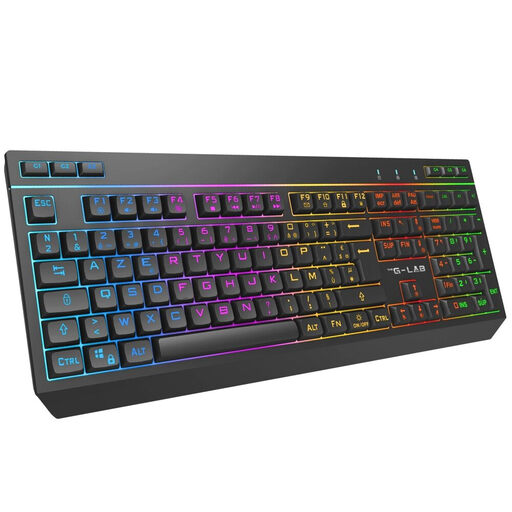
Why it stands out: This is the ultimate Swiss Army knife. Its triple connectivity (wired, 2.4?GHz, and Bluetooth) allows it to switch effortlessly between a PC, a console, and even a tablet. It becomes the true command center for your entire setup.
Key Features:
Who is it for? The ideal companion for versatile gamers who want a high-performance, discreet wireless gaming keyboard capable of switching between devices in the blink of an eye.
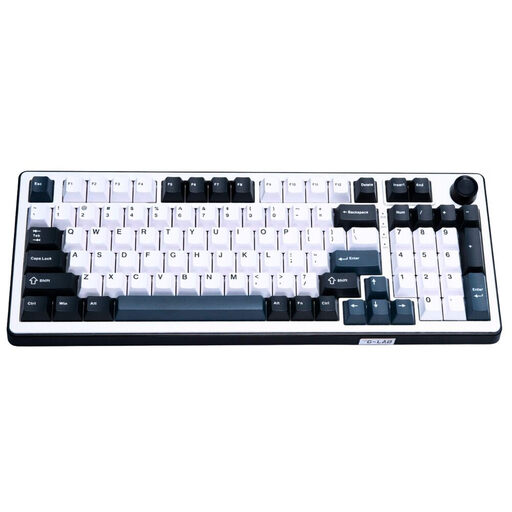
Why it stands out: The Keyz Elite 400 HE is a powerhouse, built for pure performance. It features magnetic Hall Effect switches: a technology that detects pressure via a magnetic field, offering responsiveness and precision far superior to classic mechanical switches.
Key Features:
Who is it for? It clearly targets competitive gamers for whom speed and responsiveness are non-negotiable. Its QWERTY layout makes it suitable for experienced users or those accustomed to this configuration.
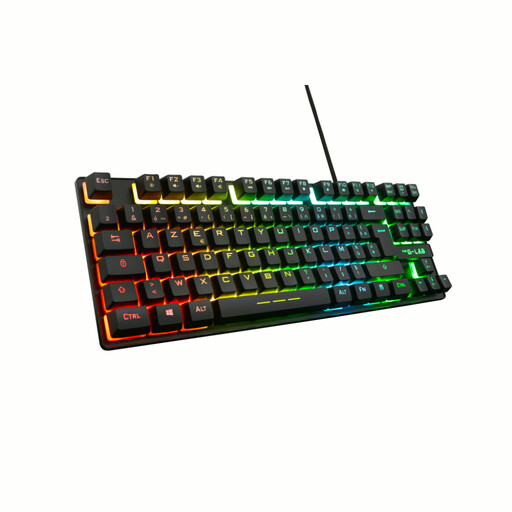
Why it stands out: The Keyz Caesium TKL is the smart choice for gamers looking to optimize their desk space. Its compact TKL format frees up a vital area for the mouse without sacrificing essential gaming features.
Key Features:
Who is it for? Perfect for FPS players and anyone playing games that require large mouse movements. It's an excellent choice for small setups or for those aiming for a clean and efficient configuration.
Our selection highlights models for very specific player profiles. If you haven't found what you're looking for or if you need different features (dedicated macro keys, an unconventional design, etc.), feel free to explore our full catalogue.
? Discover our full range of gaming and office keyboards
It all depends on your preferences. A mechanical gaming keyboard will offer the responsiveness and tactile feedback perfect for competition. A quieter, more versatile membrane keyboard is an excellent compromise for mixed gaming and office use.
Yes, most USB keyboards and some wireless models are compatible with the PS5 and Xbox consoles. Models like the THE G-LAB Keyz Tungsten EX are designed to work on multiple platforms, including as a PS5 gaming keyboard. However, support may vary depending on the game and specific features.
A TKL (Tenkeyless) gaming keyboard is simply a keyboard without the number pad on the right. This more compact format frees up desk space, which improves ergonomics (the mouse is closer) and provides more freedom for wide movements.