
Livraison le jour même ou le lendemain

Qualité garantie

Débloquez vos offres de bienvenue: Livraison GRATUITE | Jusqu'à -80 % | 30 jours d'essai gratuits à JoyPlus
Téléchargez l'application
Choosing a new gaming keyboard can quickly become a headache. Between the technical jargon, promises of stratospheric performance, and flashy designs, it's easy to feel lost and end up regretting your purchase. Our mission? To help you see things more clearly. Let's cut through the marketing fluff and focus on what really matters for your gaming experience… and for your wallet.
Before you pull out your credit card, watch out for these three classic traps that many gamers fall into:
To avoid these pitfalls, focus on these three pillars. They will determine the quality, comfort, and longevity of your future keyboard.
This is the engine room. It defines the feel under your fingers, the sound, and the responsiveness of each key.
The size of your keyboard should suit your desk and your habits.
A crucial point for many users is the layout: AZERTY (French) or QWERTY (US/International). Be aware that many attractive models, often imported, are QWERTY keyboards. While games adapt well to this (the ZQSD keys for movement remain functional as WASD), daily typing will require a short adjustment period or remapping through your operating system.
The wired gaming keyboard remains the gold standard for near-zero latency and rock-solid reliability. It's the preferred choice of competitive gamers. Modern wireless models are very high-performing but require battery management.
Also, check for features like anti-ghosting (or N-Key Rollover), which ensures all your keystrokes are registered even when you press multiple keys simultaneously.
Here are a few options that meet specific needs, keeping our objective selection criteria in mind.
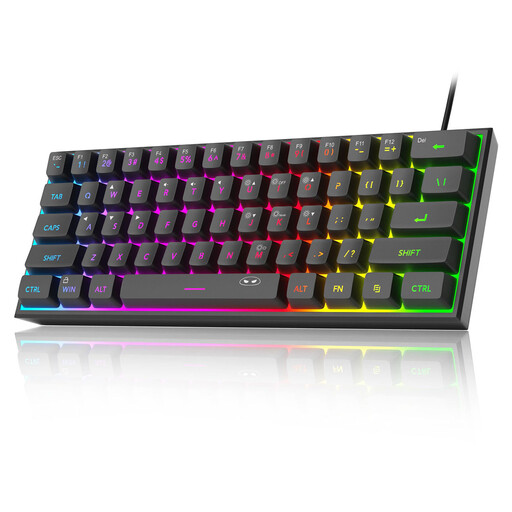
Why we love it: Perfect for a first setup, this keyboard offers the gamer look (compact format and RGB) without the mechanical model price tag. Its membrane design with a "mechanical feel" is an excellent compromise for taking your first steps into PC gaming.
It skips the extra cost of mechanical switches and complex RGB, while still offering a very decent visual and tactile experience for a beginner. Its 60% format is a deliberate choice for small desks.
Its IPX4 rating protects it against accidental spills. A real plus for long gaming sessions fueled by your favorite drink.
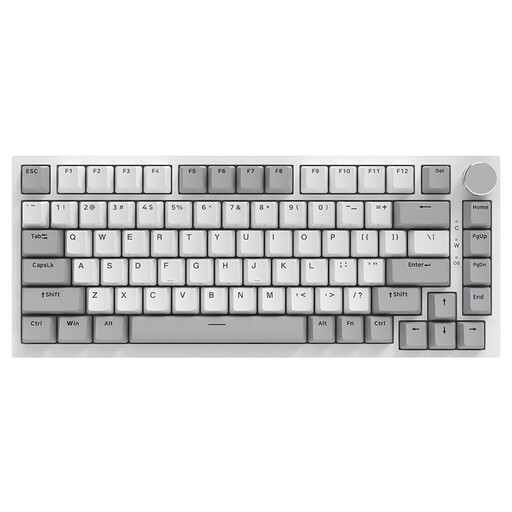
Why we love it: This keyboard is for enthusiasts who love to tinker with and optimize their gear. The ability to change switches on the fly (hot-swappable) lets you experiment without buying a whole new keyboard. Its "Gasket Mount" structure and sound-dampening foam provide a typing feel and acoustic profile worthy of high-end models.
It bypasses the "wrong switch" trap by giving you the freedom to change them. Its 75% format is the ideal compromise: it keeps the function keys and arrows, avoiding the frustration of more extreme layouts.
The CNC metal volume knob is a wonderfully practical addition for managing audio on the fly. The PBT keycaps, more robust than standard ABS, ensure excellent durability.
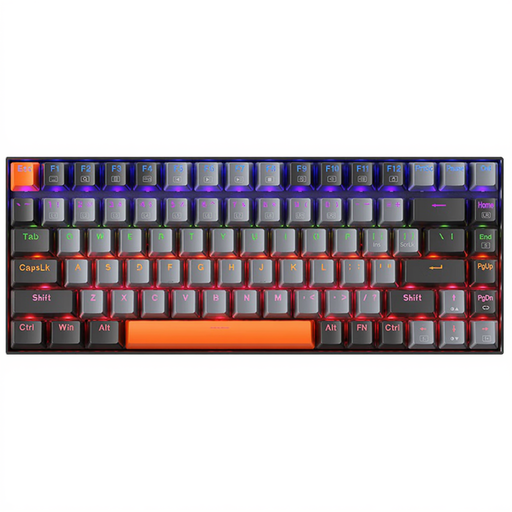
Why we love it: The focus here is all on understated efficiency. Its light gray design and plain white backlighting fit just as well in an office as in a minimalist gaming setup. Its red (linear) switches make it as versatile as it is discreet.
It bucks the "all-RGB" trend with a simple, functional, and elegant white backlight. Its 75% format is an excellent compromise that doesn't sacrifice any essential keys, whether for gaming or work.
The combination of quiet red switches and a compact format makes it a perfect ally for late-night gaming sessions and open-plan office work, without drawing attention or disturbing neighbors.
For total immersion, don't forget that sound is as crucial as your controls. A good gaming headset, like the Siukie CH25, will perfectly complement your gear by providing spatial audio and clear communication with your teammates.
Explore our full selection of keyboards that meet our criteria for quality and performance.
1. Is a QWERTY keyboard really a problem for gaming? No, not at all. Most PC games default to using the WASD keys for movement, which physically correspond to the ZQSD key locations on an QWERTY keyboard. No issues there. For typing, you just need to set the keyboard layout to QWERTY in Windows or macOS. It's just a habit to get used to, and many gamers even end up preferring it for coding or gaming.
2. What is the lifespan of a mechanical keyboard? A mechanical keyboard is built to last. Its switches are rated for 50 to 100 million keystrokes, which is enough to last for years, even with heavy use. The keycaps may show visual wear, but on most models, they are very easy to replace.
3. Is a mechanical keyboard essential to be good at gaming? Let's be clear: no. A mechanical keyboard won't make you a pro gamer overnight; your skill is still the number one factor. However, it does offer a more pleasant, precise, and reliable experience. The consistency of the keystroke and the tactile feedback improve comfort and responsiveness over long sessions. It's a significant quality-of-life upgrade, rather than an absolute necessity to perform well.