
Livraison le jour même ou le lendemain

Qualité garantie

Débloquez vos offres de bienvenue: Livraison GRATUITE | Jusqu'à -80 % | 30 jours d'essai gratuits à JoyPlus
Téléchargez l'application
A gaming keyboard isn't just another peripheral; it's an extension of your in-game reflexes. A missed command, noticeable latency, or an uncomfortable keystroke can be the difference between victory and defeat. Faced with a multitude of technologies, form factors, and marketing terms, choosing the right model can quickly become overwhelming.
This guide is here to help you cut through the noise. We've decoded the spec sheets and put the marketing claims to the test so you can choose the keyboard that truly matches your playstyle, without drowning in jargon.
Before diving into our top picks, here are three essential criteria to guide your choice.
The technology under each keycap defines your keyboard's typing feel, noise level, and responsiveness.
The size of your keyboard directly impacts your desk space and ergonomics.
Here, it all comes down to your priority: freedom of movement or a rock-solid connection.
Here are the models that caught our eye, each catering to a specific type of gamer.
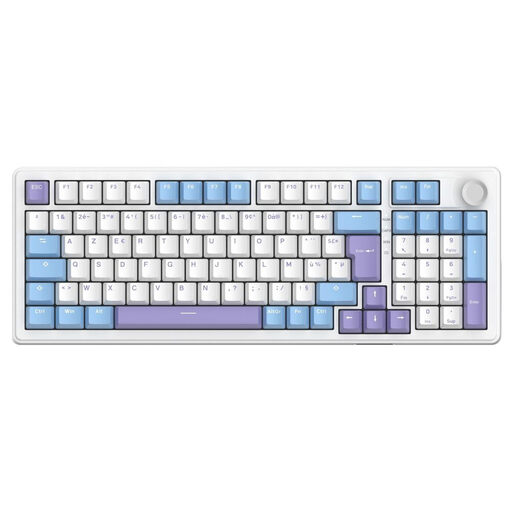
Why it stands out: This model is all about versatility and customisation. Its triple connectivity (wired, 2.4 GHz, Bluetooth) allows it to switch seamlessly between uses, from intense PC gaming to working on a tablet on the go. Its 5-layer internal structure (gasket mount) and pre-lubricated hot-swappable switches provide a soft, cushioned typing comfort that is rare in this price range.
Key Features:
Who is it for? For the gamer looking for a do-it-all mechanical keyboard that can switch from a wireless gaming setup to office work across multiple devices. Its typing comfort also makes it an excellent companion for long sessions. Be aware, however: this model comes in a QWERTY layout, a crucial point to check depending on your preferences.
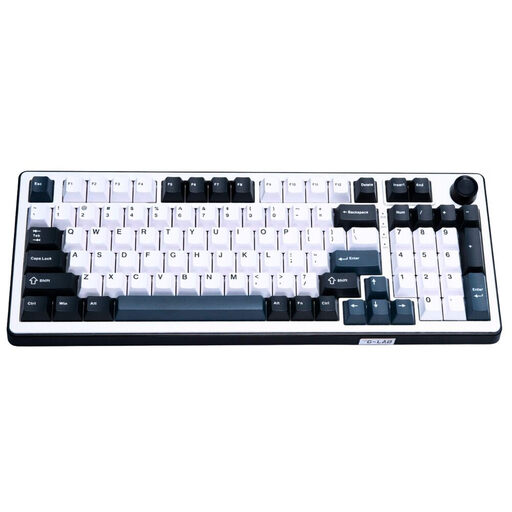
Why it stands out: This keyboard is built for pure performance. It features Hall effect magnetic switches, a technology that ensures more stable key detection and lightning-fast responsiveness. Its 8000 Hz polling rate reduces input lag to an absolute minimum, providing a decisive edge in competition.
Key Features:
Who is it for? Aimed at competitive gamers and esports enthusiasts for whom every millisecond is crucial. If you play fast-paced titles (FPS, rhythm games) and are looking to gain every possible advantage, this technology is for you. Important note: this model also comes in a QWERTY layout, making it best suited for users accustomed to it.
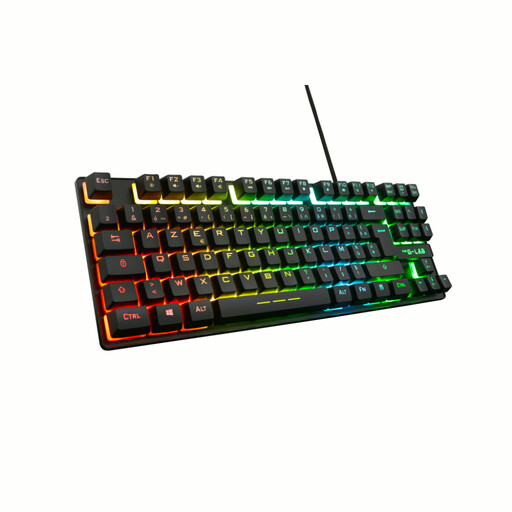
Why it stands out: The Keyz Caesium TKL is an excellent entry point into the world of gaming. Its compact TKL form factor frees up desk space, while its membrane keys provide a responsive and quiet typing experience. Its broad compatibility, including consoles, makes it a simple and versatile solution to upgrade your gaming experience without breaking the bank.
Key Features:
Who is it for? Ideal for beginner gamers, those on a tight budget, or people who play in a shared space and need a silent keyboard. Its console compatibility also makes it a very smart choice for living room gamers.
If your setup's aesthetics are just as important as performance, a keyboard with a unique design can transform your desk. For options that stand out from the crowd, explore our selection of cute RGB keyboards.
A membrane keyboard like the THE G-LAB Keyz Caesium TKL is an excellent starting point. It's affordable, offers a quiet typing experience, and includes essential features like anti-ghosting and RGB backlighting. If you prefer a more distinct feel, a mechanical keyboard with linear switches is a great compromise between gaming and everyday typing.
Modern wireless technologies, especially 2.4 GHz connections, have made huge strides. For the vast majority of gamers, even at a high level, the latency is now imperceptible and entirely comparable to a wired connection. A wired model remains the guarantee of absolute stability, without ever having to worry about the battery, but a good wireless gaming keyboard offers welcome freedom and aesthetics for a clean setup.
Yes, many USB keyboards are recognised by PlayStation and Xbox consoles for text entry and menu navigation. Some games also support a keyboard and mouse combo. Just be sure to check the keyboard's compatibility with your console; for example, the Keyz Caesium TKL is explicitly listed as a compatible PS5 keyboard and Xbox keyboard.