
Livraison le jour même ou le lendemain

Qualité garantie

Débloquez vos offres de bienvenue: Livraison GRATUITE | Jusqu'à -80 % | 30 jours d'essai gratuits à JoyPlus
Téléchargez l'application
Latency costing you the win, a desk too cluttered for your mouse, clicks that drive everyone around you crazy? Choosing the right gaming keyboard can quickly become a real puzzle. Faced with a jungle of technologies, form factors, and features, it's easy to get lost.
This guide is here to help you see things more clearly. Our editorial team has decoded the spec sheets to present you with clear options tailored to your needs. Follow along to discover the essential criteria for a smart purchase, followed by our selection of keyboards that truly make a difference.
Before we introduce our favourite models, let's review the key points that will guide your choice.
The typing feel is paramount. It depends directly on the technology hidden beneath the keycaps.
The size of your keyboard has a direct impact on your ergonomics and the available space on your desk.
Always check the compatibility of your future keyboard. Most USB models are easily recognised by PCs, but if you're looking for a PS5-compatible keyboard or one for Xbox, make sure the manufacturer explicitly states it. Finally, for optimal typing comfort in English-speaking regions, a QWERTY keyboard is essential.
Here are some models that stand out from the crowd, designed for different player profiles and budgets.
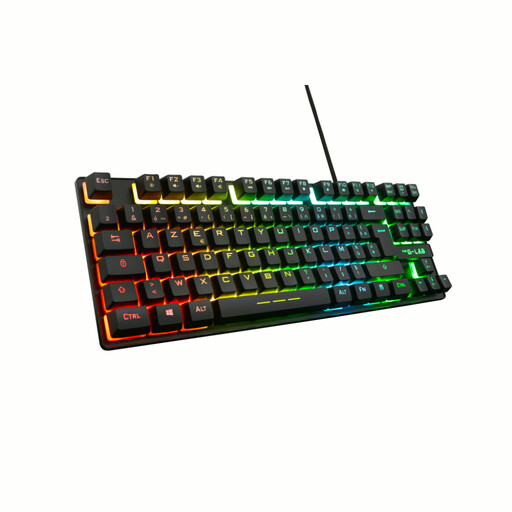
Why it stands out: The Keyz Caesium TKL is an excellent entry point into the world of gaming. Its membrane technology ensures responsive yet discreet typing, perfect for not disturbing anyone. Its TKL form factor is a real asset for smaller desks or for FPS players who need more room for their mouse. The customisable RGB gaming keyboard adds a nice aesthetic touch.
Key Features:
Who is it for? The perfect keyboard for beginner gamers, those who share their gaming space, or users looking for an effective and accessible solution for gaming on both PC and console.
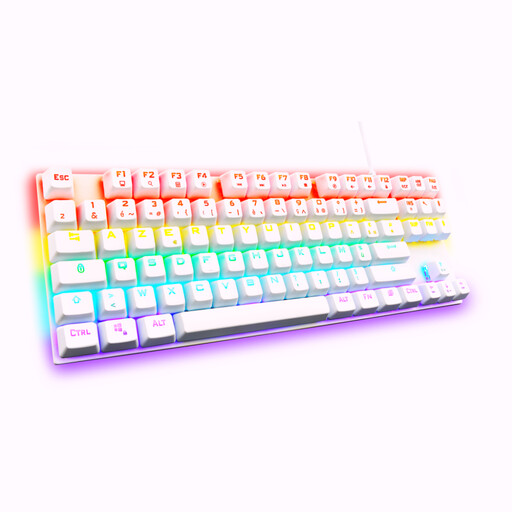
Why it stands out: The Keyz Mercury TKL takes things to the next level. This mechanical keyboard is equipped with red switches, known for their linear and fast travel with no audible click. This is exactly the kind of responsiveness sought after in competitive games where every millisecond counts. Its TKL format and full anti-ghosting technology make it a precision tool for demanding gamers.
Key Features:
Who is it for? Ideal for FPS, MOBA, and any other competitive gamers seeking the precision and speed of a mechanical keyboard in a compact format optimised for performance.
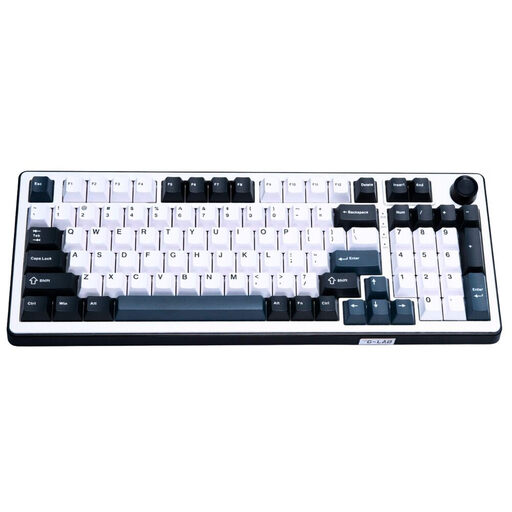
Why it stands out: The KEYZ ELITE 400 HE is a game-changer with its cutting-edge technology. Its Hall effect magnetic switches allow for ultra-fine sensitivity adjustment. Paired with a 8000?Hz polling rate, it reduces latency to a nearly imperceptible level. Its 96% format is an excellent compromise, offering the compactness of a TKL while retaining the number pad.
Key Features:
Who is it for? This keyboard is aimed at esports players and performance enthusiasts who demand minimal latency and advanced customisation. It's suitable for users who are comfortable with a QWERTY layout or are specifically looking for one (for programming, etc.).
If style matters to you as much as performance, and you're looking for a versatile keyboard for both gaming and daily use, other options are available. Ergonomics and design are also important criteria for creating a workspace and gaming setup that reflects your personality.
Discover our selection of cute Bluetooth keyboards, perfect for adding a stylish flair to your desk while maintaining excellent wireless functionality.
Yes, the vast majority of wired USB keyboards are natively recognised by PlayStation and Xbox consoles. Simply plug them into a USB port, and they will work for text input and in compatible games. However, advanced features like macro programming or fine-tuning the RGB gaming keyboard via software often remain exclusive to PC.
The main difference lies in their internal mechanism. A mechanical keyboard uses individual switches for each key, offering precise tactile feedback, better responsiveness, and greater longevity. A membrane keyboard uses a sheet of rubber domes, which makes it quieter and generally less expensive, with a softer typing feel.
RGB lighting is primarily an aesthetic choice that allows you to personalise your setup. It has no direct impact on in-game performance. However, it can have practical uses: some software allows you to sync the lighting with in-game events or highlight specific key groups (like the WASD keys), which can serve as a visual cue.