
Livraison le jour même ou le lendemain

Qualité garantie

Débloquez vos offres de bienvenue: Livraison GRATUITE | Jusqu'à -80 % | 30 jours d'essai gratuits à JoyPlus
Téléchargez l'application
Choosing a new gaming keyboard can quickly become a headache. Between the technical jargon, marketing promises, and flashy designs, it's easy to make a mistake and invest in a model that fits neither your needs nor your budget. As tech experts, our mission is to help you see things more clearly. Let's cut through the noise and focus on what really matters to make the right choice.
Here are the 3 most common pitfalls to avoid when making your purchase:?
To avoid making a mistake, focus on three technical parameters that truly define the performance and comfort of a PC gaming keyboard.
The switch is the mechanism hidden under each key. It defines the typing feel, sound, and responsiveness of the keyboard.
The size of your keyboard directly impacts your comfort and the amount of space available for your mouse.
No, a wireless gaming keyboard is no longer synonymous with latency—as long as you choose the right technology.
Here are a few models that cater to distinct user profiles, taking into account the performance and design criteria we've just discussed.
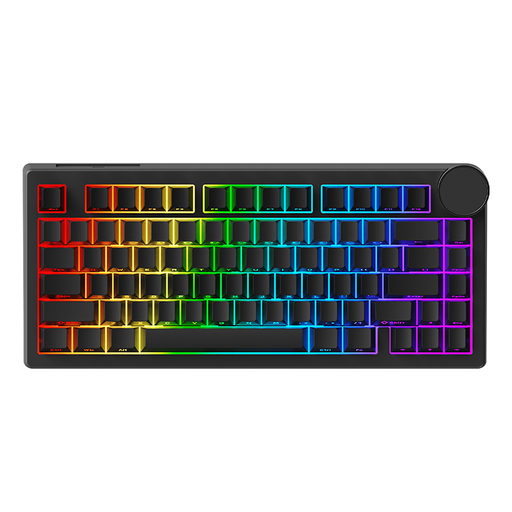
Why it's the right choice: For the player who leaves nothing to chance and seeks to optimize every millisecond. This keyboard features cutting-edge technology: its magnetic switches allow for ultra-precise actuation point adjustment and instant reset (Rapid Trigger), which are decisive advantages in FPS and rhythm games.
It doesn't just rely on RGB lighting. Its true value lies in its magnetic switches and 8KHz polling rate—technical features that provide a tangible in-game advantage far beyond mere aesthetics.
Adjustable Actuation Point: Customise the sensitivity of each key from 0.1mm to 3.3mm. Ultra-Low Latency: The wired connection with an 8000Hz polling rate ensures a near-instantaneous response.
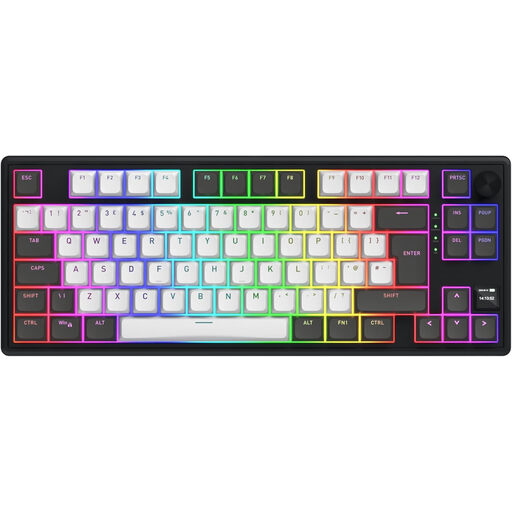
Why it's the right choice: The perfect ally for those who juggle gaming, work, and creative tasks. The TKL format frees up space, the triple connectivity (2.4 GHz, Bluetooth, wired) offers maximum flexibility, and its silent linear switches let you play or work without disturbing others.
This model avoids the trap of an unsuitable format and layout. It comes with extra keycaps to easily switch to your preferred regional layout, and its TKL format is an excellent compromise between ergonomics and functionality.
Triple Connectivity: Switch from low-latency 2.4 GHz for gaming to Bluetooth for your tablet. Long Battery Life: The 8000 mAh battery provides dozens of hours of wireless use.
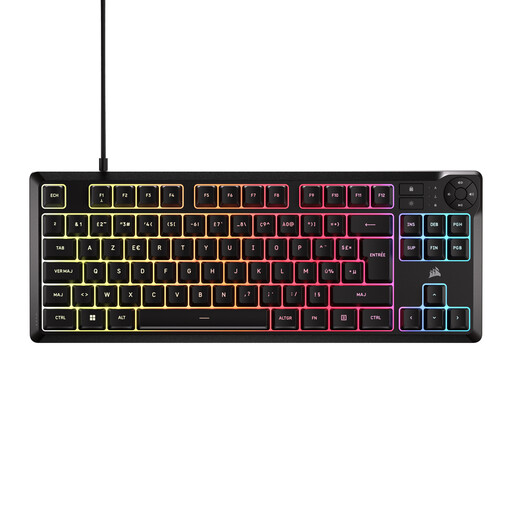
Why it's the right choice: For getting started with PC gaming on a controlled budget, this keyboard offers the essentials without the frills. You get the reliability of a trusted brand, a practical TKL format, customisable backlighting, and a spill-resistant design.
It doesn't pretend to be something it's not. It's a membrane keyboard, and it owns it. It provides a quiet and responsive typing experience for its category, without falling into the "faux-mechanical" trap. Plus, it comes natively in an AZERTY layout.
Quiet Operation: The rubber domes are perfect for late-night gaming sessions or shared spaces. TKL Format and AZERTY Layout: Ready to use out of the box for French gamers, with a welcome space-saving design.
Discover our full selection of keyboards that meet our criteria for performance and quality.
No, that's a stubborn myth! The noise depends entirely on the switch type. Clicky (blue) switches are designed to be loud. In contrast, Linear (red, black) and Tactile (brown) switches are much more discreet. There are even "Silent" versions that reduce noise even further, making them perfectly suitable for an office environment.
These are the two most common types of plastic used to make keycaps.
Absolutely. Most games default to using the WASD keys for movement on a QWERTY keyboard (which correspond to ZQSD on an AZERTY keyboard). You can usually reconfigure the keybindings in the game's settings. The main drawback will appear when you need to use the in-game chat or for any other typing task, where a foreign layout can be impractical if you're used to your native one.