
Livraison le jour même ou le lendemain

Qualité garantie

Débloquez vos offres de bienvenue: Livraison GRATUITE | Jusqu'à -80 % | 30 jours d'essai gratuits à JoyPlus
Téléchargez l'application
Choosing a new gaming keyboard can quickly become a headache. Between the technical jargon, marketing promises, and flashy designs, it's easy to make the wrong choice and regret your purchase. Our mission: to help you see things more clearly. Let's cut through the noise and focus on what's essential for your gaming experience.
Before you start, watch out for these two common pitfalls:
To avoid falling into these traps, you need to master a few technical concepts. These are what determine the typing feel, responsiveness, and lifespan of your future keyboard.
This is the most important component. It defines the feel and performance of every key.
The size of your keyboard has a direct impact on your ergonomics.
A wireless gaming keyboard is no longer synonymous with latency.
Finally, don't forget to check the key layout. For use in English-speaking countries, a QWERTY layout is essential for a familiar typing experience.
To illustrate these tips, here are three models that check all the right boxes, each designed for a different type of gamer.
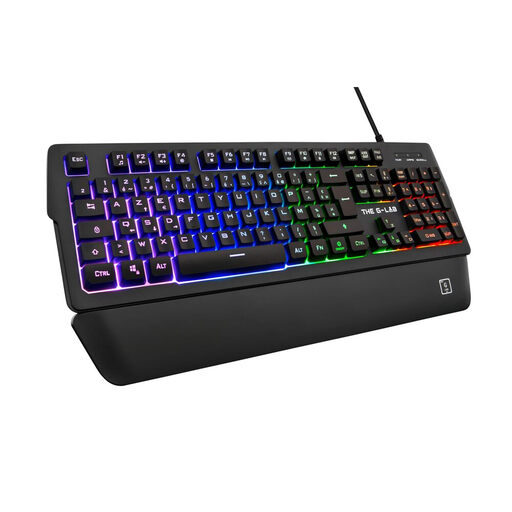
Why we chose it: Ideal for those looking for a full-featured keyboard for both gaming and office work without breaking the bank. It offers the comfort of a magnetic wrist rest and quiet membrane keys, perfect for gaming without disturbing anyone.
It does more than just offer RGB lighting. It integrates useful features like 26-key anti-ghosting, programmable macros, and a wrist rest, which emphasize long-term comfort and performance.
Removable magnetic wrist rest for adaptable comfort. Quiet and responsive keystrokes for mixed gaming/work use.
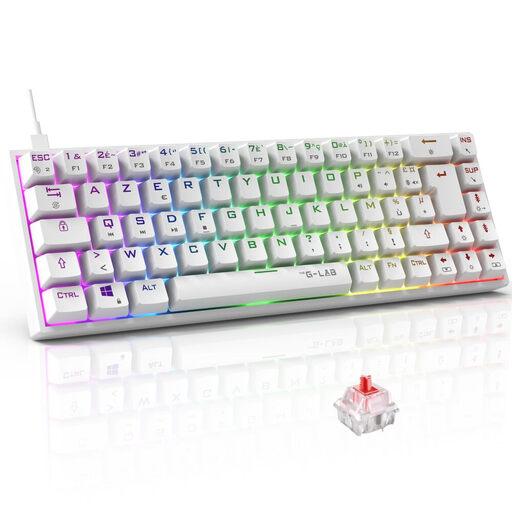
Why we chose it: Designed for gamers who need maximum space for their mouse. Its compact 65% form factor and mechanical red switches provide the responsiveness and freedom of movement essential in competitive shooters.
It avoids the wrong form factor trap. By removing the number pad and condensing the keys, it frees up valuable desk space, preventing your mouse from hitting the keyboard during wide movements.
Ultra-compact 65% form factor for optimized gaming space. Red mechanical switches for maximum responsiveness and rapid keystrokes.
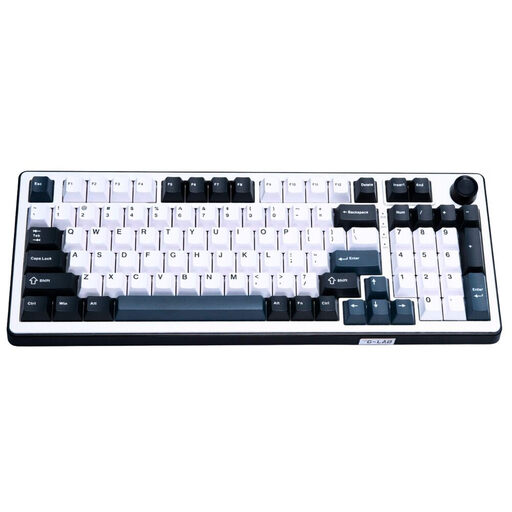
Why we chose it: For gamers who accept no compromises. It features Hall Effect magnetic switches, a cutting-edge technology that allows for adjustable sensitivity and responsiveness. Its 8000 Hz polling rate reduces latency to an absolute minimum. Note: This model has a QWERTY layout, a deliberate choice made by many pro gamers who remap their keys.
It goes far beyond mere appearances. Every feature is geared towards pure performance: magnetic switches for durability and customization, an ultra-high polling rate for near-zero latency, and an internal "gasket" structure for superior typing comfort.
Hall Effect magnetic switches with adjustable sensitivity. 8000 Hz polling rate for instantaneous responsiveness.
Explore our full selection of gaming peripherals, all vetted by our editors for performance and safety compliance.
Yes, provided you choose the right technology. A wireless gaming keyboard using a 2.4 GHz connection (via a USB dongle) now offers response times of less than 1ms, which is indistinguishable from a wired connection for the vast majority of gamers, including at the professional level. Bluetooth technology is slightly slower and is better suited for mobile or non-competitive use.
Durability is one of the major advantages of a mechanical keyboard. While a membrane keyboard is generally rated for about 5 to 10 million keystrokes, mechanical switches are often guaranteed for 50 million keystrokes or more (up to 200 million for some optical switches). With regular maintenance, a good mechanical keyboard can last you for many years.
For regular cleaning, unplug your keyboard and use a can of compressed air to dislodge dust and debris from between the keys. Then, wipe the surface with a slightly damp microfiber cloth. For a deep clean, you can remove the keycaps using a keycap puller. This will allow you to thoroughly clean the keyboard's plate and the keycaps themselves. Never use liquid products directly on the keyboard.