Joybuy Insights

Gaming Keyboard Buyer’s Guide: Find the Right Model for Your Playstyle

Choosing a new gaming keyboard can quickly become a daunting task given the overwhelming sea of available models. From the surgical precision of a mechanical gaming keyboard and the total freedom of a wireless model to the whisper-quiet feel of a membrane keystroke, every detail counts when it comes to elevating your gaming experience. Whether you're a PC e-sports pro, a demanding console player, or a streamer meticulous about your setup, finding the right peripheral is absolutely essential.

This guide is here to help you make sense of it all. We'll break down the criteria that truly matter and present our selection of the best models—all without the confusing marketing jargon.

How to Choose the Right Gaming Keyboard??

Before you dive in, here are a few key points to consider to guide your decision.

Mechanical vs. Membrane: A Matter of Feel and Performance

The switch type is often the number one criterion.

  • Mechanical Gaming Keyboards?: The go-to choice for gamers, prized for their responsiveness, precision, and incredible durability. Each key has its own mechanical switch. Several types exist, offering a variety of feels: linear (smooth and fast), tactile (with a noticeable bump), or clicky (with an audible click). This is the top choice for competitive play.
  • Membrane Keyboards?: More budget-friendly, they offer a softer keystroke and are an excellent option for a silent gaming keyboard. The keys rest on a rubber dome. While long considered less responsive than mechanicals, membrane technology has made huge strides and now offers high-performance models perfect for casual gaming and streaming.

Form Factor: TKL, 96%, or Full-Size?

The keyboard's size has a direct impact on your ergonomics and the amount of space available for your mouse.

  • Full-size: Includes the numeric keypad and all function keys. It's a versatile format, especially useful if you also use your PC gaming keyboard for office tasks.
  • TKL (Tenkeyless): This format omits the numeric keypad. A TKL gaming keyboard is more compact, freeing up valuable desk space for wide mouse movements—a crucial advantage in first-person shooter (FPS) games.
  • 96% Form Factor: This is the clever compromise that rearranges the keys to integrate the numpad into a chassis that is only slightly wider than a TKL. It retains nearly all the functionality of a full-size keyboard while optimising space.

Connectivity and Customization: Wireless, RGB, and Macros

The extra features can make all the difference.

  • Connectivity: A modern wireless gaming keyboard using 2.4?GHz technology offers near-zero latency, easily rivalling wired models. Bluetooth, on the other hand, provides greater versatility for connecting multiple devices. A wired connection remains a reliable choice for a foolproof connection with no battery concerns.
  • Backlighting: An RGB gaming keyboard allows you to customise per-key lighting, create immersive ambiances, or highlight essential keybinds for your games.
  • Gaming Features: Anti-ghosting is crucial, ensuring that all your keystrokes are registered, even when multiple keys are pressed simultaneously. Programmable macros allow you to automate complex command sequences.

Gaming Keyboard Recommendations

Here are our recommendations, designed for various budgets and player profiles.
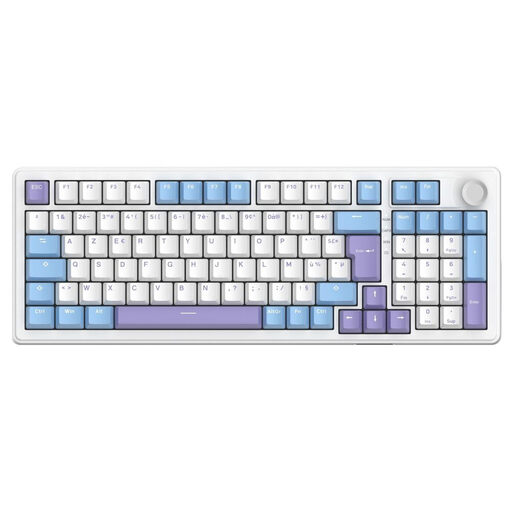
THE G-LAB KEYZ ELITE 400: Versatility Without Compromise

THE G-LAB KEYZ ELITE 400 Linear Switch Mechanical Gaming Keyboard

Why it stands out:?This keyboard from The G-Lab shines with its exceptional versatility. Its triple connectivity (2.4?GHz wireless, Bluetooth, and wired USB-C) adapts to any situation. Its compact 96% layout is an excellent balance between space-saving design and functionality, while its pre-lubed, hot-swappable linear mechanical switches offer a smooth and fully customisable typing experience.

Highlights:

  • Connectivity: Triple mode (2.4?GHz, Bluetooth, wired).
  • Switches: Linear mechanical, hot-swappable for advanced customisation.
  • Comfort: 5-layer "gasket" mount structure for a cushioned and quiet typing feel.
  • Performance: 100% NKRO anti-ghosting and sub-1ms latency.
  • Battery Life: Up to 80 hours with RGB off.

Who is it for? For the all-around gamer who wants a keyboard that is as high-performing in competitive play as it is practical on the go, and who wants the ability to customise it to evolve their typing feel over time.
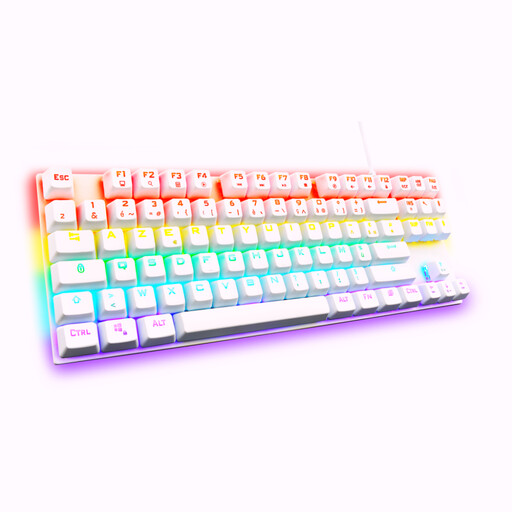
THE G-LAB Keyz Mercury TKL: The Competitor's Edge

THE G-LAB Keyz Mercury Gaming Keyboard Mechanical Red Switch Wired RGB TKL

Why it stands out:?The Keyz Mercury is a purpose-built TKL gaming keyboard designed for raw performance. Its compact form factor frees up maximum space for your mouse. Equipped with red mechanical switches, it offers fast, linear actuation, ideal for lightning-fast in-game actions. Its sturdy build and full anti-ghosting make it a powerful ally for intense gaming sessions.

Highlights:

  • Form Factor: Compact TKL for an optimised gaming space.
  • Switches: Red mechanical (linear) with a 45g actuation force.
  • Performance: Full anti-ghosting across all 88 keys.
  • Customisation: 32 programmable macros and 20 lighting modes.
  • Compatibility: Works with PC, PS4, PS5, and Xbox.

Who is it for? For the e-sports player and competitor who gets straight to the point: responsiveness, speed, and a compact form factor to maximise performance, with no frills.
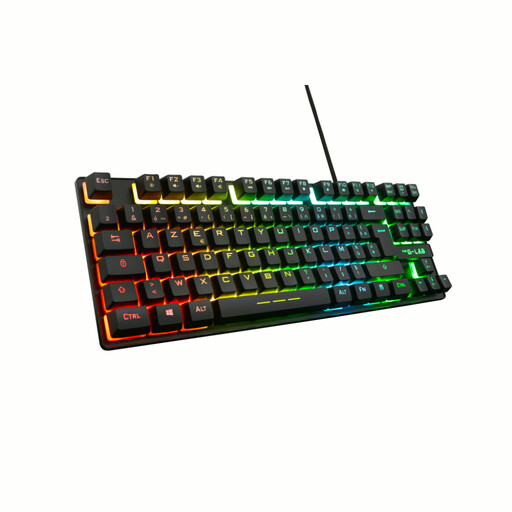
THE G-LAB Keyz Caesium TKL: Quiet Comfort

THE G-LAB Keyz Caesium TKL Wired RGB Membrane Gaming Keyboard

Why it stands out:?This keyboard combines the benefits of a TKL form factor with the comfort of a silent gaming keyboard with membrane keys. It's the ideal and affordable solution for those who want gaming features without the characteristic noise of mechanical switches. Its keystrokes are responsive yet quiet, making it perfect for late-night gaming or streaming.

Highlights:

  • Keystrokes: Responsive and silent membrane keys.
  • Form Factor: Compact TKL for a clutter-free desk.
  • Customisation: RGB backlighting with 11 effects and 15 programmable macros.
  • Performance: 26-key anti-ghosting for essential combinations.
  • Stability: Reinforced ABS thermoplastic chassis.

Who is it for? For the casual gamer, streamer, or anyone who shares their gaming space and is looking for a responsive yet discreet keyboard. It packs in essential gaming features at a very competitive price.

Want a Style That's Out of the Ordinary?

Are setup aesthetics as important to you as performance? If you're looking for a standout design, other options are available. For a touch of originality, a uniquely designed keyboard can make all the difference.

Discover our selection of cute wired keyboards to add a touch of fun to your desk.

Frequently Asked Questions About Gaming Keyboards

What type of switch should I choose for a mechanical keyboard?

It all depends on your preferences and how you'll use it.

  • Linear Switches (Reds): They offer smooth travel with no tactile bump or click. Fast and responsive, they are ideal for competitive gaming.
  • Tactile Switches (Browns): They feature a small, noticeable bump at the actuation point, which confirms the keypress without being loud. They are the perfect compromise between gaming and everyday typing.
  • Clicky Switches (Blues): They combine tactile feedback with a distinct audible click. Very satisfying for typing, but they can be noisy for those around you.

Is a wireless gaming keyboard reliable enough for competitive play?

Absolutely. Modern wireless technologies, especially a 2.4?GHz connection via a USB dongle, offer latency times of less than 1 millisecond—imperceptible compared to a wired connection. Many professional players now use a wireless gaming keyboard in competitions without any performance loss.

Why choose a TKL gaming keyboard?

The main advantage of a TKL gaming keyboard is the space it frees up on your desk. By omitting the numeric keypad, it allows you to position your mouse closer to the keyboard. The result is better ergonomics and more room for wide arm movements—a crucial point for players who use a low mouse sensitivity. Not to mention, it's much easier to transport to LAN parties or on the go.