
Livraison le jour même ou le lendemain

Qualité garantie

Débloquez vos offres de bienvenue: Livraison GRATUITE | Jusqu'à -80 % | 30 jours d'essai gratuits à JoyPlus
Téléchargez l'application
Navigating the vast world of gaming keyboards in 2026 can be a daunting task. Between marketing promises, jargon-filled spec sheets, and a plethora of models, buyer's remorse is just one click away. Our mission? To help you see things more clearly. This guide breaks down the essential criteria for choosing a keyboard that truly fits your needs, while helping you sidestep the most common pitfalls.
Before we dive in, let's review the classic mistakes that lead straight to disappointment.
To make the right choice, three elements must be examined closely: they define your entire gaming and typing experience.
The feel, responsiveness, and sound... it all comes down to the switches.
The size of your keyboard is not a minor detail: it determines your comfort and the layout of your setup.
The classic dilemma: should you prioritise the absolute stability of a wired connection or the freedom of wireless?
To help you make your final choice, here are a few models that check the right boxes for different user profiles.
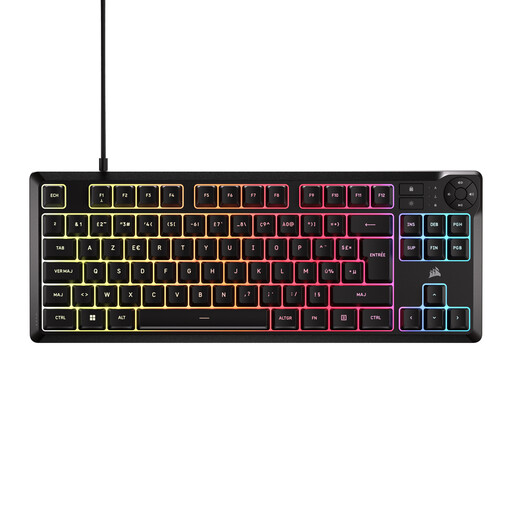
Why it's a great choice : Perfect for anyone looking for a responsive keyboard for gaming and work, without breaking the bank on a mechanical model. Its TKL form factor and standard layout make it a smart, practical, and ergonomic first choice.
This keyboard doesn't try to be something it's not. It embraces its membrane technology to offer a quiet and comfortable typing experience, thus avoiding the pitfall of disappointing, low-end mechanical keyboards.
Quiet typing, ideal for shared spaces ; spill-resistant design (because accidents happen) ; compact TKL form factor.
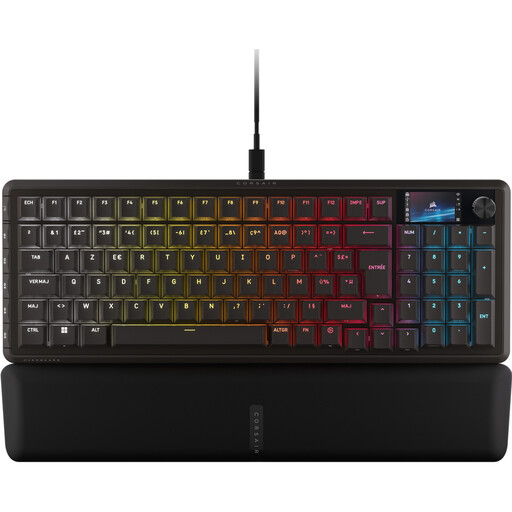
Why it's a great choice : Built for esports and players who demand flawless responsiveness. Its magnetic switches allow for total control over the actuation point, offering a decisive advantage in fast-paced games.
Here, performance isn't just a marketing claim. It's real, thanks to cutting-edge technology: the adjustable actuation point of the switches. This is what justifies its premium positioning.
CORSAIR MGX Hyperdrive magnetic switches for lightning-fast responsiveness ; compact 96% format that retains the number pad ; integrated LCD screen.
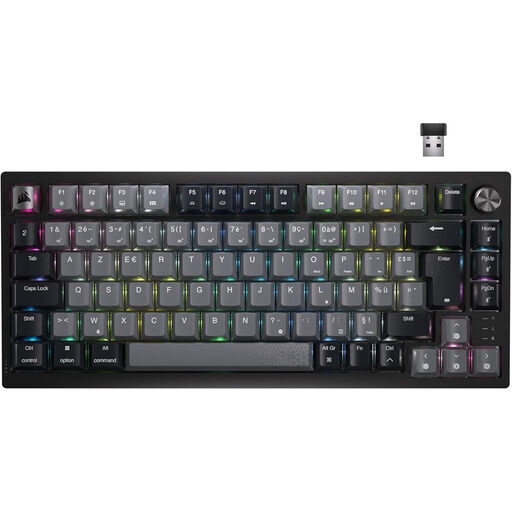
Why it's a great choice : The perfect ally for those who dream of a minimalist desk setup and love to switch between their devices (PC, console, laptop) without sacrificing typing quality.
This wireless gaming keyboard makes no compromises on comfort. It features excellent linear mechanical switches (Corsair MLX Red) that guarantee a premium experience, whether wired or wireless.
Triple connectivity (Bluetooth, 2.4 GHz, wired) ; smooth linear mechanical switches ; very practical dedicated volume wheel.
We have curated a full range of products that meet our demanding selection criteria.
Are mechanical keyboards really more durable? Yes, by a long shot. The switches in a mechanical keyboard are designed to withstand tens of millions of actuations (typically between 50 and 100 million). A membrane keyboard, on the other hand, usually maxes out at 5 to 12 million. It's a much more durable investment.
Is a gaming keyboard a good idea for work? Absolutely! Many professionals swear by the comfort and precision of a mechanical keyboard for heavy typing. For mixed use, opt for linear (Red) or tactile (Brown) switches, which are much quieter than clicky (Blue) models that can quickly annoy your colleagues (or family).
Is software required to manage RGB? Not necessarily. Most RGB gaming keyboards offer basic lighting effects accessible via a keyboard shortcut (often using the FN key). However, to go further and create your own animations, adjust the colour key by key, or synchronise the lighting with your games and other peripherals, the manufacturer's software (like iCUE for Corsair) becomes essential.