
Livraison le jour même ou le lendemain

Qualité garantie

Débloquez vos offres de bienvenue: Livraison GRATUITE | Jusqu'à -80 % | 30 jours d'essai gratuits à JoyPlus
Téléchargez l'application
An inadequate workspace is a daily source of frustration, whether you're working from home or in the middle of a game. Between the discomfort that sets in after hours and lagging performance, it's hard to stay productive or truly enjoy your leisure time. Designing a complete workstation that is equally adept for gaming and work can sometimes be a real headache.
This guide will help you choose the essential equipment to build a truly versatile gaming desk setup. We'll review the criteria that make all the difference—ergonomics, performance, and versatility—to help you create the perfect home workstation for your needs.
Before diving into our selection, here are a few basic principles to help you make the right choices and get the most out of your investment.
Sitting for hours in front of a screen, for both work and play, puts a strain on the body. An ergonomic office chair isn't a luxury; it's an investment in your health. Look for models with multiple adjustments: lumbar support, armrest height, backrest tilt, and a headrest. A good chair reduces fatigue and pain, allowing you to stay focused for longer. Ergonomics also apply to your monitor: placing it at eye level is essential.
The best remote work equipment is the kind that also shines on the entertainment front. A 100?Hz curved PC monitor provides the essential fluidity for gaming while expanding your field of view for professional tasks. Similarly, good Bluetooth desk speakers ensure clear video calls and immerse you in the action of your games and movies. Opting for versatile peripherals is a great way to optimise your space and budget.
A well-designed setup is an ecosystem where everything communicates seamlessly. Check the connectivity of your devices (HDMI, USB-C, DisplayPort) to ensure they are compatible with your PC and consoles. Good cable management and wireless gaming accessories or office peripherals create a clean, minimalist environment, ideal for staying focused.
Here is our selection of products that check all the boxes—versatility, performance, and comfort—perfect for building a modern setup.
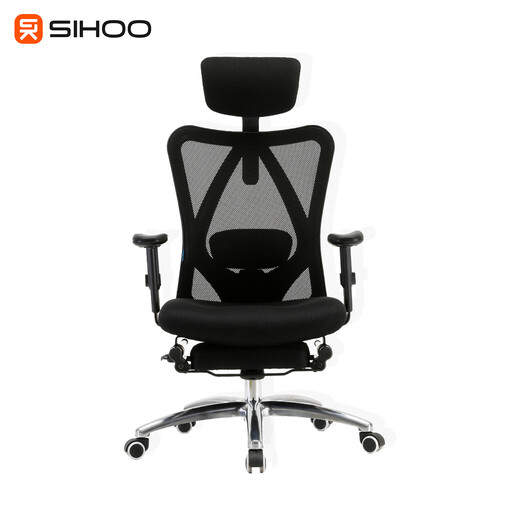
Why This Product Stands Out
The SIHOO M18 chair stands out thanks to its five adjustment points, which allow you to fine-tune your posture with precision. It's designed for long sessions, with a breathable mesh back that allows air to circulate and prevents overheating.
Key Features
Who Is It For?
Ideal for remote workers, content creators, and gamers who spend more than 6 hours a day at their desk. It's the sensible choice for anyone seeking reliable back and neck support with quality materials.
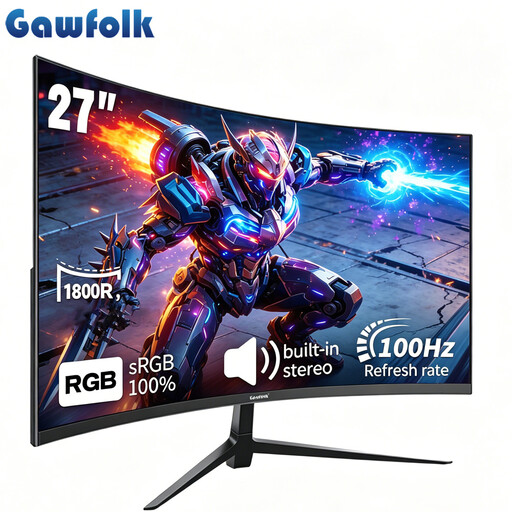
Why This Product Stands Out
This 27-inch Gawfolk monitor combines an immersive 1800R curvature with a 100?Hz refresh rate, delivering a fluid and enveloping visual experience. It's equally at home in fast-paced games and for multitasking, where its curve limits head movement and fatigue.
Key Features
Who Is It For?
For those who want a single monitor for everything: gaming, streaming, and working. Gamers will appreciate its fluidity and immersion, while professionals and creatives will be won over by its colour accuracy and visual comfort.
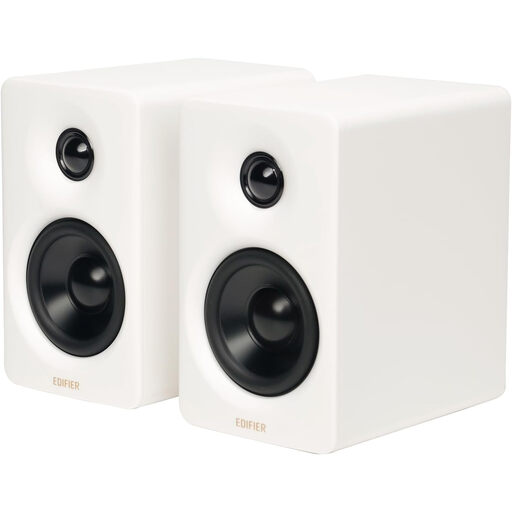
Why This Product Stands Out
The Edifier M60s deliver high-resolution sound in a discreet, desk-friendly format. With their Hi-Res Audio certification (wired and wireless) and support for the LDAC codec, they reproduce detailed and precise audio. The standout feature: the included 15-degree tilted aluminium stands, designed to direct the sound perfectly towards your ears.
Key Features
Who Is It For?
For audiophiles, movie lovers, and gamers who want excellent sound quality without sacrificing desk space. Their versatility makes them a smart choice for juggling entertainment and video calls.
Every setup is personal. If this selection doesn't check all your boxes or if you simply want to see other options to perfect your station, feel free to explore our catalogue.
To discover a wider selection of desks, monitor stands, and accessories to create your custom workstation, take a look at our Workstation Tops category.
A 27-inch monitor is often the ideal sweet spot. This size provides enough space to display multiple windows side-by-side—a real plus for productivity—while ensuring excellent immersion in games without needing to move your chair back. A curved model enhances this immersion and can even reduce eye strain, as the distance between your eye and the screen remains more consistent.
Yes, and the difference is significant, even if they sometimes look similar. Many "gamer" chairs focus entirely on the "bucket seat" aesthetic, which isn't necessarily optimised for long hours of sitting. A true ergonomic office chair, on the other hand, focuses on precise and often certified adjustments (dynamic lumbar support, 4D armrests, etc.) to conform to your body shape and encourage good posture. This is essential for your long-term well-being.
Good cable management is the key to a clean and functional desk. Use cable sleeves or ties to group wires that follow the same path. Cable management trays, which attach under the desk, are also an excellent solution for hiding power strips and excess cable length. Finally, going wireless for certain peripherals (like Bluetooth desk speakers or a mouse) is the easiest way to visually declutter your space.