
Livraison le jour même ou le lendemain

Qualité garantie

Débloquez vos offres de bienvenue: Livraison GRATUITE | Jusqu'à -80 % | 30 jours d'essai gratuits à JoyPlus
Téléchargez l'application
A gaming headset should not be chosen based solely on its appearance or speaker diameter. An incompatible connection, a poorly positioned microphone or ear cushions that get too warm can quickly turn an appealing purchase into a disappointing experience. Before comparing gaming headsets with microphones, it is therefore worth focusing on the features that really matter for the way you use yours.
A headset described as compatible with several platforms may require a specific connection. A PS5 or Xbox headset with a 3.5 mm connection will generally plug into the controller, while a USB model designed for PC connects directly to the computer. On a desktop PC, a headset with two separate plugs may also require an adapter if your machine only has a combined socket.
So always remember to check:
Expressions such as ‘immersive sound’, ‘noise reduction’ and ‘spatial audio’ can refer to very different things. Passive isolation depends on the shape of the ear cushions and the materials used. A noise-cancelling microphone is mainly designed to reduce sounds picked up around your voice. Active noise cancellation, meanwhile, relies on dedicated electronic hardware.
When choosing a gaming headset, look at the technical specifications rather than relying on marketing claims alone. The microphone type, driver diameter, frequency response and whether dedicated adjustment software is available will tell you far more.
A comfortable gaming headset should stay securely in place without putting excessive pressure on your head. Memory foam ear cushions can improve the seal around your ears, but faux leather tends to retain more heat. Weight, headband shape and cable length become particularly important during long gaming sessions.
A detachable cable makes storage and replacement easier if a problem occurs. A fixed cable is more straightforward to use, but avoid pulling it or bending it sharply.
A wired gaming headset does not need a battery and works straight away. The 3.5 mm jack is suitable for many PS5, PS4, Xbox and Nintendo Switch controllers, as well as smartphones and laptops. USB provides a convenient digital connection on PC and Mac, but does not necessarily work with a console controller.
A wireless gaming headset with a 2.4 GHz dongle is designed to minimise transmission delay during gaming. A Bluetooth headset is more versatile for calls, videos and music, but its compatibility with consoles varies between models. Some headsets combine both technologies, making it easy to switch between devices.
For team gaming, choose a flexible, adjustable or retractable microphone. The flip-to-mute function, which mutes the microphone when you raise its boom, lets you pause the conversation with one simple movement. A volume wheel positioned directly on the ear cup or cable means you do not have to open a menu in the middle of a game.
A microphone described as ‘noise-reducing’ will not eliminate every background sound. Depending on its design and your surroundings, it may simply limit the pickup of certain unwanted noises. For calls and working from home, positioning the microphone a few centimetres from your mouth remains crucial.
The manufacturer’s stated weight provides a useful starting point for comparison, but the way pressure is distributed has just as much impact on comfort. Wired models avoid the need to recharge. For a wireless headset, check the stated battery life, the type of USB-C charging and whether you can switch to another connection when the battery is nearly empty.
To protect your hearing, start at a low volume and avoid listening at high levels for extended periods. Electrical devices and their batteries should be used in accordance with the manufacturer’s recommendations, then disposed of through the appropriate recycling channels at the end of their life.
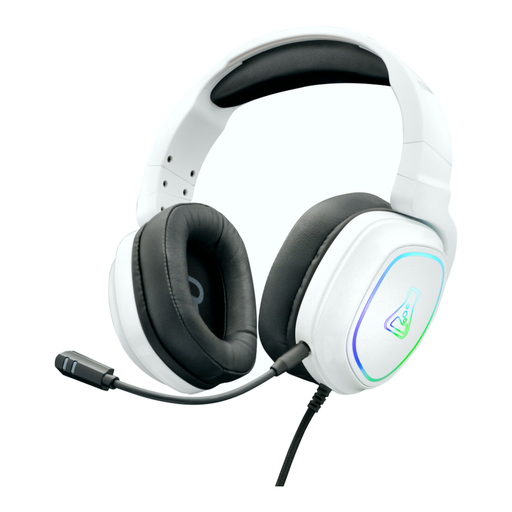
Why this choice suits this profile : its 3.5 mm jack works with PC, PS4, PS5, Xbox One and Nintendo Switch. It is ready to use immediately, with no complicated setup.
The wired connection eliminates charging and potential pairing issues. The microphone is detachable, while the cable includes volume, mute and lighting controls.
Stereo sound, memory foam ear cushions, a stated weight of 275 g and a two-year warranty.
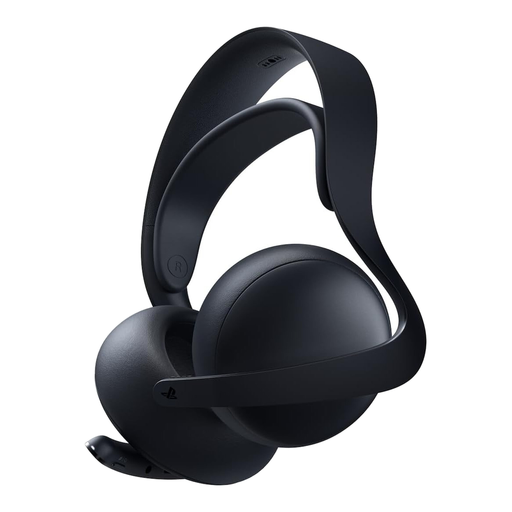
Why this choice suits this profile : it is designed for players using PS5, PlayStation Portal, PC, Mac and mobile devices who want a wireless headset that can handle a range of uses.
PlayStation Link and Bluetooth compatibility make its different uses clear. The retractable microphone means there is no fixed boom to get in the way when the headset is used for listening to music or making calls.
Planar magnetic drivers, up to 30 hours of stated battery life and a charging hook included.
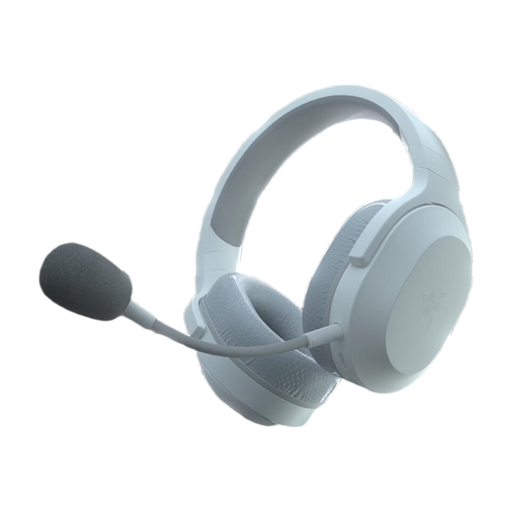
Why this choice suits this profile : its dual 2.4 GHz and Bluetooth modes are ideal for people who regularly switch between console, PC, mobile use and travel.
The USB-C dongle, Bluetooth and 3.5 mm analogue connection provide a backup option depending on the device being used. The detachable microphone reduces bulk as soon as the headset is used outside gaming.
A stated weight of 250 g, up to 50 hours of battery life and compatibility with several platforms.
We have put together a complete, real-time updated list of products that meet these demanding selection criteria and European safety regulations.
A 3.5 mm jack model connected to the controller is generally the easiest to set up. On PS5, check that the microphone works properly with the DualSense controller. On Xbox, make sure the headset is compatible with the controller’s socket. Wireless models require you to check that the dongle and protocol being used are compatible.
Yes, provided you take the stated battery life and charging time into account. A headset with an integrated battery requires more forward planning than a wired model. If you play for several hours at a time, choose plenty of battery life, USB-C charging and, if possible, a wired backup connection.
Store it in a dry place, avoid pulling on the cable and clean the ear cushions with a soft cloth suitable for their coating. Protect the headset from moisture and do not attempt to replace an integrated battery yourself. Finally, keeping the volume at a reasonable level and taking regular breaks will help you enjoy your headset for longer while reducing the risks to your hearing.