
Livraison le jour même ou le lendemain

Qualité garantie

Débloquez vos offres de bienvenue: Livraison GRATUITE | Jusqu'à -80 % | 30 jours d'essai gratuits à JoyPlus
Téléchargez l'application
A gaming headset can significantly improve voice communication, sound perception and comfort during long sessions. However, some product listings focus mainly on the number of features or lighting effects, without clearly explaining compatibility limitations. To avoid a disappointing purchase, it is best to check the connection, microphone, comfort and actual conditions of use.
The term 7.1 surround generally refers to virtual sound processing, activated by compatible software or a console. It does not mean that the headset contains several physical speakers. The results can also vary depending on the game, operating system and audio settings.
A correctly configured wired stereo gaming headset may therefore be more suitable than a model advertising a surround function that is unavailable on your device.
A headset with a microphone and a 3.5 mm jack will generally connect to a controller, laptop or console with a combined output. On a computer with separate sockets for sound and microphone, an adapter or splitter may be required.
A USB gaming headset will often connect directly to a PC or PlayStation, but it is not necessarily compatible with an Xbox, Nintendo Switch or smartphone. Always check the list of supported devices, as well as the type of port available.
An RGB gaming headset can add a stylish touch, but the lighting says nothing about microphone quality or comfort. Conversely, a lightweight model may place excessive pressure on your ears or head. For long sessions, the shape of the ear cushions, headband adjustment and cable length are much more important.
If you plan to use the headset across several platforms, prioritise a listing that clearly states “PC and console compatible headset”. A PS5 headset will not necessarily work with Xbox, while a Nintendo Switch headset may use the console’s socket or the controller’s socket, depending on the setup.
A microphone that can be rotated or lifted makes it easy to mute transmission quickly. Models with a detachable microphone are practical if you also want to use the headset for listening to music. Check for a volume control on the ear cup or cable, as well as the position of the mute button.
Terms such as “noise reduction” describe a technical feature of the microphone. They do not guarantee perfectly clear speech in every room or regardless of surrounding noise.
For long sessions, choose circumaural ear cushions, an adjustable headband and moderate pressure. Weight remains a useful indicator, but it should be considered alongside the headset’s shape and the quality of its padding.
Follow the manufacturer’s warnings: prolonged listening at high volume can damage your hearing. Take regular breaks, turn down the volume and never use a headset while driving or operating machinery.
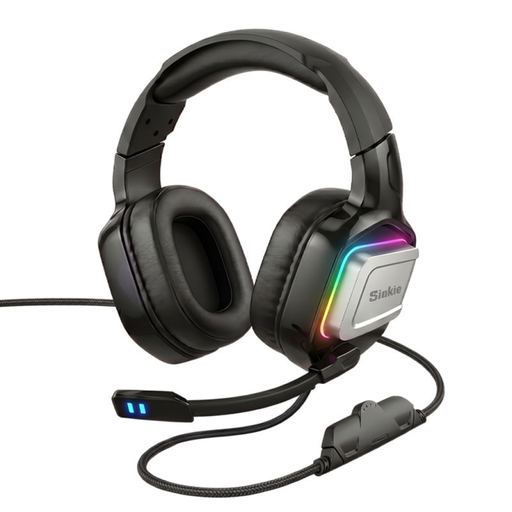
Why this choice suits this profile : its dual USB and 3.5 mm connectivity allows it to be used with different computers and compatible devices. Its RGB lighting will appeal to gamers who want equipment with a distinctive look.
Having two connectors reduces the risk of buying a headset that cannot be used with your device. However, it is still essential to check the ports and available functions on each one.
Two advertised connection modes, 50 mm drivers and RGB lighting. The listing also mentions safety instructions concerning heat, cables and small parts.
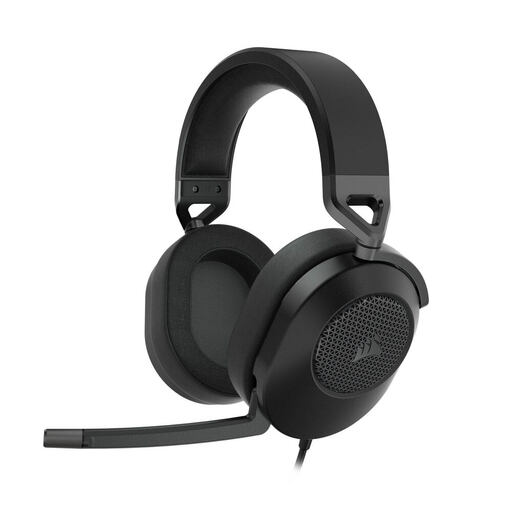
Why this choice suits this profile : it is aimed at gamers who use several devices and want a headset with a microphone, an aluminium frame and virtual surround processing on PC.
The listing specifies the wired connection, how 7.1 works on PC with iCUE software, and the stated compatibility with PC, Mac, PS5, PS4, Xbox and Nintendo Switch.
50 mm drivers, memory foam ear cushions, a lift-to-mute omnidirectional microphone and volume control integrated into the ear cup.
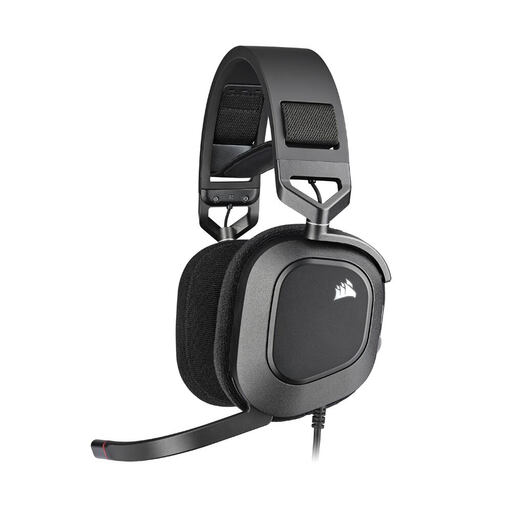
Why this choice suits this profile : its USB connection makes it primarily suitable for computers. Its memory foam ear cushions are designed for long gaming and voice-chat sessions.
The listing clearly distinguishes the USB connection, RGB settings and use of iCUE software. So check that you have a USB-A port and access to the software before placing your order.
Lift-to-mute omnidirectional microphone with mute indicator, 50 mm drivers, an advertised frequency range of 20 Hz to 40 kHz and customisable RGB lighting.
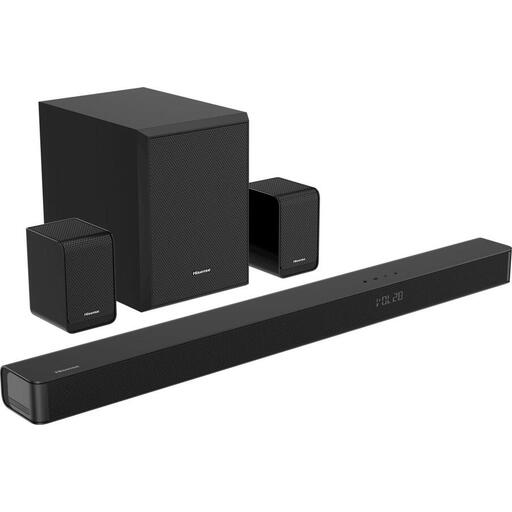
Why this choice suits this profile : in a shared living room, a soundbar accompanied by a subwoofer and rear speakers can improve the TV’s sound without requiring everyone to wear a headset.
The listing details the included components: soundbar, wireless subwoofer and two wireless rear speakers. It also specifies HDMI eARC, optical, coaxial, USB, 3.5 mm jack and Bluetooth inputs.
5.1 configuration, advertised support for Dolby Atmos and DTS:X, film and gaming modes, with an advertised maximum audio output of 340 W.
We have selected a complete range, updated in real time, of products that meet these demanding criteria as well as European safety standards.
A compact Dolby Atmos soundbar is ideal when space is limited or you do not want multiple speakers. The TCL S45H offers a 2.0 configuration with Dolby Atmos and DTS Virtual:X processing, Bluetooth, HDMI ARC and an optical input. Bass is handled directly by the soundbar, without a separate subwoofer.
If you want greater impact from low frequencies, a soundbar with a subwoofer such as the LG DS40T, Samsung HW-B450F or a 2.1 system will be more suitable. Remember to check the subwoofer’s dimensions, whether it has an HDMI ARC or eARC connection, and how much floor space is available.
A Bluetooth home cinema audio system with rear speakers requires more setup, but it distributes sound around the room more effectively. Check the location of the power sockets, the stability of the speakers and compatibility between the audio formats and your TV and consoles.
No. It depends on the model, the available port and any software that may be required. A USB headset may work with a PC and certain consoles, while a 3.5 mm jack model is generally more versatile. Check the official list of compatible devices before buying.
Not necessarily. Virtual 7.1 can alter how you perceive the soundstage, but activating it may require software. If you play on several devices, a wired stereo headset compatible with your different connections will often be easier to use.
It depends on the quality of the cable, ear cushions and headband, as well as your usage habits. Avoid pulling on the cable, store the headset away from moisture and clean it with a dry cloth. For USB or wireless models, also check the availability of accessories and the warranty terms.