
Livraison le jour même ou le lendemain

Qualité garantie

Débloquez vos offres de bienvenue: Livraison GRATUITE | Jusqu'à -80 % | 30 jours d'essai gratuits à JoyPlus
Téléchargez l'application
To fully immerse yourself in a game and coordinate with your team, a good gaming headset isn't a luxury—it's a necessity. Whether you're trying to detect an opponent's footsteps in a competitive FPS or get lost in the atmospheric soundscape of an adventure game, audio quality makes all the difference. With a plethora of options on the market, making the right choice can quickly become a daunting task.
This guide is here to help you cut through the noise by breaking down the key criteria and presenting a curated selection of models for every use case and platform, whether you play on PC, PS5, or Xbox Series X.
Before diving into our selection, let's review the key points to help you define your needs.
The choice between a wired gaming headset and a wireless gaming headset primarily depends on your setup and habits.
Ensure the headset is fully compatible with your gaming platform(s).
A gaming headset must excel on two fronts: the sound you hear and the voice you transmit. The size of the drivers (often 40mm or 50mm) and spatial sound technologies (like DTS Headphone:X or THX Spatial Audio on PC) are key to great immersion and precise sound spatialisation. The microphone, for its part, must capture your voice with crystal clarity while isolating background noise (like the clicking of your mechanical keyboard!).
To help you decide, here are a few models that caught our eye, each with its own strengths and target audience.
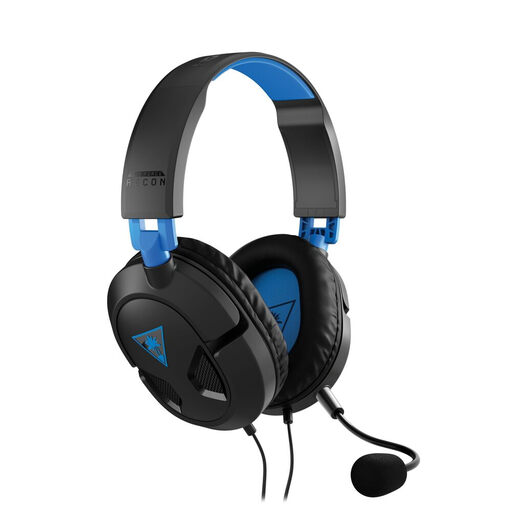
Key Selling Point: The Turtle Beach Recon 50P is a model that gets straight to the point. Its wired 3.5mm jack connection ensures near-universal compatibility, from PC to consoles (PS5, Xbox, Switch) and mobile devices.
Advantages:
Who is it for? This headset is an excellent option for gamers looking for an affordable, multi-platform, 'plug and play' solution without any complex setup.
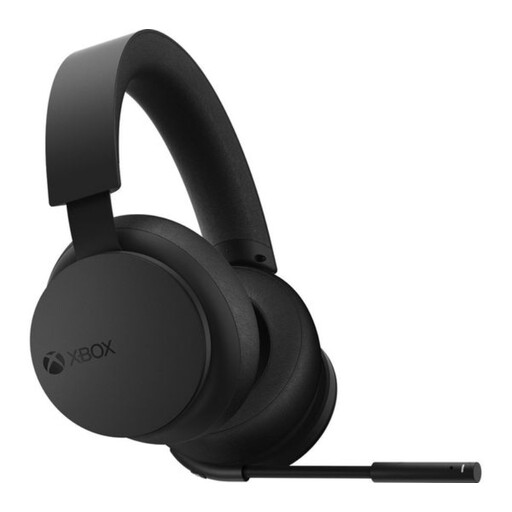
Key Selling Point: Designed by Microsoft, this headset integrates seamlessly into the Xbox ecosystem. It connects directly to the console via the Xbox Wireless protocol, no dongle required, for an exceptionally smooth experience.
Advantages:
Who is it for? It's the obvious choice for any Xbox Series X or Xbox One owner looking for a native, hassle-free wireless experience. Its PC compatibility (via a separately sold adapter or Bluetooth) also makes it an excellent companion for gamers who switch between Microsoft platforms.
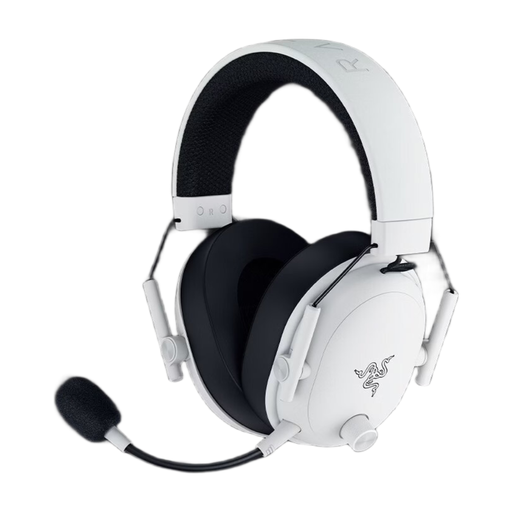
Key Selling Point: The Razer BlackShark V3 Wireless is built for PC competition. Its guiding principles are minimal latency, precision audio, and a flawless microphone.
Advantages:
Who is it for? It's clearly aimed at competitive PC gamers looking for a wireless gaming headset that makes no compromises on performance. With THX Spatial Audio and its customisable audio profiles, it's a true precision tool for gaining an in-game advantage.
The world of gaming headsets is vast, and to each their own: comfort, design, features... every gamer is unique. If our selection doesn't check all your boxes, don't worry—dozens of other models are waiting for you.
Discover our full range of PC headsets to find the model that matches your playstyle and budget.
To switch between a PS5 and a PC, the easiest option is to choose a USB model or one with a 3.5mm jack. The vast majority of PS5-branded headsets are recognised by PCs without any issues. A quick look at the spec sheet is the best way to be sure.
No, for the most part. Modern 2.4GHz models (via a USB dongle) like Razer HyperSpeed or Logitech Lightspeed offer latency so low it's imperceptible to the human ear, even for professional gamers. Bluetooth, on the other hand, can introduce a slight delay. It's best reserved for less fast-paced games or for listening to music and podcasts.
Regular maintenance will extend your headset's lifespan. Wiping the surfaces, especially the ear cushions, with a soft, dry cloth is a good start. Of course, avoid all contact with liquids. Ideally, store it on a dedicated stand to protect the headband and prevent the cable from kinking. If the ear cushions are removable, check the manual: they are often washable or replaceable, which is a great way to give your headset a new lease on life.