
Livraison le jour même ou le lendemain

Qualité garantie

Débloquez vos offres de bienvenue: Livraison GRATUITE | Jusqu'à -80 % | 30 jours d'essai gratuits à JoyPlus
Téléchargez l'application
A gaming headset with microphone isn’t just about delivering game audio. It also needs to let you communicate clearly, stay comfortable for hours on end, and work seamlessly with your setup. Yet some of the features highlighted on product pages can be misleading.
Before you compare a PS5 gamer headset, an Xbox headset with microphone or a PC gaming headset, check three things: actual compatibility, connection type and microphone design. These criteria will help you avoid nasty surprises – or even buying a model that won’t work with your gear at all.
A headset with a 3.5 mm jack will generally plug into a controller, computer or compatible handheld console. On the other hand, a USB, Bluetooth or wireless model with an adaptor may offer different features depending on the platform.
A wireless gaming headset designed for PlayStation won’t necessarily work the same way on Xbox. With the Nintendo Switch, you also need to distinguish between handheld and docked use. So check the detailed list of compatible devices, and don’t forget to see what accessories are included.
The ear cushions that surround your ears block out some outside noise – that’s called passive isolation. It shouldn’t be confused with active noise cancellation, which uses microphones and electronic processing.
Similarly, the phrase “noise-cancelling microphone” usually refers to voice pickup, not to what you hear from the game. The Razer BlackShark V2 X, for example, combines passive isolation with a cardioid microphone – these two functions are quite distinct.
A 7.1 surround sound gaming headset simulates multiple audio directions using software processing. The result depends on the platform, the game and the software being used. On some models, like the Razer Kraken X Lite, this feature is only available on PC.
An immersive stereo headset can therefore still be an excellent choice, especially on console. Sound positioning accuracy, comfort and voice clarity are often more important than a simple number on the box.
A wired gaming headset is all about simplicity: no battery to charge and very few settings to adjust. A 3.5 mm jack is particularly handy with a PS5, Xbox or Switch controller. The downside is that the cable can restrict movement and needs to be stored properly to avoid tripping or snagging.
A wireless gaming headset offers more freedom. For gaming, a 2.4 GHz connection with a USB receiver is usually preferred to keep audio latency low. Bluetooth is better suited to mobile devices and everyday listening, though its compatibility with consoles varies from model to model.
Some headsets combine these different technologies. The Razer Barracuda X offers a 2.4 GHz connection, Bluetooth 5.2 and a 3.5 mm analogue connection. This versatility is handy if you also plan to use your headset with a phone or laptop.
For team play, choose a microphone that sits close to your mouth, is adjustable and has an easily accessible mute control. “Flip-to-mute” models cut the sound when you lift the boom arm – a practical solution for quickly chatting with someone in the room.
A cardioid microphone picks up sound mainly from the front. An omnidirectional model records sound from all around, making it more dependent on your environment. Neither term on its own guarantees flawless voice quality in every room.
A comfortable gaming headset should apply balanced pressure and stay in place without squeezing your head too tightly. Look at the weight, the headband adjustment options, the material of the ear cushions and how well they let air circulate. A lightweight model can be pleasant during long sessions, but weight isn’t everything.
The Razer BlackShark V2 X weighs 240 g, compared with 228 g for the Turtle Beach Airlite Fit. The Logitech H340 comes in at 282 g and has a design more suited to calls, meetings and everyday use. If you wear glasses, soft ear cushions or ones with a relief zone can reduce pressure on the arms.
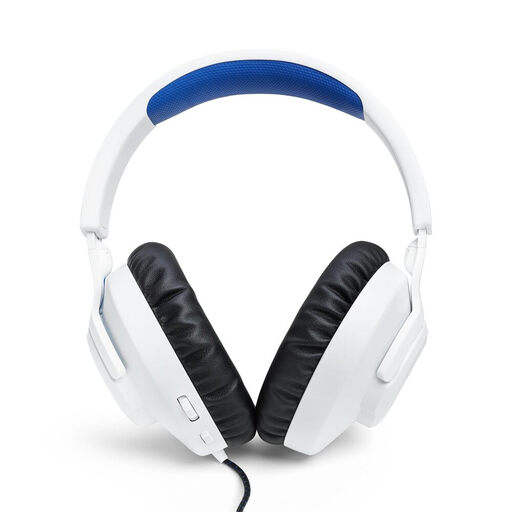
Why this choice suits this profile: Its 3.5 mm jack works with PS5, PS4, PC and Nintendo Switch, with no battery or complicated setup required.
The wired connection eliminates battery life and compatibility issues that some wireless adaptors can cause.
40 mm drivers, detachable microphone, volume control and an advertised weight of around 220 g.
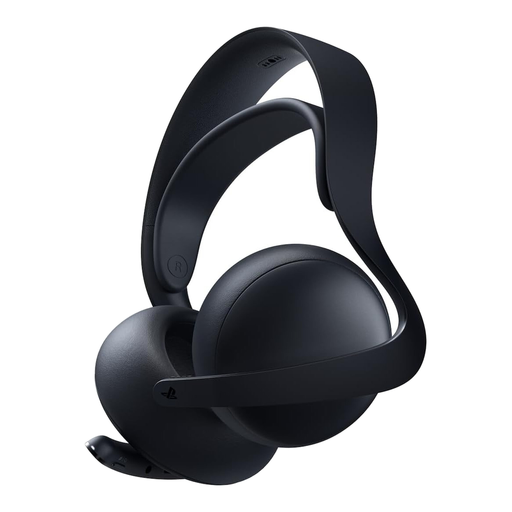
Why this choice suits this profile: It’s aimed at PS5, PlayStation Portal, PC, Mac and mobile users looking for a versatile wireless headset.
The product page clearly states the presence of PlayStation Link and Bluetooth, so you can distinguish between console and mobile use.
PlayStation Link wireless connection, Bluetooth, retractable microphone and an advertised battery life of up to 30 hours.
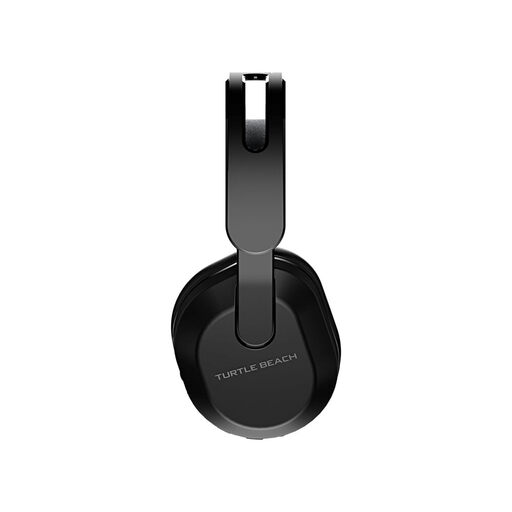
Why this choice suits this profile: This Xbox headset with microphone is ideal for long sessions and gamers who switch between console, PC, Switch or mobile.
The product page distinguishes the 2.4 GHz connection for Xbox from the Bluetooth intended for other devices, rather than claiming universal compatibility.
Advertised battery life of up to 40 hours, flip-to-mute microphone, Bluetooth 5.2 and equaliser accessible via the Swarm II app.
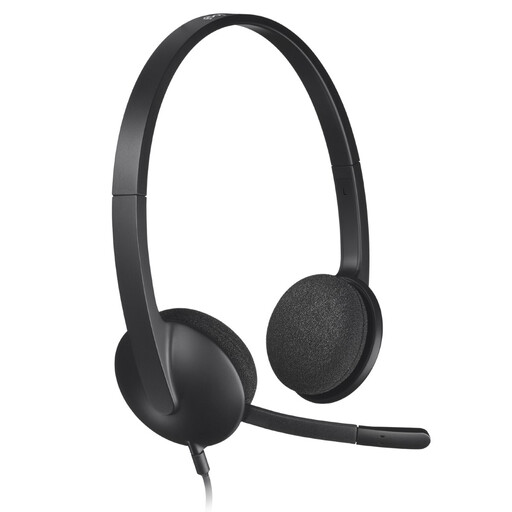
Why this choice suits this profile: Its USB connection and plug-and-play design are ideal for calls, online meetings, classes and gaming on PC or Mac.
It doesn’t promise universal console compatibility – the product page clearly targets PC and Mac computers.
Noise-reducing microphone, adjustable headband, swivelling ear cushions and driver-free installation.
We’ve put together a comprehensive, real-time updated list of products that meet these demanding selection criteria and European safety standards.
With a wired model, plug the 3.5 mm jack into your controller or the relevant port on the console. On PC, a USB headset connects directly to your computer. For a wireless model, use the supplied receiver if the platform supports it, then select the headset as your audio output and input device in the settings.
It depends on how often you use it, the durability of the cable or battery, and how well you look after it. Store the headset in a dry place, avoid pulling on the cable and clean the ear cushions with a suitable cloth. A built-in battery will eventually lose capacity, so check the warranty terms and replacement options before you buy.
Bluetooth is convenient for mobile use, music and some cross-platform scenarios. For competitive gaming, check the advertised latency and compatibility with your console. A 2.4 GHz connection or a wired connection may be preferable when synchronisation between sound and action is a priority.