
Livraison le jour même ou le lendemain

Qualité garantie

Débloquez vos offres de bienvenue: Livraison GRATUITE | Jusqu'à -80 % | 30 jours d'essai gratuits à JoyPlus
Téléchargez l'application
A gaming headset with microphone does more than reproduce in-game audio. It must also transmit your voice clearly, remain comfortable for several hours and work with your platform without leaving you scrambling to buy an adapter at the last minute. Product listings can sometimes blur the line between theoretical compatibility, features that are genuinely accessible and everyday comfort.
Before placing your order, there are three potential pitfalls to look out for.
For a wired gaming headset, the 3.5 mm four-pole jack remains the simplest solution for a PS5 or Xbox controller, Nintendo Switch, laptop or phone with a compatible audio output. It requires neither a battery nor software for essential functions.
On a desktop PC with two separate ports for audio and microphone, check whether an audio splitter is included. The Turtle Beach Recon 70 PC, for example, comes with a 2 m cable and an adapter that separates the two signals.
Wireless models require closer attention to the specification sheet. The Turtle Beach Stealth 500 uses a 2.4 GHz connection with a USB receiver as well as Bluetooth 5.2. The Corsair VOID v2, meanwhile, combines 2.4 GHz and Bluetooth 5.3. These two solutions do not meet exactly the same needs: the receiver is generally intended for use with a console or PC, while Bluetooth is convenient for a phone, tablet or certain portable devices.
A flip-to-mute microphone is silenced simply by lifting the boom. This is particularly useful when you need to interrupt a conversation quickly without fumbling around for a button. It is still worth checking the boom’s position in relation to your mouth and how easy the volume dial is to reach.
The Turtle Beach and Corsair headsets featured here have lift-up microphone booms. The Corsair HS80 RGB USB adds a light indicator to show when the microphone is muted, while several wired models use mechanical feedback or a click to confirm muting.
Speaker size alone is not enough to predict sound quality, but it does provide an initial indication of the product. The models in this selection use 40 or 50 mm drivers. Surround or spatial audio may depend on the console, operating system, software and sometimes a licence. It is therefore important to distinguish between advertised compatibility and the function that is actually available straight out of the box.
When it comes to comfort, pay attention to the materials used: the Turtle Beach Airlite Fit features breathable mesh ear cushions, while the Recon 70 uses synthetic leather. Glasses wearers may also be interested in the Recon 200 Gen 2’s ProSpecs technology, designed to reduce pressure on the arms of glasses.
An amplified wired headset such as the Recon 200 Gen 2 has a rechargeable battery, with up to 12 hours of battery life when amplification is enabled. However, it retains its essential audio functions even when the battery is empty. By contrast, a conventional wired model such as the Recon 70 does not need recharging.
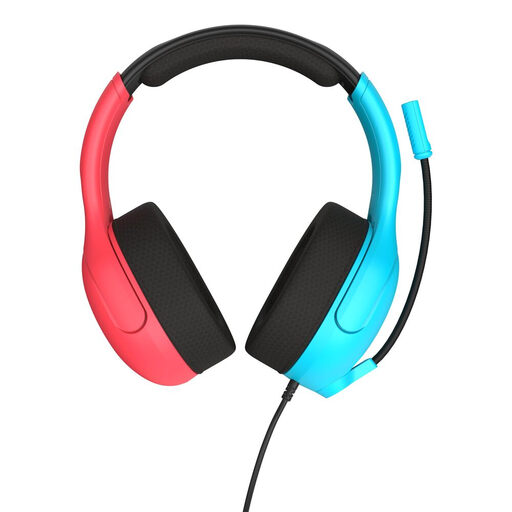
Why this choice suits this profile : Its 3.5 mm jack and compatibility with the Nintendo Switch, Switch Lite, Switch OLED, PCs and mobile devices make initial setup simple.
No battery to manage for wired audio, plus a volume dial built directly into the cable. The microphone lifts up to mute your voice.
40 mm speakers, mesh ear cushions and a stated weight of 228 g.
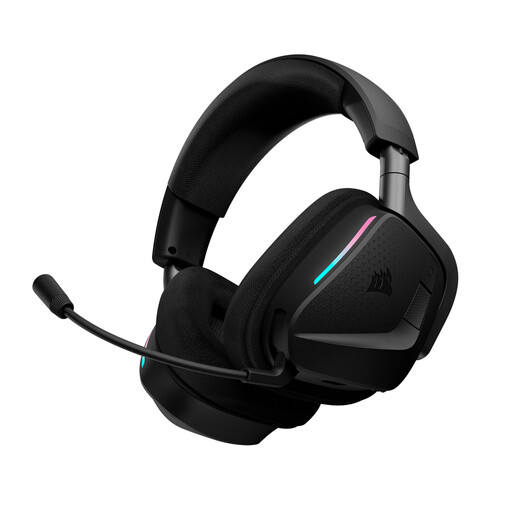
Why this choice suits this profile : Its dual wireless connection, software settings on PC and spatial audio are aimed at players who want to customise their sound environment.
The listing clearly distinguishes between 2.4 GHz and Bluetooth, and specifies that certain features, such as NVIDIA Broadcast, require compatible hardware.
Up to 70 hours of battery life in 2.4 GHz mode without RGB lighting, Bluetooth and a flip-to-mute microphone.
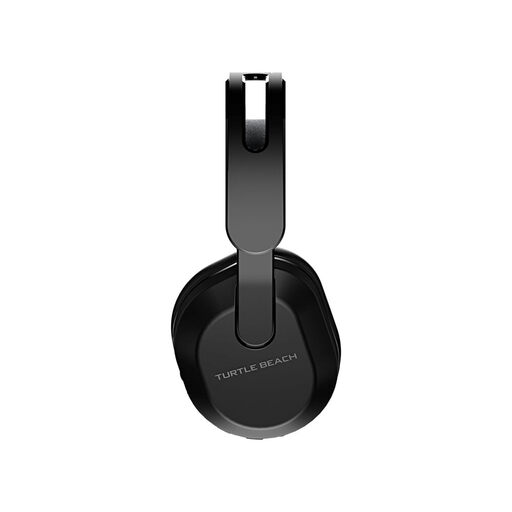
Why this choice suits this profile : It is aimed at players using Xbox Series X|S and Xbox One who also play on PC, on a Nintendo Switch in docked mode or on mobile.
The listing specifies the compatible devices, the type of receiver used and the presence of the QuickSwitch button for switching between sources.
Up to 40 hours of battery life, Bluetooth 5.2, 2.4 GHz connection and a lift-up omnidirectional microphone.
We have put together a complete, real-time updated selection of products that meet these strict criteria, while complying with European safety regulations.
A model with a 3.5 mm jack can work with devices equipped with the corresponding port, including via a PS5 or Xbox controller, or directly with a compatible Nintendo Switch. On a desktop PC, a splitter may be required when the audio and microphone ports are separate. Always check the headset’s listing and the type of port available on your device.
Wireless frees you from the cable while you play, but means recharging the headset and sometimes connecting a USB receiver. Wired remains a relevant option for long sessions, for players who want to avoid any interruptions or for devices that already have a jack socket. The best choice therefore depends mainly on your setup and how tolerant you are of recharging.
Lifespan depends on how often it is used, how it is stored, ear cushion care and the strain placed on the cable or microphone boom. To keep it working for longer, clean it with a soft, dry cloth, avoid moisture, do not bend the cable excessively and keep the volume at a reasonable level. On a wireless model, the integrated battery is generally not designed to be replaced by the user.