
Livraison le jour même ou le lendemain

Qualité garantie

Débloquez vos offres de bienvenue: Livraison GRATUITE | Jusqu'à -80 % | 30 jours d'essai gratuits à JoyPlus
Téléchargez l'application
A gaming headset can significantly improve your comfort during play, communication with teammates, and your perception of in-game audio. Yet some purchases turn out to be disappointing after just a few weeks: an incompatible connection with your console, an awkward microphone, uncomfortable pressure on your ears, or a battery life that was quoted without specifying the test conditions.
Before choosing a wireless gaming headset, a wired gaming headset or wireless gaming earphones, it’s best to start with your equipment and your habits. Here are the criteria to examine to avoid any nasty surprises.
A headset described as “multi-platform” won’t necessarily work without an accessory on every machine. A 3.5 mm jack will generally plug into a PS5, PS4, Xbox or Switch controller, whereas a USB headset may be designed primarily for a computer.
The Xbox also imposes certain constraints depending on the wireless technology used. Before placing your order, check the precise list of compatible devices, the type of connection, and whether an adapter or USB dongle is included.
Bluetooth is perfectly fine for music, videos and calls, but it can introduce a noticeable delay in certain games. For a low-latency gaming headset, a 2.4 GHz radio connection with a USB receiver is often preferable. However, not all dongles are created equal: distance, obstacles and interference can all affect connection stability.
After several hours, the weight, the shape of the ear cushions and the pressure exerted by the headband become really important. A headset weighing between 230 and 285 g may be more comfortable to wear for long periods than a heavier model, but everyone’s head shape is different.
A gaming headset with a microphone must also allow you to position the capsule correctly. Models with a fold-away or detachable microphone are practical for switching from gaming to music or video calls.
For a PS5 gaming headset, check compatibility with the console and the controller. For an Xbox headset, don’t assume a standard USB dongle will be recognised. On PC, USB, Bluetooth and 3.5 mm models generally offer more flexibility.
The size of the drivers, expressed in millimetres, gives you a first indication, but it isn’t enough to predict sound quality. A sound signature with generous bass may suit action games, while a more balanced profile will be better for music, videos and remote working.
Passive noise reduction relies on the ear cushions, which physically isolate your ears. Active noise cancellation (ANC) uses microphones and electronic processing to reduce certain ambient sounds. It doesn’t eliminate all noise and can also reduce battery life.
On the microphone side, look for an easily accessible mute control, a flexible boom arm or a “flip-to-mute” mechanism. Terms like “immersive sound” or “spatial audio” need to be taken in context: some features require specific software, a compatible console or Windows.
The advertised battery life of a wireless gaming headset generally depends on volume level, lighting and whether Bluetooth or ANC is in use. A battery quoted at 40, 50 or 70 hours won’t necessarily last that long in all conditions.
Also remember to check:
Whichever model you choose, avoid listening at high volume for extended periods. Cables, small detachable microphones and dongles should also be kept out of reach of young children.
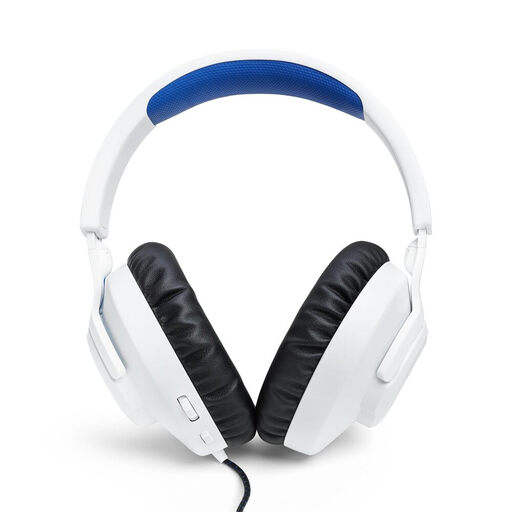
Why this choice suits this profile: This wired gaming headset connects via 3.5 mm and is aimed at players on PS5, PS4, PC and Nintendo Switch who want a simple, instant setup.
The 3.5 mm connection means you don’t have to worry about a battery, while the detachable microphone lets you easily remove it when you’re not communicating.
40 mm dynamic drivers, volume control and microphone mute on the ear cup, with an advertised weight of around 220 g.
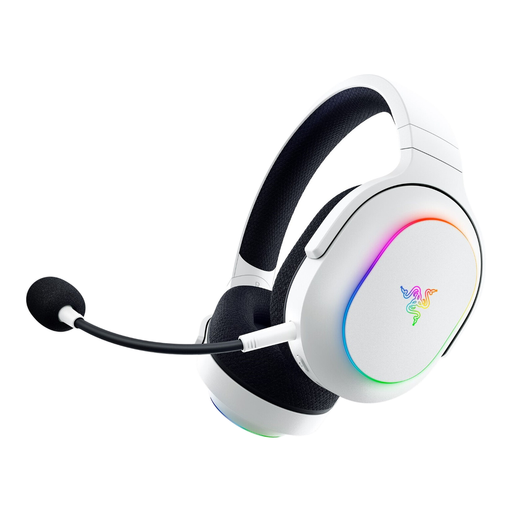
Why this choice suits this profile: Its dual 2.4 GHz and Bluetooth connection is ideal for those who switch between gaming on PC or console and listening on their mobile.
Switching between HyperSpeed and Bluetooth lets you clearly separate your uses, rather than relying solely on Bluetooth for gaming.
Up to 70 hours of advertised battery life, detachable HyperClear cardioid microphone, 2.4 GHz, Bluetooth and 3.5 mm connections.
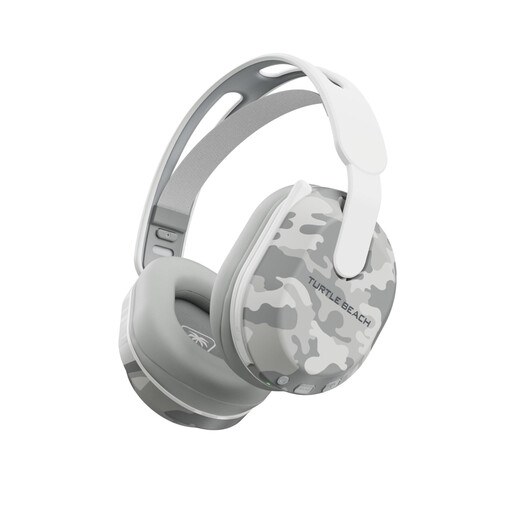
Why this choice suits this profile: It’s aimed at players on PS5, PS4, PC and mobile who want to switch between 2.4 GHz radio and Bluetooth during long sessions.
The 2.4 GHz connection remains independent of Bluetooth, and the QuickSwitch button lets you change source without having to re-pair.
Up to 40 hours of advertised battery life, fold-away microphone with mute, memory foam ear cushions and settings via the Swarm II app.
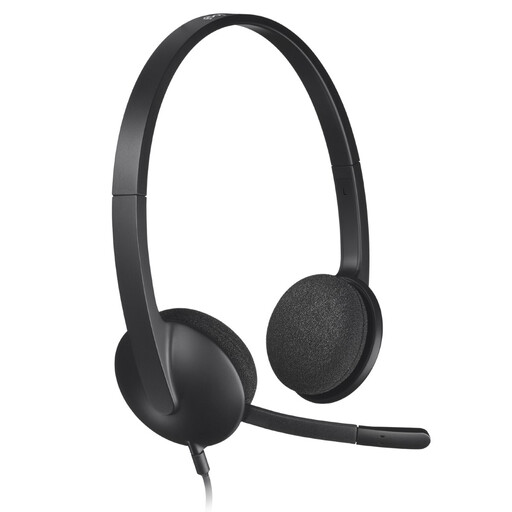
Why this choice suits this profile: This USB headset is suitable for calls, online classes, videos and gaming on PC or Mac, without complicated audio settings.
The USB connection avoids confusion between separate microphone and audio jacks, with detection said to be instant on PC and Mac.
Microphone with ambient noise reduction, 1.8 m cable and adjustable headband with swivelling ear cushions.
We’ve put together a complete, real-time updated list of products that meet these demanding criteria, while complying with European safety regulations.
Wired avoids the need to recharge and offers a simple connection, particularly via the 3.5 mm jack on the controller. Wireless gives you more freedom of movement. For gaming, choose a 2.4 GHz radio model if latency is your priority, then make sure the receiver is fully compatible with your console.
It all depends on the battery, how often you use it, your charging cycles and how you look after it. Avoid leaving the battery completely flat for long periods, store the headset away from moisture, and don’t force the hinges. An integrated battery is generally not designed to be replaced by the user.
Yes, as long as you check its compatibility with your computer and your calling apps. A USB headset like the Logitech H340 can work perfectly. In a noisy environment, be sure to distinguish between the noise reduction applied to the microphone and the noise reduction intended for your listening: these are two different functions.