
Livraison le jour même ou le lendemain

Qualité garantie

Débloquez vos offres de bienvenue: Livraison GRATUITE | Jusqu'à -80 % | 30 jours d'essai gratuits à JoyPlus
Téléchargez l'application
A gaming headset can really transform your online experience, provided you choose a model that’s compatible with your setup. Between the promises of immersion, so-called “crystal-clear” microphones and record-breaking battery life, some features are actually less decisive than they first appear.
Before you place your order, three common pitfalls keep cropping up:
For a PS5 gaming headset, plugging a 3.5 mm jack into the controller is still the simplest solution: no software or USB receiver needed. This setup also works with many computers, smartphones and handheld consoles.
An Xbox gaming headset needs a bit more thought. Wired models designed for a controller with a 3.5 mm port are generally straightforward to use, whereas wireless models sometimes rely on a specific protocol or transmitter. It’s best to check the exact list of compatible devices before buying.
Gamers who regularly switch between platforms can look at a multi-platform gaming headset. The Turtle Beach Stealth 700, for example, uses two USB transmitters and a 2.4 GHz wireless connection, plus Bluetooth 5.2 with a compatible mobile device. This setup isn’t as simple as a standard wired headset: you’ll also need to plan for charging and installing the transmitters.
For a Nintendo Switch 2 headset, think about how you’ll be using it: playing in handheld mode, on the dock or with a different controller. A jack socket can be very handy, but the cable length and how it routes then become important factors to consider.
The stated frequency response, typically 20 Hz to 20 kHz, refers to the theoretical range the speakers can cover. On its own, it doesn’t tell you how the headset will actually sound, but it does offer an objective point of comparison between spec sheets.
A headset with a microphone should also be judged by the mic’s position and its mute system. A flexible or adjustable microphone can be moved closer to your mouth for better pickup. On some Turtle Beach models, simply flipping the microphone up mutes it, so you don’t have to fumble for a button mid-game.
Built-in controls make day-to-day use much easier. A volume wheel on the earcup lets you adjust the sound level quickly. On PC, companion software can offer more settings, but that does mean an extra configuration step. As for spatial audio, it depends on the console, the operating system, the game and, in some cases, a dedicated service or app.
With a wired 3.5 mm headset, pay attention to the cable weight and the shape of the ear pads. The specs for Konix Nexus models list a weight of 340 to 360 g depending on the version, with soft ear pads and a 1.5 m cable. This length can work well with a controller, but may be less practical if your computer is a long way from your chair.
A wireless gaming headset frees you from that constraint, but it runs on a battery. The Turtle Beach Stealth 700 claims up to 80 hours of battery life according to its product page, with a 15-minute quick charge giving around 3 hours of use. Actual battery life can vary depending on volume level, Bluetooth usage, settings and the type of connection.
If you wear glasses, you might want to choose ear pads made from memory foam designed to reduce pressure on the arms. This is a genuine comfort point to look out for, though it’s not a guarantee it will suit every face shape.
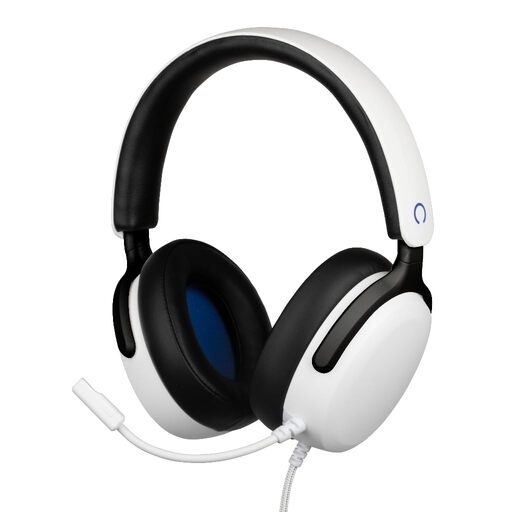
Why this suits this profile: its 3.5 mm jack connection lets you plug straight into the PS5 controller, with no pairing or battery to charge.
The spec sheet clearly states the wired connection, PS5 compatibility and 1.5 m cable length – the main limitations are known before you buy.
40 mm speakers, flexible microphone, volume wheel and soft ear pads.
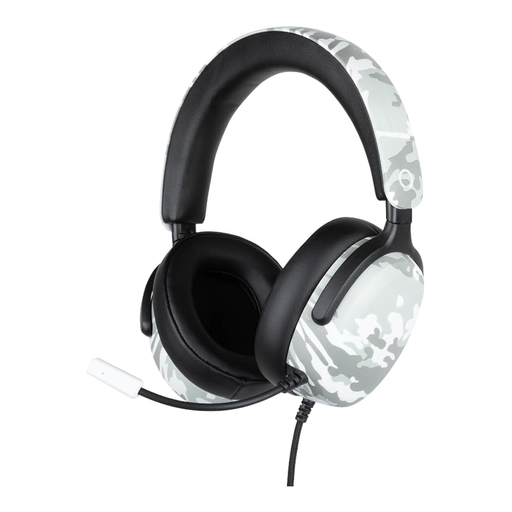
Why this suits this profile: this model works in households with a PS5, Xbox Series X|S or Nintendo Switch 2 that has a compatible jack port.
Compatibility is based on a standard 3.5 mm jack, rather than a transmitter limited to a single platform.
40 mm speakers, built-in flexible microphone, 1.5 m cable and volume control on the earcup.
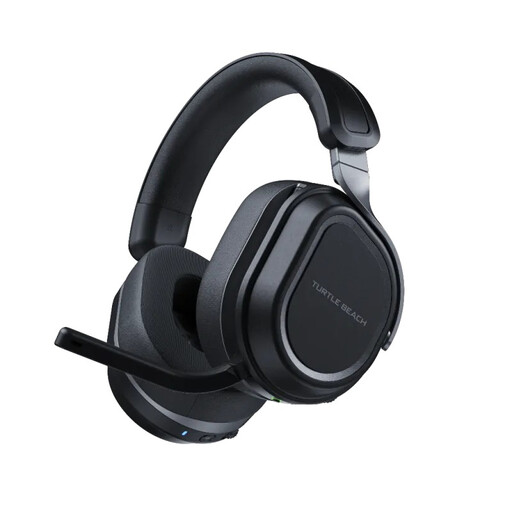
Why this suits this profile: it’s aimed at gamers who want to switch between console and PC while using a wireless connection and Bluetooth at the same time.
The two USB transmitters and CrossPlay button make switching between devices clearer than a simple single pairing.
Two 60 mm speakers, Bluetooth 5.2, flip-to-mute microphone and up to 80 hours of claimed battery life.
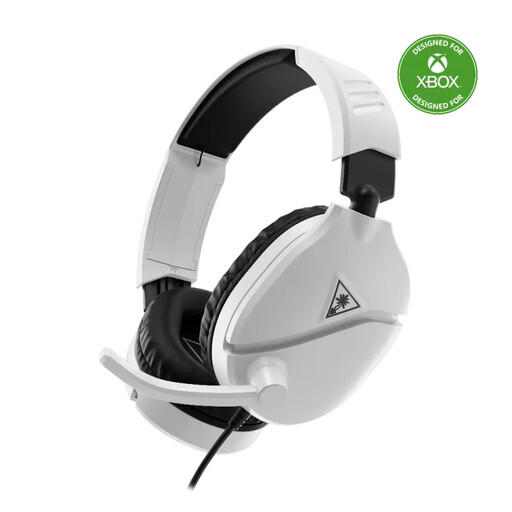
Why this suits this profile: its 3.5 mm jack and flip-to-mute microphone make it ideal for regular sessions on Xbox, PS5, PC or a compatible mobile device.
Flipping the microphone up to mute it and the volume control on the earcup reduce fiddling mid-game.
40 mm speakers, isolating ear pads, compatibility with several spatial audio systems and a design claimed to be lightweight.
We’ve put together a comprehensive, real-time updated selection of products that meet these demanding criteria, while complying with European safety regulations.
With a wired model, plug the jack into your controller or compatible audio port, then check in your console’s settings that the headset and microphone are selected as the output and input devices. On PC, the headset may need a combined socket or an adapter that separates the audio and microphone outputs.
For a wireless model, charge the battery before first use, plug in the supplied transmitter and install the software only if you want to customise the equaliser or controls. Clean the ear pads with a soft, dry cloth. Avoid moisture, chemicals and high temperatures.
Set the volume to a reasonable level and take breaks during long sessions. This precaution helps with comfortable use, but doesn’t replace the advice of a healthcare professional.
It can work with both consoles if the controller has a compatible jack socket. However, do check the model’s spec sheet and supported features, especially the microphone and volume control.
Its lifespan depends on how often you use it, storage conditions, the pressure on the headband and the condition of the cable or battery. A wired model avoids battery ageing, while a wireless model needs regular charging and proper storage.
Not necessarily. Wireless gives you more freedom of movement, but wired remains simple to set up and doesn’t need charging. Focus on comparing compatibility, the claimed range, battery life, microphone quality and how far you sit from your PC.