
Livraison le jour même ou le lendemain

Qualité garantie

Débloquez vos offres de bienvenue: Livraison GRATUITE | Jusqu'à -80 % | 30 jours d'essai gratuits à JoyPlus
Téléchargez l'application
Buying a multi-platform gaming headset seems simple… until a compatibility issue, microphone problem or lack of comfort spoils the experience. A headset advertised as compatible with several devices may need an adapter, work wirelessly with only certain consoles or reserve its advanced settings for PC.
To avoid a disappointing purchase, it’s worth looking beyond the number of colours available, claims of “surround sound” or an endless list of compatible platforms. Here’s what to check before choosing a gaming headset for PC, PS5, Xbox or Nintendo Switch.
A headset may work with several devices via a 3.5 mm jack, without offering all its features on each one. 7.1 gaming headsets, equalisers and RGB lighting often rely on software that’s only available on Windows.
So it’s important to distinguish between:
With a wireless gaming headset, battery life varies depending on how you use it. RGB lighting, volume level and connection mode can all reduce the time between charges. For example, the Razer Barracuda X Chroma is rated for up to 70 hours without lighting, compared with 30 hours with Chroma RGB switched on.
A headset with a built-in battery will need regular charging either way. If you often forget to charge your devices, a wired gaming headset may be easier to live with day to day.
Comfort isn’t just about how thick the padding is. Weight, pressure on the arms of your glasses, ventilation and ear cup size all matter during long gaming sessions. A model weighing 230 to 285 g may suit some players perfectly, while a heavier headset could become uncomfortable after a few hours.
The 3.5 mm jack is still the simplest way to connect a headset to a PS5, PS4, Xbox or Switch controller. However, it often limits customisation options and may require a splitter on some computers, which have separate ports for the headset and microphone.
A USB headset usually gives you access to audio software on PC. For wireless gaming, 2.4 GHz is preferred for lower latency, while Bluetooth is better suited to phones and use on the go. The Razer Barracuda X Chroma supports both with SmartSwitch, using a USB-C dongle and Bluetooth 5.3.
A gaming headset with a microphone should make it easy to position the mic capsule close to your mouth. Cardioid microphones prioritise voices in front of the capsule and reduce some sounds from the sides, but they won’t eliminate all background noise.
Models with a detachable microphone are handy for travelling. Flip-to-mute mics, found on several Turtle Beach headsets, let you quickly mute yourself by lifting the boom.
Driver size — 40 or 50 mm, for example — isn’t enough on its own to judge sound quality. Check the frequency response, the balance between bass and treble, and whether you can adjust the equaliser.
Passive isolation depends mainly on the headset’s closed-back design and the shape of the ear cushions. Active noise cancellation is a different technology and isn’t found on many gaming headsets. Virtual 7.1 sound is primarily a software effect, so it may only work on Windows or with certain applications.
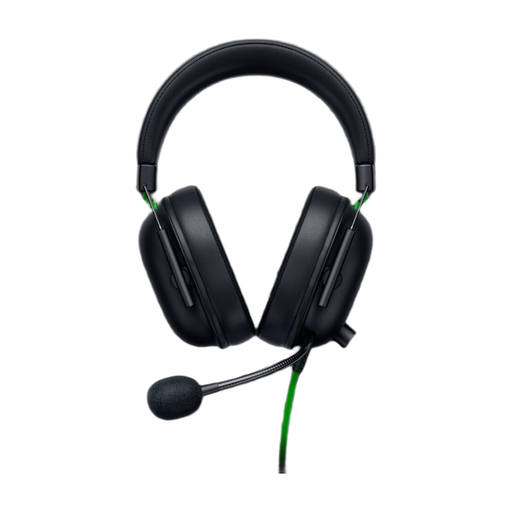
Why it suits this profile : Its 3.5 mm jack makes it easy to connect to a PC, PS5, Xbox, Switch or compatible mobile device.
The wired connection eliminates battery and wireless compatibility issues. However, virtual 7.1 sound is only available on Windows 10 64-bit and later versions.
Stated weight of 240 g, 50 mm drivers and a flexible cardioid microphone.
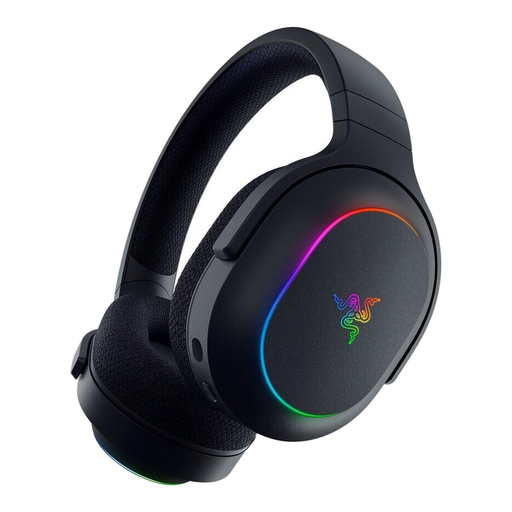
Why it suits this profile : It’s designed for players who regularly switch between PC, PlayStation, Switch and phone, and want a versatile wireless gaming headset.
Dual 2.4 GHz and Bluetooth 5.3 connectivity means less switching between devices. Xbox compatibility isn’t listed in the supplied specifications, so check before ordering.
Stated weight of 285 g, detachable microphone, six Chroma zones and up to 70 hours of stated battery life with the lighting off.
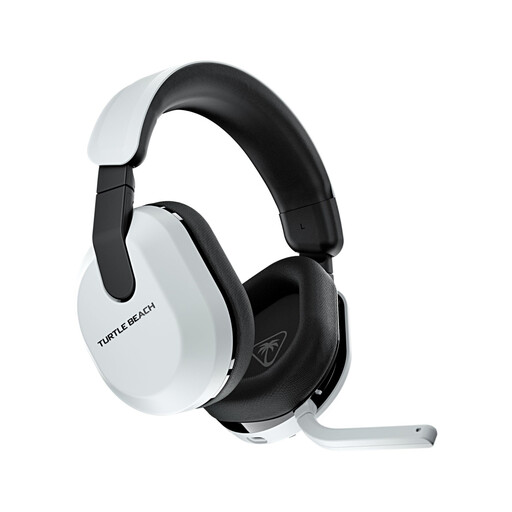
Why it suits this profile : It’s a good fit for players who move between PlayStation, PC, Switch and mobile for long sessions, and put extended battery life first.
The QuickSwitch button lets you switch between 2.4 GHz and Bluetooth 5.2. Xbox compatibility isn’t mentioned in the supplied product details.
Up to 80 hours of stated battery life, a flip-to-mute microphone and memory foam ear cushions.
We’ve put together a comprehensive selection, updated in real time, of products that meet these strict criteria and European safety requirements.
No. It depends on the connection type and the features supported by each device. A 3.5 mm jack is often versatile, while a USB or USB-C dongle may only work with certain platforms. So make sure the specifications specifically mention PS5, Xbox or Switch.
Wireless gives you more freedom, but you’ll need to keep an eye on battery life and remember to recharge it. Wired headsets don’t need charging and are particularly practical for gaming at a desk. The right choice depends mainly on your habits, how far you sit from the screen and how often you’re on the move.
It depends on the build quality, how well you look after the cable or battery, and how heavily you use it. Avoid pulling on the cable, store the headset somewhere dry and clean the ear cushions with a soft cloth. To protect your hearing, keep the volume at a moderate level and avoid long sessions at high volume.