
Livraison le jour même ou le lendemain

Qualité garantie

Débloquez vos offres de bienvenue: Livraison GRATUITE | Jusqu'à -80 % | 30 jours d'essai gratuits à JoyPlus
Téléchargez l'application
Buying a gaming controller isn't just about picking a colour or a design. An overlooked compatibility issue, an overestimated battery life or a joystick that doesn't suit your needs can turn an appealing purchase into a frustrating accessory. Before you compare a Nintendo Switch controller, a PC controller or a gaming joystick, it's worth focusing on the features that really matter for how you play.
The Joy-Con 2 Switch 2 are designed exclusively for the Nintendo Switch 2. They don't automatically replace a standard pair of Joy-Con Nintendo Switch controllers. Conversely, some wireless controllers intended for the Nintendo Switch family may not support all the features of the new console.
Always check the compatibility information for your model:
A wireless controller can communicate via Bluetooth, via a USB 2.4 GHz receiver, or use both technologies. The setup and compatibility can vary significantly from one solution to another. On PC, a receiver may be essential, while a Bluetooth connection sometimes requires manual configuration.
Also look at the stated battery life, charging time and the ability to keep playing with a USB-C cable when the battery is nearly empty.
A small Joy-Con is handy for travel or local multiplayer, but a standard controller is generally more comfortable during long sessions. For a fighting game, an arcade stick can offer a better-suited layout. For a simulator, a simple gaming joystick may not provide enough axes or controls.
The right choice depends less on the number of features highlighted and more on how useful they are in the games you actually play.
Compatibility must be confirmed on the product page, not assumed from the mere presence of a USB port. A PC controller may work on Windows without being compatible with a console. Similarly, a controller advertised for Switch may not work with the Switch 2.
For a computer, check in particular:
Hall effect or TMR sticks use magnetic detection, which is presented as a solution that limits direct mechanical contact. They may appeal to players looking for precise control, but that doesn't replace checking the warranty, dead zone settings and software compatibility.
On Nintendo Switch, motion sensors, gyroscope, haptic feedback and NFC functionality can be essential depending on the games. On PC, the number of axes becomes particularly important for a flight simulator joystick or a HOTAS system.
A built-in battery avoids the need for disposable batteries, but it is generally not designed to be replaced by the user. Check the charging method, the cable supplied and the ability to play while charging.
For Joy-Con controllers, wrist straps are especially useful in games that use motion detection. For a PC controller, a non-slip surface and a properly positioned cable reduce the risk of drops or disconnections. Clean the devices with a soft, dry cloth, never introducing liquid into the connectors.
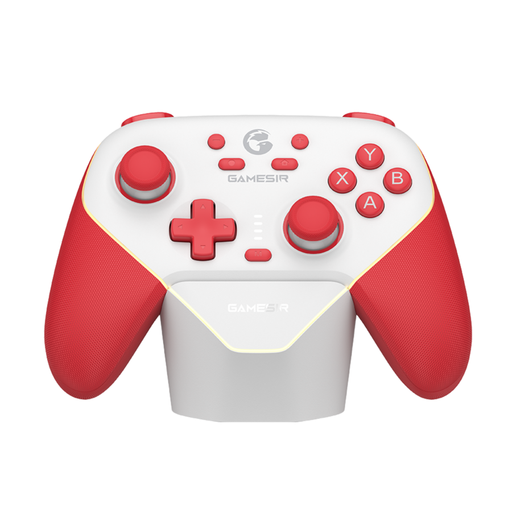
Why this choice suits this profile: This controller is suitable for players looking for a versatile solution for Switch, PC, iOS and Android, with three advertised connection modes: Bluetooth, wired and wireless receiver.
The product page clearly states the platforms and connection types, which limits unpleasant surprises linked to an accessory designed for a single device.
Triple-mode connection, stated weight of approximately 263 g and compatibility with multiple devices.
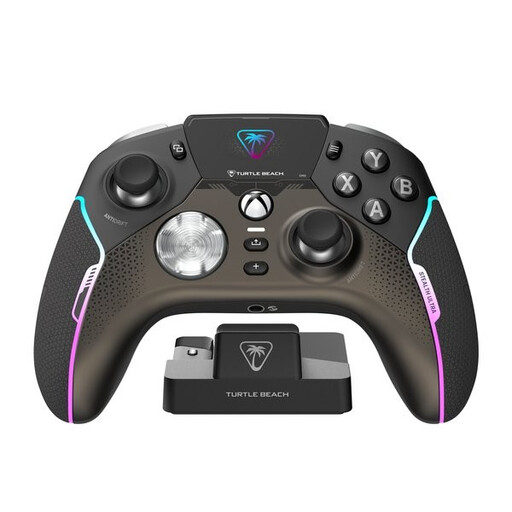
Why this choice suits this profile: PC and Xbox players who enjoy customising their controls have an integrated control screen, four programmable rear buttons and adjustable triggers.
The product page details Xbox and PC compatibility, the 2.4 GHz receiver and Bluetooth, rather than presenting wireless connection as universal.
Advertised Hall effect sticks, four programmable buttons and stated battery life of approximately 8 to 10 hours depending on settings.
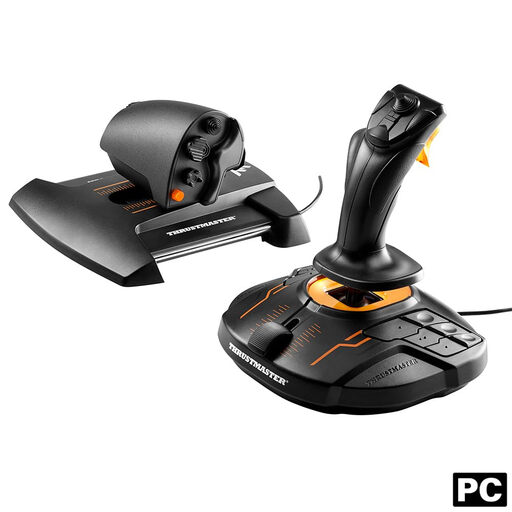
Why this choice suits this profile: This system is aimed at PC gamers who play flight simulators or space games and are looking for a joystick with a separate throttle control.
The specifications indicate the number of axes and buttons, the USB connection and Windows compatibility. This allows you to check the game's requirements before placing an order.
Four axes on the joystick, five on the throttle and stated 16-bit resolution.
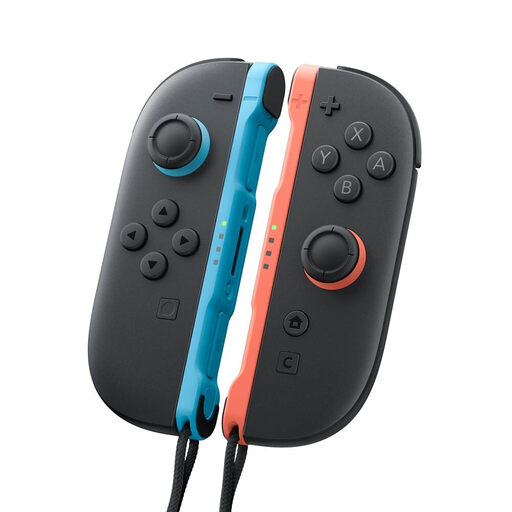
Why this choice suits this profile: This official pair is designed exclusively for the Switch 2. It is suitable for handheld play, local multiplayer and titles compatible with motion controls.
The "Nintendo Switch 2 only" compatibility is explicitly stated, which prevents buying it by mistake for a Switch of another generation.
Left and right pair, wrist straps included, HD Rumble 2 feedback, C button and advertised motion controls.
We have compiled a comprehensive list, updated in real time, of products that fully meet these strict selection criteria and European safety regulations.
Start by checking Windows compatibility, the connection type and game support. A standard PC controller is suitable for action, racing or platform games. For Microsoft Flight Simulator, Elite Dangerous and other simulations, a PC HOTAS consisting of a joystick and throttle offers more axes and buttons.
Battery life depends on the battery, charging frequency, vibrations and lighting. The figures stated by the manufacturer are indicative and may vary depending on settings. To preserve the battery, avoid high temperatures and use a compatible charger or cable.
Not always. Some games allow you to share each Joy-Con between two players. For titles that require a full controller per person, a second pair or a compatible controller will be more suitable. Check the number of supported players and the type of controls required by the game before making your choice.