
Livraison le jour même ou le lendemain

Qualité garantie

Débloquez vos offres de bienvenue: Livraison GRATUITE | Jusqu'à -80 % | 30 jours d'essai gratuits à JoyPlus
Téléchargez l'application
A gaming controller is more than just an accessory; it's an extension of your hands in the gaming world. Yet, choosing the right one can quickly become a headache. Between marketing promises, impenetrable spec sheets, and flashy designs, it's easy to make a misstep. This guide is here to help you decode the jargon and find the perfect gamepad for your playstyle, while avoiding the most common pitfalls.
The market is saturated with models, but not all are created equal. Here are the three most frequent issues that can ruin your gaming experience and your investment.
To make an informed choice, you need to read between the lines of the spec sheet. Let's focus on two aspects that are real game-changers.
This is arguably THE most crucial technical point for ensuring the longevity of your joysticks.
The choice between a wired connection and a wireless controller depends on your habits and how demanding you are.
Because every gamer is unique, we've selected models that meet specific needs, all while avoiding the pitfalls we've just discussed.
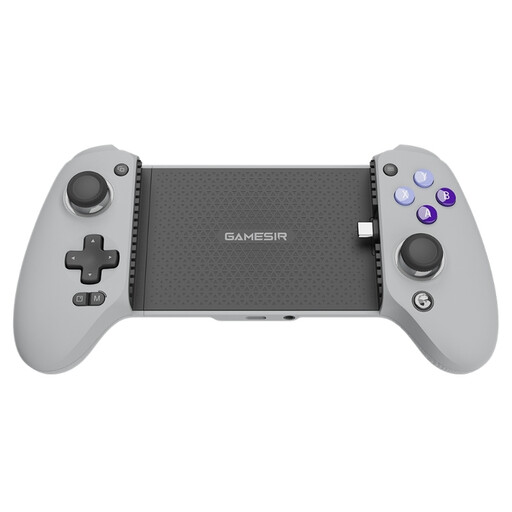
Why this model? This controller transforms any smartphone (Android or iOS) into a true portable console, offering ergonomics and precision worthy of a home console controller for mobile games. A must-have for those who take mobile gaming seriously.
It features analog joysticks and triggers with Hall effect technology, making it natively immune to the drift problem and guaranteeing far above-average durability.
Direct USB-C connection for zero latency and pass-through charging to ensure you never run out of battery mid-game.
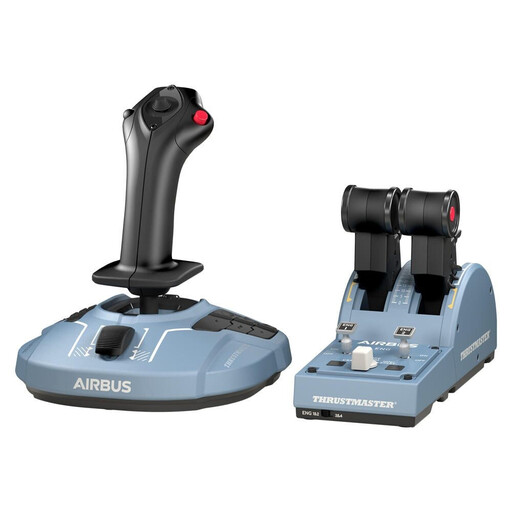
Why this model? Designed for PC simulation fanatics, this pack offers a faithful replica of an Airbus A320's controls. It's the ultimate choice for immersion for virtual pilots on Microsoft Flight Simulator or X-Plane.
It uses H.E.A.R.T magnetic sensor technology (a variant of Hall effect), ensuring surgical precision and a virtually unlimited lifespan, light-years ahead of the wear-and-tear issues of classic joysticks.
Official Airbus-licensed replica for maximum immersion. Modular and ambidextrous design to adapt to any virtual cockpit setup.
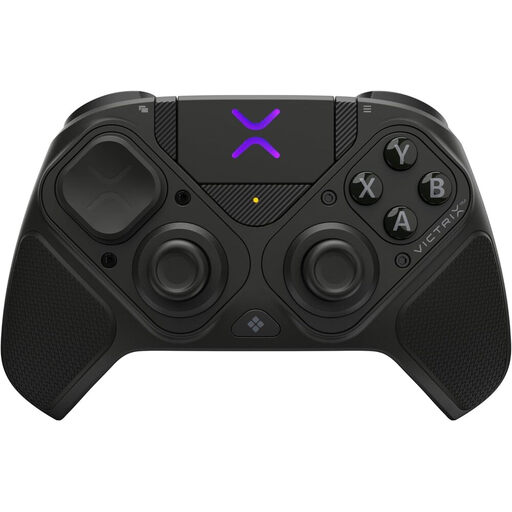
Why this model? This is a true performance tool built for competitive players on PC and Steam Deck. Its extreme modularity allows it to be reconfigured on the fly to adapt to any game, from FPS to fighting games.
Full Hall effect configuration (joysticks and triggers) for rock-solid reliability. Its modularity allows you to change the button layout, countering the pitfall of unsuitable ergonomics.
Complete modularity with an included 6-button "fightpad" module. "Clutch Triggers" with 5 stopping points for minimal reaction time.
Our complete selection features products that meet our quality and durability criteria, all tested and approved by our experts.
Absolutely. Hall effect technology relies on magnetic fields to detect movement, which eliminates the physical contact and friction responsible for wear in traditional controllers. The result: virtually no wear and tear, leading to highly effective prevention of joystick "drift" and significantly increasing the controller's lifespan.
Generally, no, at least not directly. Consoles like the Switch and Xbox use proprietary communication protocols. While third-party adapters exist that allow for such connections, they can introduce latency and don't always guarantee support for all features (vibrations, gyroscope, etc.). Our advice: always opt for a controller that clearly states native compatibility with your platform.
To minimize latency (or input lag) with a wireless controller, prioritize models that use a 2.4 GHz connection via a USB dongle. This technology is generally faster and more stable than standard Bluetooth. For competitive games where every millisecond counts, a wired connection remains the most reliable solution. Also, remember to keep your controller's firmware up to date, as manufacturers often release patches that improve performance.