Whether you're a gamer pulling all-nighters or a remote worker spending your days in front of a screen, the reality is the same: the discomfort of a bad chair can ruin everything. Back pain, neck strain, poor circulation… An unsuitable seat can turn a passion or a workday into a total nightmare. The gaming chair market promises a solution, but it's saturated with products whose aggressive marketing often hides design flaws.
As a product expert at Joybuy, my mission is to help you see through the noise. Let's set aside the marketing jargon and focus on what truly matters. Here are the 3 classic traps to avoid so you don't regret your purchase a few months down the line.
- The Illusion of Non-Adjustable "Ergonomics"?: Many chairs are labelled "ergonomic" based solely on their racing-style bucket seat design. However, true ergonomics lies in the chair's ability to adapt to your body, not the other way around. A seat without precise adjustments is just a rigid shell.
- Materials Designed for Obsolescence?: Entry-level PU leather has a nasty habit of cracking and peeling after a year, while low-density foam quickly sags, leaving you literally sitting on the metal frame.
- Aesthetics at the Expense of Support?: A flashy, racing-inspired design is appealing, but it's no guarantee of proper support. A well-designed ergonomic office chair will often be far better for your back than a flashy but poorly engineered gaming chair.
Beyond the Marketing?: Technical Specs to Check
To make an informed choice, you must rely on objective features. Here are the three pillars of a comfortable and durable office chair, whether it's for gaming or work.
1. Adjustable Ergonomics?: Your Spine Will Thank You
A good gaming seat must offer a full range of adjustments. Look for these key features?:
- Adjustable Lumbar Support?: This is non-negotiable. A simple removable pillow is a stopgap, but a gaming chair with built-in adjustable lumbar support (in height and/or depth) is far more effective at maintaining the natural curve of your spine.
- Multi-Directional Armrests?: Fixed armrests are a nightmare for your traps and shoulders. Aim for at least 2D armrests (adjustable in height and width). 3D (adding forward/backward) or 4D models (adding rotation) ensure perfect alignment with your desk, relieving strain on your shoulders and wrists.
- Recline and Tilt Mechanism?: A reclining backrest allows you to vary your posture throughout the day. A synchronized tilt mechanism, where the seat and backrest tilt in a coordinated motion, encourages dynamic posture and improves blood circulation.
2. Upholstery and Padding?: The Comfort and Durability Duo
The choice of material directly impacts the comfort and longevity of your chair.
- PU Leather?: Easy to clean and aesthetically pleasing, but its quality varies widely. Entry-level models are not very breathable and age poorly. Some brands offer micro-perforated surfaces (like AIR Technology) to improve ventilation.
- Fabric and Mesh?: A breathable mesh gaming chair is the top choice for those who tend to run hot. Mesh offers unbeatable ventilation and conforms well to the body's shape. Fabric, meanwhile, is a good alternative, often softer to the touch.
- Foam Density?: This is the crucial factor for durability. High-density foam (typically over 50 kg/m?) will retain its shape and support much longer than a low-end foam that will flatten in just a few months.
3. The Foundation?: Frame, Gas Lift, and Safety
The sturdiness of your ergonomic computer chair depends on a stable foundation.
- The Gas Lift?: This controls the seat height. Insist on a Class 4 gas lift. It's the most robust standard for office chairs, guaranteeing safety and longevity, typically supporting up to 150 kg.
- The Wheelbase?: The star-shaped base can be made of nylon or metal (steel, aluminium). A metal base is always more robust and durable, although modern reinforced nylon bases also offer excellent stability.
Our Recommended Chair Picks
Instead of a random list, we've selected specific models for concrete use cases to help you find the perfect fit.
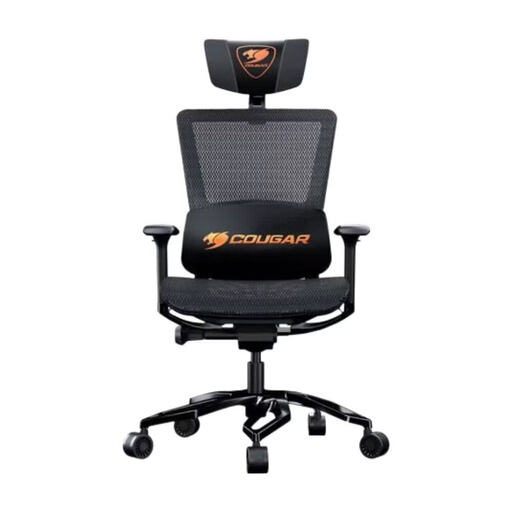
IDEAL FOR : THE VERSATILE USER (GAMING & REMOTE WORK)
Why it's a match : Perfect for those who juggle long workdays and gaming sessions. Its understated design fits into a professional office while offering the adjustments a gamer demands.
How it avoids the trap
It delivers true ergonomics with dynamic lumbar support and 4D armrests. Its breathable mesh design solves the dual problems of heat buildup and premature PU leather wear.
Key Advantage & Highlights
Fully breathable mesh design for optimal thermal comfort. Full adjustability (height, seat depth, recline, 4D armrests) for a precision-tuned fit.
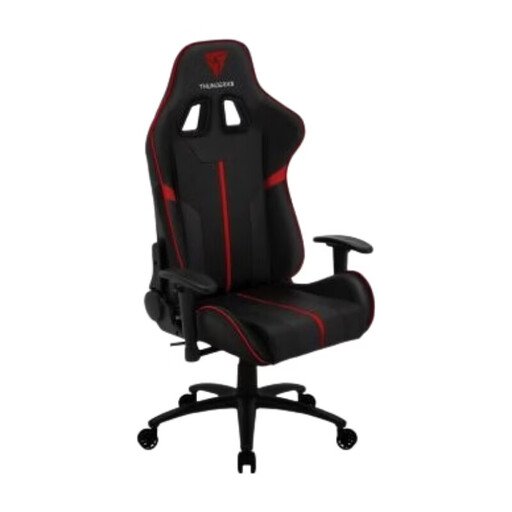
IDEAL FOR : THE DEDICATED GAMER (STYLE & ENDURANCE)
Why it's a match : It combines the racing aesthetic prized by gamers with features designed for long-term comfort, like a deep backrest recline and support cushions.
How it avoids the trap
It sidesteps the non-breathable PU leather trap with its AIR Technology, which uses a micro-perforated surface to improve airflow. It doesn't sacrifice comfort for the sake of style.
Key Advantage & Highlights
AIR Technology for enhanced upholstery breathability. Backrest reclines up to 135° with a rocking function to relax between matches.
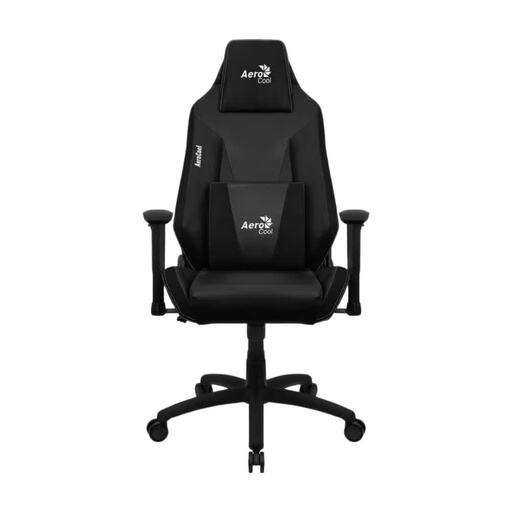
IDEAL FOR : THE FIRST-TIME BUYER (BUDGET-CONSCIOUS)
Why it's a match : It's a solid entry point for those who want a real gaming chair without breaking the bank. It offers a level of comfort far beyond that of a standard office chair.
How it avoids the trap
It doesn't skimp on safety and structure, incorporating a Class 4 gas lift and a steel frame—features often sacrificed on entry-level models.
Key Advantage & Highlights
Class 4 gas lift supporting up to 150 kg for enhanced safety and durability. Removable head and lumbar pillows included for an effective first layer of support.
Looking for other options ?
We have curated a complete selection of products that meet our demanding selection criteria and safety standards.
Frequently Asked Questions About Gaming Chairs
What is the lifespan of a gaming chair?
The longevity of a gaming chair depends on the quality of its components and how it's used. An entry-level model with low-density foam and thin PU leather can show signs of wear within the first or second year. A mid-range or high-end chair with a steel frame, a Class 4 gas lift, and quality upholstery will easily last 3 to 5 years, or even longer with proper care.
PU leather or mesh chair: which should you choose?
It all depends on your priorities?:
- PU Leather?:
- Pros?: Easy to clean (a simple wipe-down is enough), premium look, wide choice of colours.
- Cons?: Less breathable (can get warm), and low-end versions can crack over time.
- Fabric or Mesh?:
- Pros?: Very breathable (ideal for long sessions or warm rooms), flexible, and comfortable.
- Cons?: Stains more easily and can be harder to clean if you have a tough spill.
How do you properly adjust an ergonomic computer chair?
Proper adjustment is the key to preventing pain. Here’s the step-by-step process?:
- Seat Height?: Sit down and adjust the height so your feet are flat on the floor and your knees form a right angle (about 90°).
- Lumbar Support?: Position the support (pillow or built-in adjustment) at the small of your back to maintain its natural curve.
- Armrests?: Adjust their height so your elbows rest on them at a right angle while your shoulders are relaxed. Your forearms should be parallel to the floor.
- Seat Depth (if adjustable)?: Leave a gap of two to three fingers between the edge of the seat and the back of your knees.
- Recline?: Alternate between an upright position for focused tasks (around 100°) and a more reclined position for moments of relaxation (110-120°).