
Livraison le jour même ou le lendemain

Qualité garantie

Débloquez vos offres de bienvenue: Livraison GRATUITE | Jusqu'à -80 % | 30 jours d'essai gratuits à JoyPlus
Téléchargez l'application
Whether you're an esports pro, working from home full-time, or a content creator, choosing a gaming chair is not a decision to be taken lightly. It's far more than a simple accessory to enhance your setup; it's a real investment in your comfort and postural health. The problem? The market is flooded with models making often questionable marketing claims. As the hardware editor at Joybuy, my mission is to help you navigate this jungle.
This guide breaks down the most common pitfalls and gives you the keys to making an informed choice. The goal: to ensure your next gaming seat becomes a long-term ally.
Before you even start comparing models, it's vital to know how to spot the hidden flaws that can turn a promising purchase into a total nightmare.
To avoid these traps, focus on objective data. Here are the three non-negotiable points to check before you pull out your credit card.
The gas lift class is the best indicator of your gaming chair's sturdiness and safety.
Armrest adjustability is crucial for relieving tension in the shoulders, neck, and forearms.
Long-term comfort depends as much on the upholstery as it does on the foam quality.
Rather than an endless list, here are our targeted recommendations for different user profiles, all based on the quality criteria we've just covered.
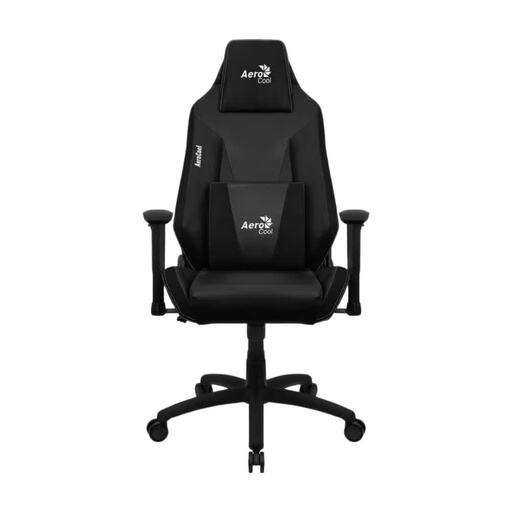
Why it's a great choice: Ideal for those who want the essentials without breaking the bank. It provides excellent comfort for long gaming or work sessions thanks to its key ergonomic adjustments.
This model includes a Class 4 gas lift and 2D armrests, allowing it to avoid the traps of low-end build quality and fake ergonomics. The support is real and adjustable.
Unbeatable value for money. It comes with removable head and lumbar cushions for customised lumbar support. Supports up to 150 kg.
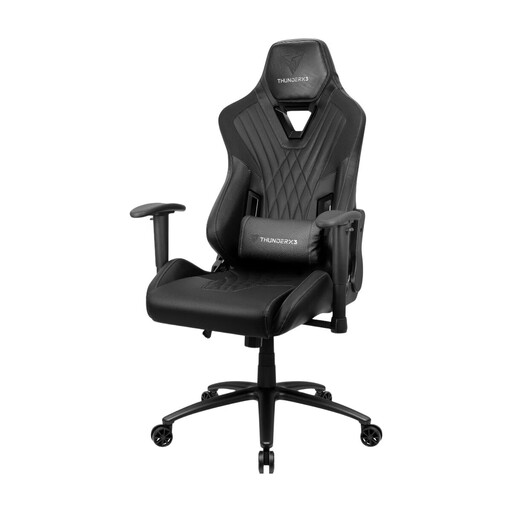
Why it's a great choice: Designed for those who spend long hours sitting down. Its breathable technology makes it as comfortable for a day of coding as it is for a night of raiding, with added style.
It directly tackles the problem of non-breathable upholstery. The AIR Technology and its micro-perforated surface ensure excellent air circulation, putting an end to discomfort.
Unmatched thermal comfort for prolonged use. Its steel frame, Class 4 gas lift, and high-density foam are all guarantees of durability.
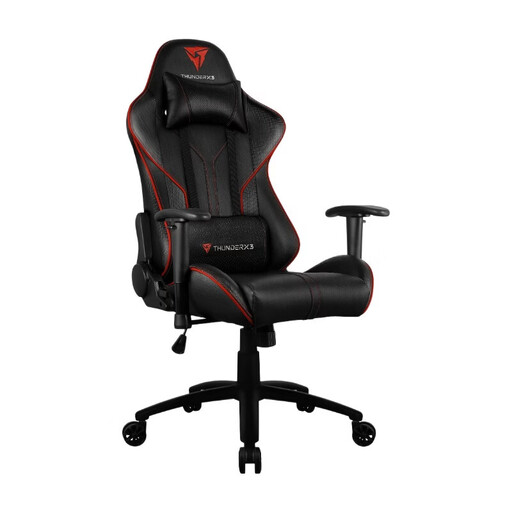
Why it's a great choice: For gamers who see their chair as the centrepiece of their setup. The bold design and RGB lighting provide the visual flair, without ever sacrificing build quality.
Here, looks don't come at the expense of sturdiness. It's built on a steel frame, incorporates a Class 4 gas lift (150 kg), and uses high-density foam to go the distance.
Its customisable HEX RGB lighting for a unique setup. Comfort isn't an afterthought, with quality PU leather and comprehensive adjustments (2D armrests, adjustable cushions).
We have selected a full range of products that meet our quality criteria and current safety standards.
Is a gaming chair really suitable for working from home? Absolutely, provided you choose a truly ergonomic model. A gaming chair with good lumbar support, adjustable armrests (2D minimum), and a quality seat will often be more versatile and better equipped than a standard office chair at the same price point.
What is the average lifespan of a gaming chair? The lifespan depends heavily on the quality of the materials. An entry-level model with a low-grade gas lift and poor-quality PU leather will show signs of wear in 1 to 2 years. Conversely, a quality chair with a Class 4 gas lift, a steel frame, and high-density foam can last you for 5 years or more, provided it's well-maintained.
How do I maintain PU leather upholstery? To maintain its suppleness and prevent cracking, clean it regularly with a soft, damp cloth. Most importantly, do not use harsh cleaning products, solvents, or alcohol, as they will dry out and damage the material. For stains, a little soapy water usually does the trick.