
Livraison le jour même ou le lendemain

Qualité garantie

Débloquez vos offres de bienvenue: Livraison GRATUITE | Jusqu'à -80 % | 30 jours d'essai gratuits à JoyPlus
Téléchargez l'application
Whether you're a hardcore gamer, a remote professional, or a content creator, one thing is certain: spending hours sitting down requires equipment that's up to the task. A gaming chair isn't just a gadget; it's a real investment in your comfort and postural health. The problem is, the market is flooded with models making flashy marketing promises that often hide nasty surprises.
Our editorial team's mission is to help you cut through the noise. Let's forget the marketing jargon and focus on what really matters. This guide breaks down the 3 most common pitfalls and gives you the essential criteria for making the right choice, without throwing your money away.
Aggressive designs and bright colours can distract from what's essential. Here are the flaws you'll bitterly regret after just a few months of use.
Many entry-level chairs are covered in low-quality polyurethane (PU). While attractive at first glance, this material tends to crack, peel, and fade in less than a year. Even worse, it's not breathable at all. The result: a feeling of discomfort and clamminess during long sessions, especially in the summer.
A gaming chair with a "racing seat" look and removable cushions isn't necessarily ergonomic. The pitfall lies in the lack of meaningful adjustments. If the armrests don't adjust to your desk height, or if the lumbar cushion is just a simple pillow with no real support, the beneficial effect on your posture will be virtually non-existent. A truly ergonomic gaming chair must adapt to your body, not the other way around.
A spec sheet stating a maximum weight capacity of 150 kg can be misleading. This value means nothing if the rest of the structure is flimsy. A lower-class gas lift (the cylinder that adjusts the height), a thin plastic base, or fragile casters are the first components to fail. The stability and durability of a gaming chair depend on the quality of every component, not just a number on the box.
To avoid these pitfalls, focus on three objective parameters that determine the quality and longevity of your future chair.
The choice of material is crucial for comfort and durability.
A good chair must adapt to you. Check for the following:
The foundation of any good chair is its skeleton: the internal frame and the base.
Rather than offering an endless list, we've matched specific models to clear user profiles, based on the objective criteria defined above.
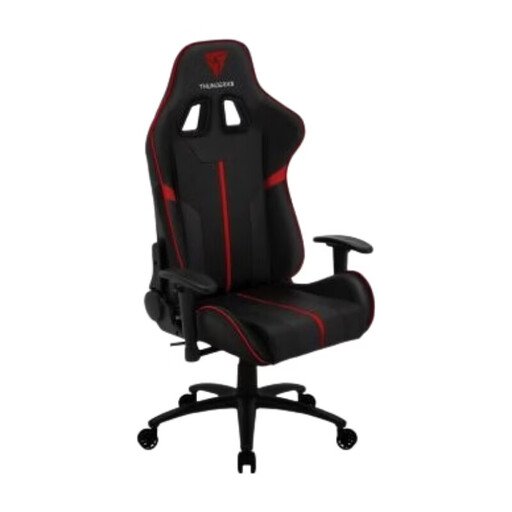
The ideal user: Gamers who put in long hours and want to avoid the discomfort of sweating at all costs. This chair is designed to stay cool, even under pressure.
It bypasses the stuffy faux leather trap with its AIR Tech: a micro-perforated surface that lets air circulate to keep you cool.
Top-tier breathability for long-lasting comfort. A backrest that reclines up to 135° and a rocking function to decompress between matches.
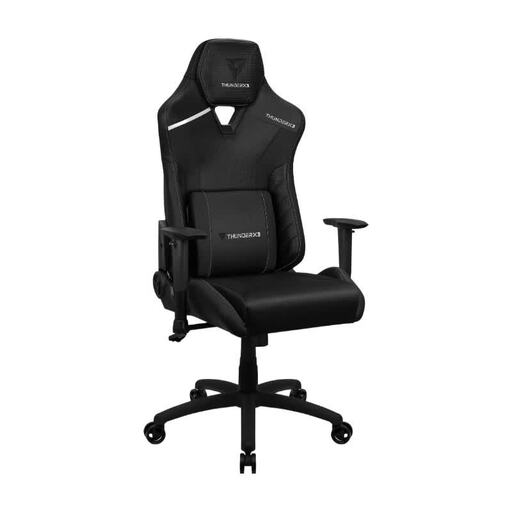
The ideal user: Those looking for a chair built to last that offers excellent support, including for larger body types.
It doesn't just display 150 kg on the spec sheet. It proves its sturdiness with components that inspire confidence: a steel frame, a Class 4 gas lift, and a reinforced nylon base.
Ultra-robust structure and a 135° reclining backrest. Its 2D armrests and adjustable cushions help you find the perfect posture.
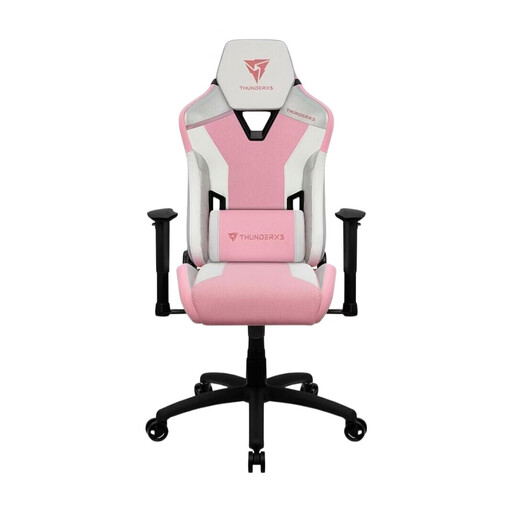
The ideal user: Creators, streamers, and remote workers who want a high-performance chair with an elegant look, capable of blending into a modern setup without the sometimes-overbearing "racing" aesthetic.
It proves that style and quality are not mutually exclusive. Behind its clean design lie serious materials: premium PU leather, high-density foam, and a reliable structure with a Class 4 gas lift.
A polished design available in 12 colours to perfectly match your space. Comfort is guaranteed by high-density foam that won't sag.
For those who love atmospheric lighting, we've also selected chairs that integrate LED lighting, without ever compromising on the quality criteria in this guide.
The longevity of a gaming chair directly depends on the quality of its materials and how it's used. A model with a steel frame, a Class 4 gas lift, and premium PU leather upholstery can easily last over 5 years with regular maintenance. In contrast, entry-level models can show signs of wear (peeling upholstery, sagging gas lift) in as little as a year or two.
Not always, and that's the key distinction. A quality gaming office chair, however, incorporates ergonomic features often reserved for much more expensive office chairs: a high backrest, adjustable lumbar and neck support, and adjustable armrests. It therefore often represents an excellent compromise for anyone who spends long hours sitting, whether for gaming or working, offering a very competitive features-to-price ratio. The key remains the chair's ability to adapt to your body.
Maintenance is simple, but it must be regular to preserve the upholstery's appearance. Use a soft, damp cloth with a little neutral soap if necessary. Rub gently without applying too much pressure. It is crucial to never use harsh chemicals, detergents, or abrasive cleaners, as they will attack the PU's protective layer and irreversibly accelerate its degradation. For synthetic leather upholstery, a regular wipe-down prevents sweat and dust from setting in.