
Livraison le jour même ou le lendemain

Qualité garantie

Débloquez vos offres de bienvenue: Livraison GRATUITE | Jusqu'à -80 % | 30 jours d'essai gratuits à JoyPlus
Téléchargez l'application
Gearing up for PC or console gaming can quickly become a daunting task. A keyboard-mouse-headset gaming bundle might seem like the perfect solution, but be warned: the market is a jungle filled with potential disappointments. It's easy to make a purchasing mistake when caught between marketing hype and technical specs.
As a product expert for the Joybuy editorial team, my mission is to cut through the noise for you. We'll skip the technical jargon and get straight to the point: finding the complete gaming kit that will serve you well for years to come, without breaking the bank.
Before we even start comparing spec sheets, let's review the classic mistakes that turn a good deal into a case of buyer's remorse.
To make the right choice, focus on these three pillars. They are your guarantee that your 4-in-1 gaming combo will hold up during your long gaming sessions.
This is your primary tool. For a first purchase, a good membrane keyboard is perfectly suitable. The important thing is to check that it has:
It's an extension of your hand. Its performance rests on two key elements:
In gaming, hearing and being heard is crucial. For an entry-level gaming headset, here are the priorities:
Keeping these criteria in mind, some bundles stand out for their excellent value. Here is a model that's perfect for beginners or gamers on a budget.
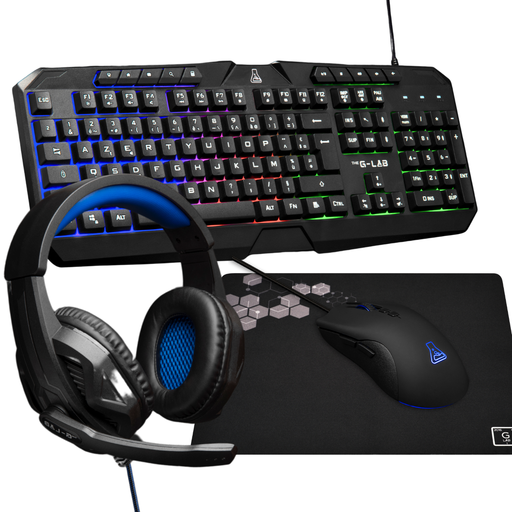
Why we recommend it: It's the ultimate all-in-one solution for a hassle-free setup. The bundle includes all four essentials (keyboard, mouse, headset, mousepad), making it the perfect starting point for a first gaming setup on PC or console.
This bundle checks all the right boxes: it includes a keyboard with a standard layout (avoiding the #1 risk!) and a mouse with adjustable sensitivity up to 3200 DPI—the ideal range to bypass marketing hype. The entire set is cohesive and designed to work in perfect harmony.
Its greatest asset is being complete and ready to play right out of the box. No more hunting for each peripheral individually. The keyboard is backlit, the headset has an integrated mic for voice chat, and the non-slip mousepad ensures a perfect glide.
Discover our full selection of bundles that meet all our quality criteria and current safety standards.
Yes, most wired USB bundles are recognized by current consoles (PS4, PS5, Xbox One, Xbox Series X/S). The keyboard and mouse will work on compatible games, such as Call of Duty, Fortnite, or Minecraft. As for the headset, it simply plugs in via USB or the 3.5mm jack on the controller.
It all depends on the quality and how you use it, of course. However, a bundle from a reputable brand, even an entry-level one, is designed to last several years with normal use. The secret to longevity? Avoid spilling soda on your keyboard, clean it from time to time, and don't yank on the cables.
Absolutely. Almost all backlit gaming keyboards allow you to manage the lighting via a key combination (often "Fn" + another key). This lets you dim the brightness or turn it off completely, whether for atmosphere or simply to avoid distractions.