
Livraison le jour même ou le lendemain

Qualité garantie

Débloquez vos offres de bienvenue: Livraison GRATUITE | Jusqu'à -80 % | 30 jours d'essai gratuits à JoyPlus
Téléchargez l'application
Building or upgrading a gaming setup is a uniquely thrilling moment for any player. But be warned: the gaming accessories market is a jungle where marketing promises can quickly turn an exciting purchase into a costly disappointment. Before pulling out your credit card, it's crucial to know the most common pitfalls so you can invest in hardware that will actually improve your gaming experience.
I'm the Head of Product Recommendations at Joybuy, and my role is to help you navigate this landscape. Let's review the mistakes to avoid and the criteria that truly matter when making the right choice.
To avoid these unpleasant surprises, it's best to focus on a few key technical specifications. These are what truly determine if an accessory is suited for your needs and if it will stand the test of time.
The choice of a gaming keyboard largely comes down to the type of switches.
The choice between wired and wireless is primarily a matter of priorities.
To help you take action, here is a selection of products suited for different profiles, chosen according to the criteria we've just discussed.
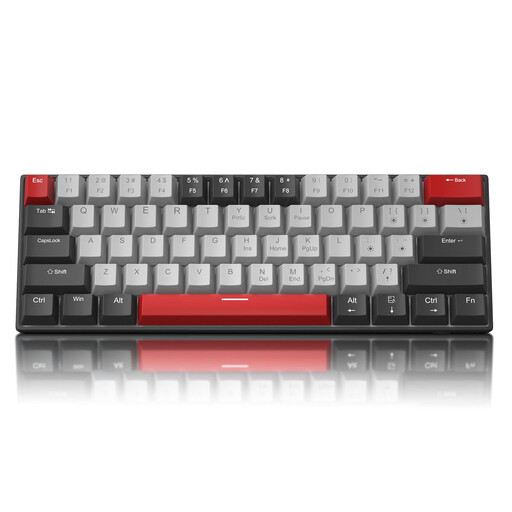
Why this model? Perfect for a first gaming setup or for smaller desks. This compact wired keyboard gets straight to the point: it delivers the fundamentals of a good gaming keyboard, no frills, allowing you to get serious gear without breaking the bank.
It features genuine Outemu Blue mechanical switches at a very competitive price, sidestepping the trap of membrane keyboards disguised with a "mechanical feel."
Its compact 60% layout frees up maximum desk space. It also includes full anti-ghosting technology for flawless in-game responsiveness.

Why this model? Designed for gamers who love to fine-tune every detail of their experience. This keyboard offers deep customisation, premium build quality, and great versatility, equally at home in gaming and productivity.
Its triple connectivity and very high-capacity battery (up to 8000 mAh) prove that it's possible to combine sleek RGB lighting with flawless wireless performance, without sacrificing battery life.
Its PCB is hot-swappable, allowing you to change switches on the fly without soldering. Its Gasket Mount structure and 5 layers of sound-dampening foam ensure a muted and very satisfying typing experience.
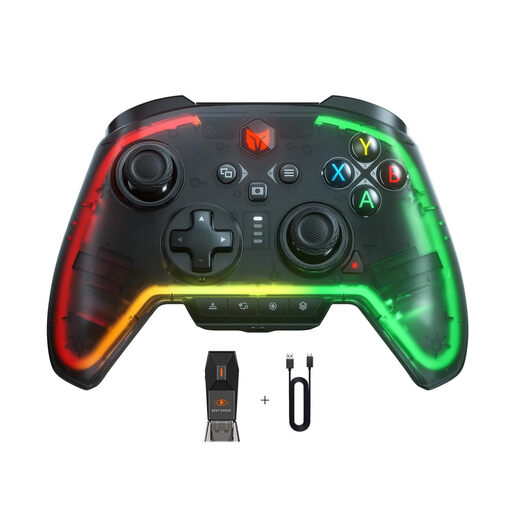
Why this model? This is the all-in-one solution for the gamer who juggles between their PC and consoles. This PC controller is designed to adapt to multiple ecosystems, saving you from buying multiple controllers and having to get used to each one.
Its spec sheet makes its intentions clear: broad compatibility (PC/Switch/PS4) that immediately eliminates any doubts or unpleasant surprises with cross-platform connections.
Programmable rear buttons, macro functionality, and a 6-axis gyro for advanced use on Switch and PC. These are features typically found on much more expensive models.
Once you've chosen your battle-ready peripherals, lighting is the finishing touch to perfect the immersion of your gaming space.
Explore our full selection of products that meet these strict selection criteria and European safety standards.
Is a mechanical keyboard really more durable? Yes, and the difference is night and day. The switches in a mechanical keyboard are rated for tens of millions of keystrokes (often 50 million or more), whereas a standard membrane keyboard struggles to surpass 5 to 10 million. The icing on the cake is that on many mechanical models, a faulty switch can be replaced individually.
Is latency on a wireless gaming keyboard an issue in 2026? Absolutely not for the vast majority of gamers. Modern 2.4?GHz wireless technologies, which use a dedicated USB dongle, now offer latency so low it's imperceptible to the human eye, rivalling a wired connection. Bluetooth may exhibit slightly more noticeable latency, but it remains perfectly playable for most non-competitive games.
How can I ensure my gaming headset will work on my PS5 and PC? The easiest way is to choose a gaming headset with dual connectivity. A model that offers both a USB connector (for PC) and a 3.5mm jack (to plug into the PS5 controller) will guarantee maximum compatibility. In any case, the golden rule is to always check the list of compatible platforms on the product page.