
Livraison le jour même ou le lendemain

Qualité garantie

Débloquez vos offres de bienvenue: Livraison GRATUITE | Jusqu'à -80 % | 30 jours d'essai gratuits à JoyPlus
Téléchargez l'application
Building your first gamer setup is an exhilarating moment, but the path is often fraught with marketing pitfalls and agonizing technical choices. As a product expert at Joybuy, my role is to guide you through this jungle to build a coherent and high-performance PC gamer configuration without throwing your money away on unnecessary components. Let's review the traps to avoid and the criteria that truly matter for making the right choices.
Before choosing your components, it's crucial to know the most common mistakes that can turn a promising investment into a costly disappointment.
To build an affordable gaming setup that still performs, focus on these key points that have a direct impact on your in-game feel.
The refresh rate, measured in hertz (Hz), is the number of images your monitor can display per second. While a standard office screen is fine at 60?Hz, the difference in gaming is simply staggering.
The 80 PLUS certification guarantees a minimum energy efficiency. An 80 PLUS Bronze power supply, for example, ensures at least 82% efficiency at 20% load and 85% at 50% load. In simple terms, this translates to:
An XXL mouse pad is more than just a cosmetic accessory. By covering a large part of your desk, it creates a uniform gliding surface for your keyboard and mouse. This allows for wide, precise mouse movements—a major asset for players who prefer low DPI settings—while also protecting your desk's surface.
Here are a few products from our catalogue, chosen to meet specific needs while avoiding the pitfalls we've just discussed.
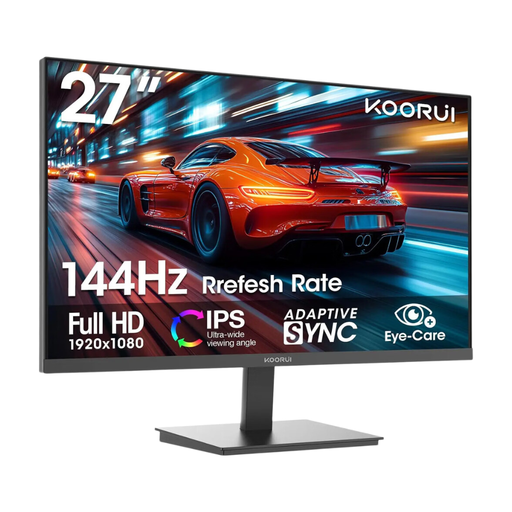
Why it's the right choice: Perfect for a first affordable gaming setup, this monitor combines a great 27-inch size with a 144 Hz refresh rate. These are two essential assets for an immersive gaming experience, all at an unbeatable price.
This choice avoids the classic trap of neglected peripherals. By dedicating a fair portion of the budget to the monitor, the impact on fluidity is immediate and noticeable.
Its 144 Hz refresh rate and IPS panel ensure vibrant colours and wide viewing angles. Adaptive Sync technology perfects the experience by eliminating screen tearing.

Why it's the right choice: Here, the goal is raw performance for FPS and e-sports. The absolute priority is responsiveness, and this 240 Hz monitor is designed to offer a tangible competitive advantage without the extra cost of a 4K model.
Rather than betting everything on the graphics card, this choice maximizes the PC's potential by ensuring every generated frame is displayed without the slightest latency.
Ultra-fast 240 Hz refresh rate and 1 ms response time. Its "Rapid IPS" panel ensures maximum responsiveness without sacrificing colour richness.
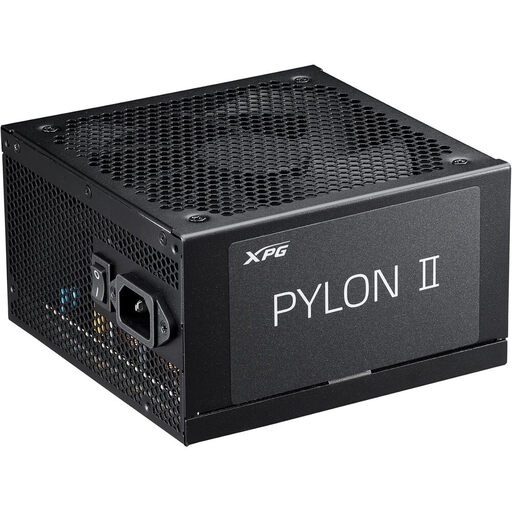
Why it's the right choice: This type of gamer knows that a solid foundation is the secret to longevity. This power supply unit provides stable and efficient power for a mid-range build, while leaving headroom for future upgrades.
It tackles the trap of the neglected power supply head-on. Investing in a certified PSU is like buying life insurance for your entire PC gamer configuration against power surges and failures.
80 PLUS Bronze certification for an excellent efficiency-to-price ratio. Its compatibility with recent standards (ATX 3.1) ensures good future-proofing.
We have curated a complete selection of products that meet our performance criteria and comply with European safety standards.
Yes, as long as you remain realistic. A well-balanced, affordable gaming setup designed for 1080p gaming will run the vast majority of recent titles. You'll likely need to make some compromises on graphical details (switching from "Ultra" to "High" or "Medium") to maintain perfect fluidity. The trick is to prioritize a high refresh rate over a 4K resolution, which is out of reach for this type of budget.
It all depends on the quality of the chosen components. A certified PC power supply and a good-quality motherboard can last 5 to 7 years, or even longer. The graphics card and processor are the first to show their limits against the demands of new games. Generally, a mid-range build remains relevant for 3 to 4 years before a graphics card upgrade becomes necessary to comfortably play the latest blockbusters.
For an optimal gaming experience from day one, three peripherals are essential: