
Livraison le jour même ou le lendemain

Qualité garantie

Débloquez vos offres de bienvenue: Livraison GRATUITE | Jusqu'à -80 % | 30 jours d'essai gratuits à JoyPlus
Téléchargez l'application
A standard controller isn't enough for every game. Whether you're into flight simulation, space combat, fighting games or sessions on the Nintendo Switch 2, each use case demands a specific design. The market for game controllers and joysticks is full of promises about precision, responsiveness and durability, but it doesn't always spell out the limitations of each product.
Before you head to the checkout, keep three pitfalls in mind.
Start by checking the precise list of compatible devices: PC Windows, PS5, PS4, Xbox Series, Xbox One, Nintendo Switch or Nintendo Switch 2. A PS5 joystick, an Xbox joystick and a PC joystick don't necessarily offer the same features.
On a computer, XInput or DirectInput mode can change how the device is recognised by games. On a console, some models require a USB connection, even when they offer advanced features. A wireless gaming controller should also specify its protocol: Bluetooth, 2.4 GHz receiver or proprietary connection.
Hall Effect sensors – also known as contactless magnetic sensors – reduce the mechanical friction involved in detecting movement. You'll find them on several specialised controllers, but this technology doesn't let you skip checking the calibration, trigger travel and base stability.
For a flight simulation joystick, look at the number of axes available:
A HOTAS flight simulator system pairs a stick with a throttle control. A HOSAS setup, with two sticks, is better suited to space games that make use of all six degrees of freedom.
A controller with lots of controls naturally takes up space. Measure your desk before choosing a flight simulation joystick or a system with a mounting bracket. Non-slip pads, desk clamps and the weight of the base all play a part in stability.
With a programmable controller, check for saveable profiles, rear buttons and compatible software. For a fight stick, examine the eight-button layout, the type of lever, the cable length and how accessible the components are. A case that opens can make maintenance or replacing certain parts easier, without guaranteeing that the manufacturer will cover all repairs.
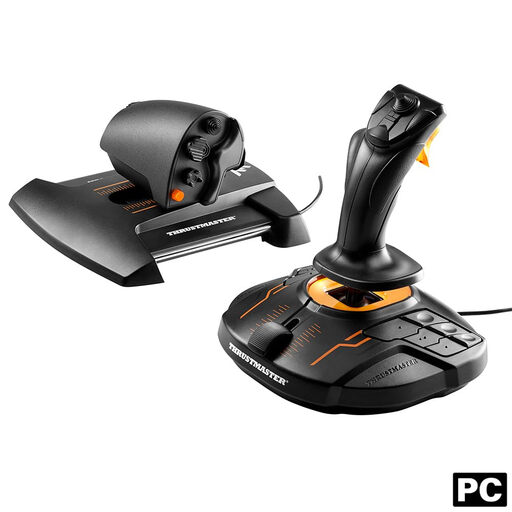
Why this choice suits this profile: This duo, comprising a joystick and a throttle control, offers a complete foundation for discovering Microsoft Flight Simulator, X-Plane or Elite Dangerous on PC Windows.
The listing mentions a wired USB connection and compatibility with Windows 10 and 11, which reduces unpleasant surprises related to platform or battery.
H.E.A.R.T. magnetic sensor advertised as 16-bit, ambidextrous stick, four axes on the joystick and five on the throttle control.
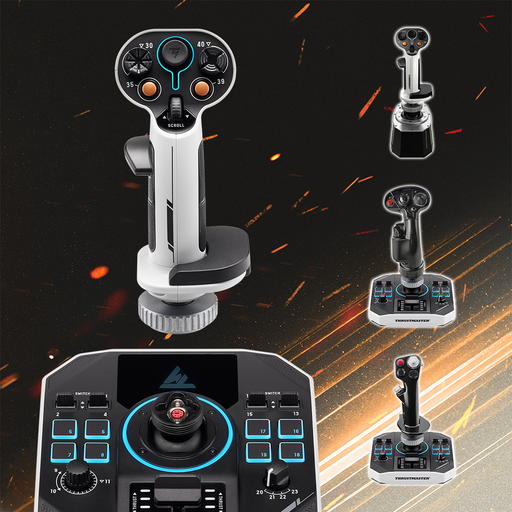
Why this choice suits this profile: Space simulation fans on PC get two sticks to split movements and rotations in Elite Dangerous or Star Citizen.
The setup is clearly presented as a HOSAS duo for PC – no ambiguity about any universal console compatibility.
Two sticks, H.E.A.R.T. magnetic sensors, six axes of movement and up to 88 assignable buttons, according to the product listing.
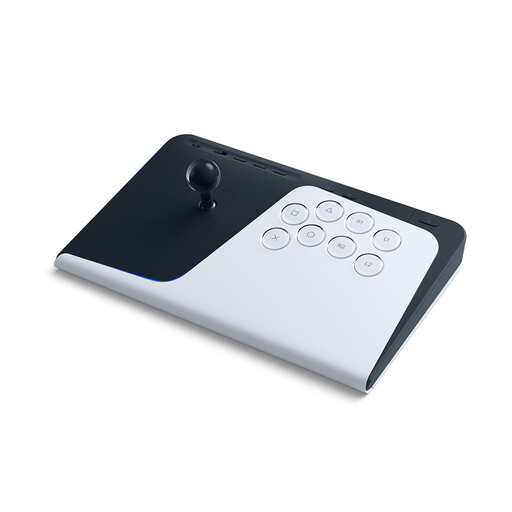
Why this choice suits this profile: This PS5 fight stick is aimed at fighting game fans who want to play at home or easily transport their gear in its carry case.
It offers both a PlayStation Link wireless connection and a USB Type-C connection, so it can adapt to different gaming situations.
Digital stick, mechanical switch buttons, interchangeable restrictor gates and a battery life advertised at up to 40 hours.
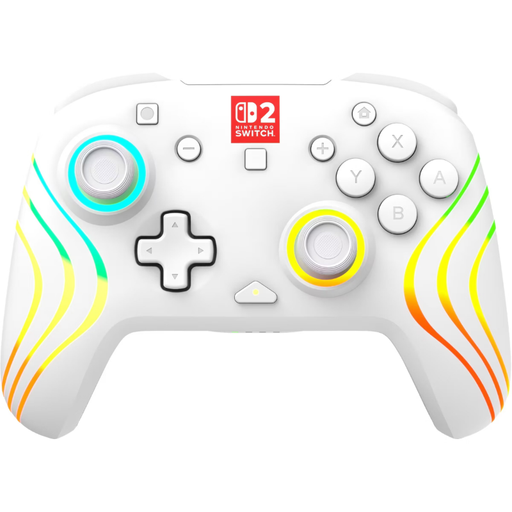
Why this choice suits this profile: This controller is ideal for Switch 2 users who move from the sofa to online gaming and want to customise their controls.
The listing confirms compatibility with Switch 2, Switch, Switch Lite and Switch OLED, as well as Bluetooth and USB-C connections.
Battery life advertised at up to 20 hours, two programmable rear buttons, motion controls, C button and 3.5 mm headphone jack.
We've put together a comprehensive list, updated in real time, of products that meet these demanding selection criteria and European safety standards.
Simply plug the device into a USB port, install the supplied software if needed, then open the game's settings. Assign each axis and each button before starting a game. You may need to calibrate if the stick doesn't return to centre properly.
It all depends on how often you use it, how you transport it, how well you maintain it and the quality of its components. Magnetic sensors reduce some friction, but buttons, cables, triggers and the battery are still subject to wear. Keep liquids away, store the controller somewhere dust-free and unplug it by pulling the plug, never the cable.
It doesn't need recharging and its battery doesn't need replacing, but you do have to deal with a cable. A wireless controller gives you more freedom, at the cost of occasional recharging and having to factor in a receiver or Bluetooth connection. The right choice really comes down to your space and your gaming habits.