
Livraison le jour même ou le lendemain

Qualité garantie

Débloquez vos offres de bienvenue: Livraison GRATUITE | Jusqu'à -80 % | 30 jours d'essai gratuits à JoyPlus
Téléchargez l'application
Choosing a new gaming keyboard can often be a daunting task. Between the different switch types, form factors, and features, it's easy to get lost. The French brand The G-Lab offers a diverse range, designed for every type of gamer. Whether you're a latency-obsessed esports pro, a versatile gamer seeking a clean desk setup, or a mechanical typing aficionado, there's a G-Lab keyboard for you.
This guide is here to break down The G-Lab's range of gaming keyboards. We'll scrutinise the essential features to help you find the peripheral that perfectly matches your playstyle, budget, and preferences.
Before diving into our selection, here are the key points to keep in mind to guide your choice.
This is the component that defines everything: the feel under your fingers, the responsiveness, the sound... The choice of switches is paramount.
The choice between a wired and wireless connection depends on your priorities for performance and aesthetics.
For most users in English-speaking regions, a QWERTY keyboard is simply essential for comfortable typing, both in-game and for daily tasks. Beyond the layout, the form factor is also important: a full-size keyboard (105 keys) includes the number pad, while a more compact format (like 96%) retains it while freeing up precious desk space for your mouse.
Here are three models from The G-Lab range that stand out and cater to specific gamer profiles.
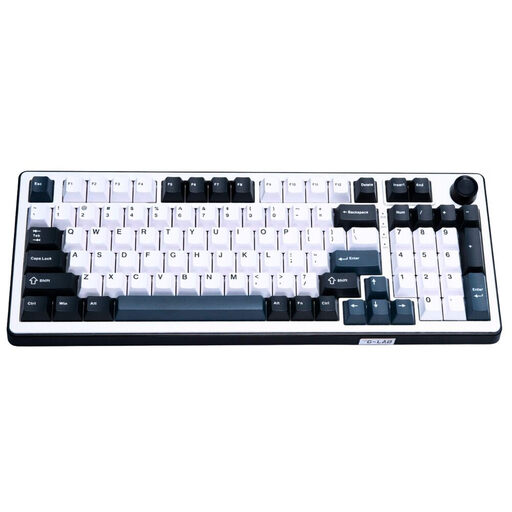
Why it stands out: This model is at the cutting edge of technology with its Hall Effect magnetic switches. It offers a polling rate that climbs up to 8000 Hz, reducing latency to an absolute minimum. Its 5-layer gasket structure ensures a stable and much quieter typing experience than a classic mechanical keyboard.
Advantages:
Who is it for? For competitive gamers and hardware enthusiasts seeking absolute performance and near-zero latency. This model is offered in a standard QWERTY (US) layout, making it perfect for both gaming and typing.
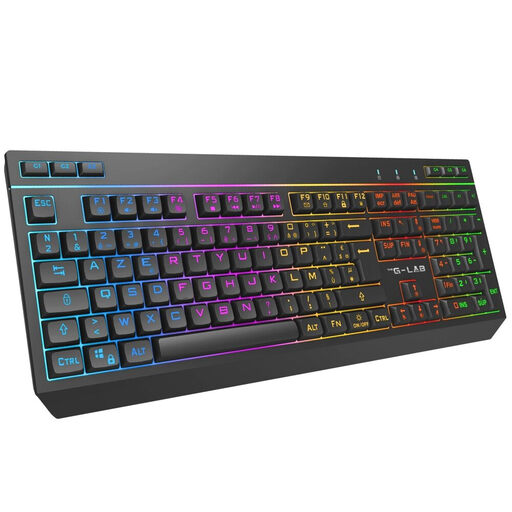
Why it stands out: The Keyz Tungsten EX is the champion of flexibility. Its triple connection (2.4 GHz wireless, Bluetooth, and wired USB-C) allows it to effortlessly juggle between a PC, a console, and other devices. Its optimised membrane technology makes it an excellent silent gaming keyboard.
Advantages:
Who is it for? For the versatile gamer looking for a single keyboard for their PC and consoles, with the freedom of wireless and quiet typing. Be aware that this model features an AZERTY layout, designed for French-speaking users.
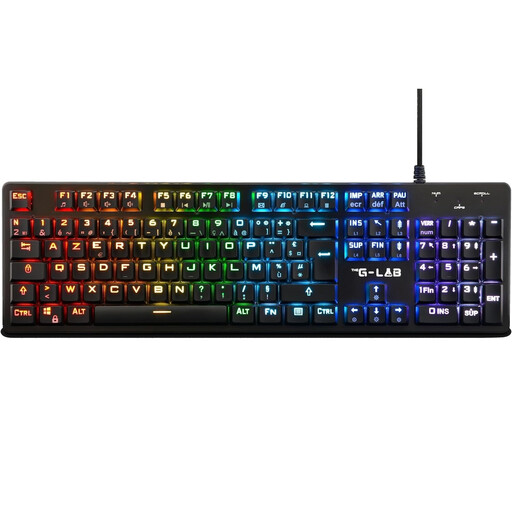
Why it stands out: The Keyz Platinum combines the speed of mechanical red switches with an ultra-slim low-profile design. Actuation is faster and key travel is reduced. The result: increased responsiveness, ideal for fast-paced games. Its aluminium alloy chassis gives it rock-solid stability and durability.
Advantages:
Who is it for? For the mechanical gaming keyboard enthusiast who makes speed and responsiveness their top priority. Its low-profile format is perfect for those who prefer a fast, short keystroke, typical of first-person shooters (FPS) and MOBAs. Note that this model also uses an AZERTY layout.
The world of gaming hardware is always evolving, with innovations constantly pushing the boundaries of performance. If the cutting-edge technology of the KEYZ ELITE 400 HE has piqued your interest, you should know that more and more models are adopting this type of mechanism.
To discover a wider selection, explore our dedicated category for Hall effect keyboards.
A mechanical switch operates through physical contact: pressing the key activates a contactor that sends the signal. A Hall Effect magnetic switch, on the other hand, has no physical contact. It measures the change in a magnetic field as the key is pressed. The advantage? Faster actuation, virtually no wear and tear, and, most importantly, the ability to adjust the actuation point of each key via software.
Yes, most The G-Lab keyboards are compatible with the latest generation of consoles like the PS4, PS5, Xbox One, and Xbox Series X/S. The Keyz Tungsten EX, with its Bluetooth connectivity, is particularly convenient for this purpose. However, remember to check compatibility on a game-by-game basis, as not all games support keyboard and mouse input yet.
To customise the RGB backlighting, there are generally two methods: either directly on the keyboard using key combinations (often Fn + another key), or via dedicated software available for download from The G-Lab's website. Some newer models, like the KEYZ ELITE 400 HE, even offer a web-based configuration interface, which avoids installing any programs on your computer.