
Livraison le jour même ou le lendemain

Qualité garantie

Débloquez vos offres de bienvenue: Livraison GRATUITE | Jusqu'à -80 % | 30 jours d'essai gratuits à JoyPlus
Téléchargez l'application
Where and how should you set up your television? It's often a real puzzle. Between bulky TV cabinets, wall mounts that require drilling holes, and other less-than-practical solutions, it's hard to know where to turn. This is where the floor TV stand shines: a versatile alternative that adapts just as well to a living room's aesthetic as it does to the demands of a gaming setup.
Whether you're looking for a TV stand with storage to optimise your living room or an ultra-stable gaming TV stand for total immersion, this guide will help you make sense of it all. As a product expert at Joybuy, my mission is simple: to give you concrete, objective advice to make the right choice, without the marketing jargon.
Before you dive in, let's review the key points that will ensure a purchase perfectly suited to your needs and your equipment.
The perfect stand isn't the same for everyone; it all depends on how you'll use it.
This is the first thing to check before any purchase: verify that your screen's VESA (Video Electronics Standards Association) standard matches that of the stand. This standard defines the distance in millimetres between the four mounting holes on the back of your TV (e.g., 200x200 mm or 400x400 mm).
Next, consider the weight. It is imperative to choose a model with a maximum load capacity greater than the weight of your television. This is a matter of basic safety for your equipment (and for you!). This information is always clearly indicated by the manufacturer.
A good stand must also be practical. If you have multiple devices (game console, internet router, Blu-ray player), a TV stand with storage featuring open shelves and closed compartments will be much more convenient. The open shelves ensure good ventilation for your electronics, while the doors or flaps help keep a living room visually tidy.
For more advanced setups, like a VESA mount for a cockpit, modularity becomes a real asset. Some models allow you to add extra mounts to build a multi-screen configuration for a completely immersive, panoramic gaming experience.
To put this advice into practice, we've selected two models that are polar opposites but perfectly illustrate these different needs.
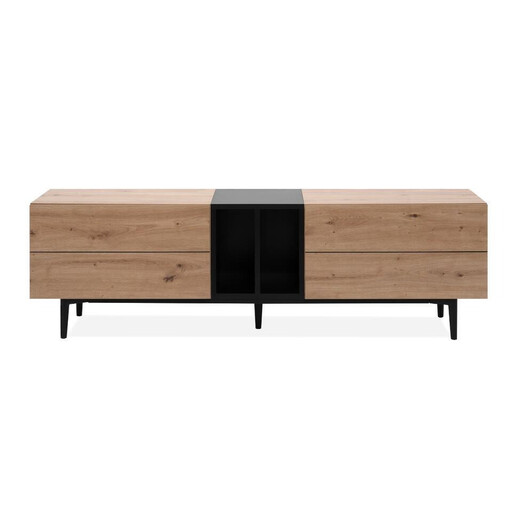
Why it stands out
The Nola 56B is the perfect example of a TV unit that checks all the boxes: style and practicality. With its 160 cm width, it easily accommodates large televisions while offering plenty of surface area. Its two-tone artisan oak and black design gives it a very trendy industrial design TV unit look that's easy to integrate into a contemporary decor. The absence of handles perfects its minimalist lines.
Advantages
Who is it for? This unit is for anyone who wants a media console that is both elegant and functional for their living space. It's the ideal solution for centralising your audiovisual equipment and putting an end to clutter, all with a bold style.
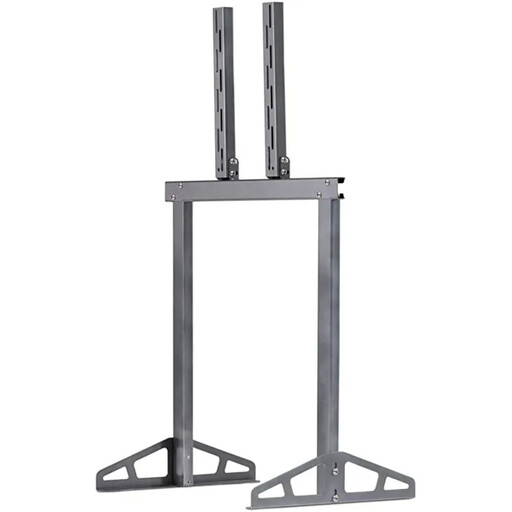
Why it stands out
The Playseat stand is a heavyweight, both literally and figuratively. It was designed for simulation enthusiasts. Its grey metal frame ensures rock-solid durability, capable of supporting a screen up to 40 kg without ever wobbling, even in the heat of the action. It is the very definition of a sim racing monitor stand: a standalone model that is placed just behind the steering wheel, at the ideal distance and height.
Advantages
Who is it for? This stand is the cornerstone of any serious sim racing setup. It is aimed at gamers who accept no compromises on stability and who are seeking the most total immersion. It is compatible with most cockpits on the market and, of course, with all simulators from the Playseat brand.
Our selection covers two very distinct needs. Is your project different? Do you have specific constraints, such as needing a white TV riser stand to match your furniture? Don't worry, other solutions exist.
Discover our complete collection of TV stands to find the model that's right for you.
The easiest way is to check your TV's manual. If you don't have it, grab a tape measure and measure the distance (in millimetres) between the four mounting holes on the back of the screen, first horizontally, then vertically. The result (e.g., 400x200 mm) is its VESA standard. Then, simply check that the stand you're interested in is compatible with that standard.
The golden rule is simple: the centre of the screen should be at eye level when you are seated in your usual viewing position. In a living room, this most often corresponds to a height between 90 and 120 cm from the floor. For a gaming TV stand paired with a cockpit, the adjustment must be more precise so that your gaze falls naturally into the heart of the action, without neck strain.
Stability is primarily a matter of design, not format. A well-designed TV stand with storage like the Nola, with its wide base and well-distributed weight, offers exemplary stability. Likewise, a specialised stand like the Playseat is engineered from the ground up for absolute stability under gaming conditions, with a heavy base and a reinforced metal structure. For maximum safety, especially in the presence of children or pets, it is highly recommended to use the anti-tip kit (often included) to anchor the unit or stand to the wall.