
Livraison le jour même ou le lendemain

Qualité garantie

Débloquez vos offres de bienvenue: Livraison GRATUITE | Jusqu'à -80 % | 30 jours d'essai gratuits à JoyPlus
Téléchargez l'application
A fast USB-C mains charger can replace several adaptors at home, in the office or when travelling. But the wattage printed on the box isn't enough to guarantee fast, compatible charging for your smartphone, tablet or laptop.
Three common pitfalls crop up when you're buying:
Here are the criteria to consider before choosing a USB-C wall charger, along with a selection suited to different needs.
Power is measured in watts. A 25 W or 30 W USB-C mains adaptor is generally suitable for a smartphone, wireless earphones or a light tablet. It won't force your device to accept more power than it can handle – the device normally adjusts the power it draws.
Some useful benchmarks:
A 100 W USB-C charger therefore doesn't necessarily deliver 100 W on each of its ports. On a multi-port model, the total power is often shared between the connected devices.
The USB Power Delivery protocol, often shortened to "USB-PD", allows the charger and device to negotiate the most suitable voltage and current. For an iPhone, iPad or Google Pixel, a fast charger compatible with Power Delivery, paired with the right cable, is a common setup.
Samsung Galaxy phones can also take advantage of PPS, which adjusts the voltage more precisely. The actual speed you get, however, depends on the phone model, the cable used, the temperature and the battery's condition. The figures quoted by manufacturers come from their own test conditions – they don't guarantee exactly the same results with every device.
Also think about your device's connector:
A GaN charger uses gallium nitride instead of silicon in certain parts of its power circuit. This design generally allows for a smaller size, which is handy in a tight wall socket or at the bottom of a bag. It doesn't, however, replace the need to check the technical specifications and certifications of the model.
Before ordering, check:
For a charger intended for a laptop, also make sure the USB-C cable can handle the required power. An unsuitable cable can limit charging, even with a 65 W or 100 W adaptor.
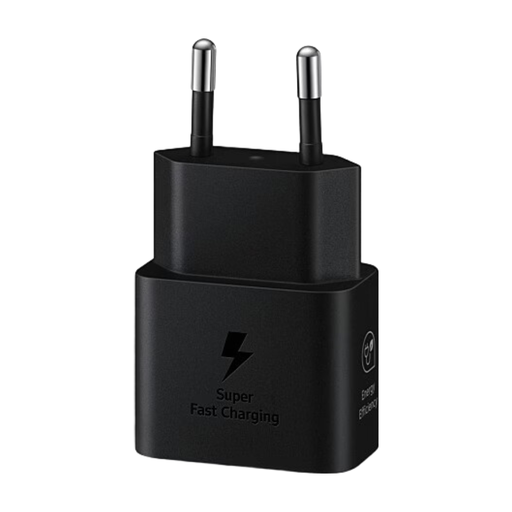
Why this fits the profile: With its 25 W, this charger is ideal for anyone who wants to charge a smartphone, tablet or earphones without collecting lots of adaptors. The USB-C to USB-C cable is included.
The stated power is clearly shown and the listing specifies USB-PD 3.0 and PPS compatibility. It also mentions the built-in electrical protections.
25 W power, stated weight of 51.6 g, 100–240 V input and cable included depending on the version shown.
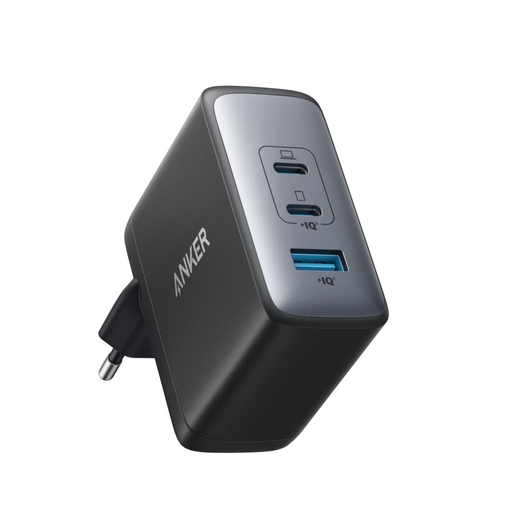
Why this fits the profile: Its two USB-C ports and one USB-A port let you power a laptop, a phone and earphones from the same workspace.
The listing distinguishes the maximum 100 W power from the port configuration. This helps avoid confusing the total power with what's actually available on each output.
GaN II technology, two USB-C ports, one USB-A port and a stated maximum power of 100 W.
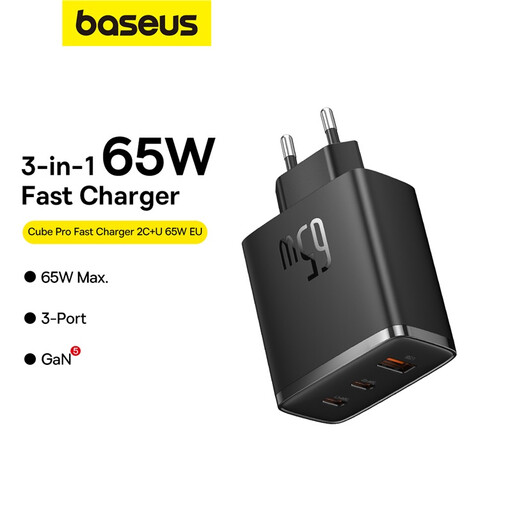
Why this fits the profile: This 65 W USB-C charger is aimed at people who carry several devices and want to lighten their bag by avoiding multiple adaptors.
The listing details the power distribution between the two USB-C ports and the USB-A port when several devices are connected.
GaN5 technology, two USB-C ports and one USB-A port, 110–240 V input and detailed outputs up to 65 W on one USB-C port.
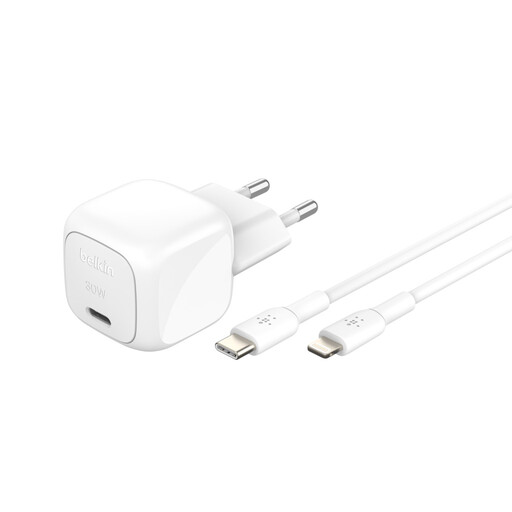
Why this fits the profile: The included one-metre cable lets you charge an iPhone or iPad with a Lightning port straight away, with no extra purchase needed.
The cable type is clearly stated. This makes it impossible to confuse a USB-C charger with a USB-C to USB-C cable, which wouldn't let you plug in a Lightning device directly.
Stated power of 30 W, 1 m USB-C to Lightning cable, compact size and electrical protections as indicated by the manufacturer.
We've put together a full selection, updated in real time, of products that meet these demanding criteria and European safety regulations.
Yes, as long as it's compatible with the device's protocol. The phone will only draw the power it can accept. For a smartphone, a 25 W or 30 W model is usually sufficient and is often more compact.
The cable must match the connector and the power you need. For a laptop, choose a USB-C cable rated for the required power. With an iPhone that has a Lightning port, go for a USB-C to Lightning cable compatible with fast charging. Always check whether the cable is included in the product listing.
Its lifespan depends on the quality of the components, ventilation, how often you travel with it and the condition of the cable. Keep it dry, don't cover it while it's in use, and stop using it if the casing is cracked, if it gets unusually hot or if it gives off a strange smell. Unplugging it when not in use also helps reduce its standby power consumption.