
Livraison le jour même ou le lendemain

Qualité garantie

Débloquez vos offres de bienvenue: Livraison GRATUITE | Jusqu'à -80 % | 30 jours d'essai gratuits à JoyPlus
Téléchargez l'application
The era of proprietary chargers for every device is well and truly over. While USB-C has unified our connections, it has also made choosing a fast USB-C charger far more complex. Faced with a jungle of available models, it's easy to get lost in marketing promises and end up with an unsuitable product. A charger that's too weak, incompatible, or unreliable isn't just a waste of money: it can also hamper your daily productivity.
This guide's mission is to demystify the key points to help you choose a charger that meets your exact needs, while sidestepping the most common traps.
The market is saturated with technical jargon and confusing marketing claims. Here are the three main pitfalls to be aware of to make an informed choice.
To avoid these disappointments, focus on a few key technical specifications. These are what will determine the performance and lifespan of your USB-C power adapter.
Power, expressed in watts (W), is the number one criterion. Here are some benchmarks to help you see clearly:
It's crucial to verify compatibility with the USB Power Delivery (PD) standard. This allows the charger to communicate with your device to deliver the precise power needed, ensuring a charge that is both fast and safe.
A multi-port charger is convenient, but be sure to analyze its configuration:
GaN technology is a major asset for mobility. A GaN charger is significantly smaller and lighter than a traditional charger of the same wattage, making it the ultimate travel charger.
For getting around, a dedicated car charger with a USB-C PD port is essential to keep your devices powered up on the road, especially on long trips where the GPS is running at full throttle.
Rather than an endless list, we've selected models that cater to specific user profiles, ensuring they sidestep the pitfalls mentioned earlier.
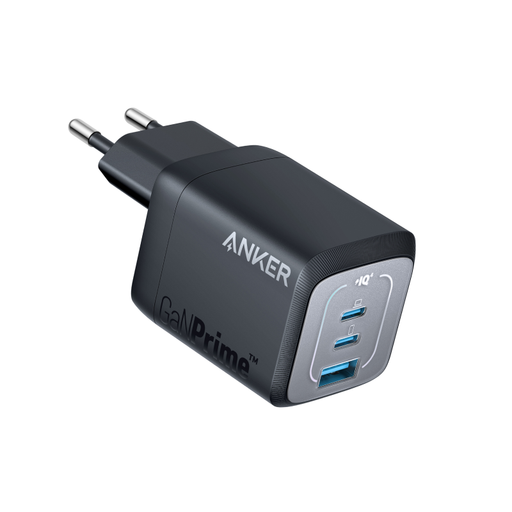
Why it stands out: Perfect for those who juggle a laptop, smartphone, and tablet on the go. Its 67W output is more than enough for a MacBook Air, and its 3 ports let you charge everything with a single block.
The spec sheet is crystal clear about power distribution: up to 67W on a single port, or a 65W maximum when using two ports. No nasty surprises.
Thanks to GaN technology and its foldable plug, it's 51% more compact than the original 67W Apple charger. A significant space-saver in any bag.
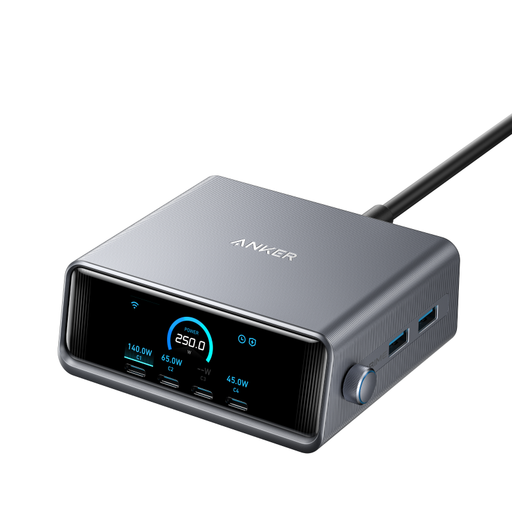
Why it stands out: For those who need to power a high-performance laptop, a tablet, a smartphone, and a host of accessories all at once. A true command center for your desk.
Its LCD screen displays the power distributed to each port in real time. Total transparency that leaves no room for ambiguity about charge distribution.
With 250W of total power and 6 ports (4 USB-C, 2 USB-A), it can fast-charge multiple power-hungry devices simultaneously, including a 16-inch MacBook Pro at its maximum power.
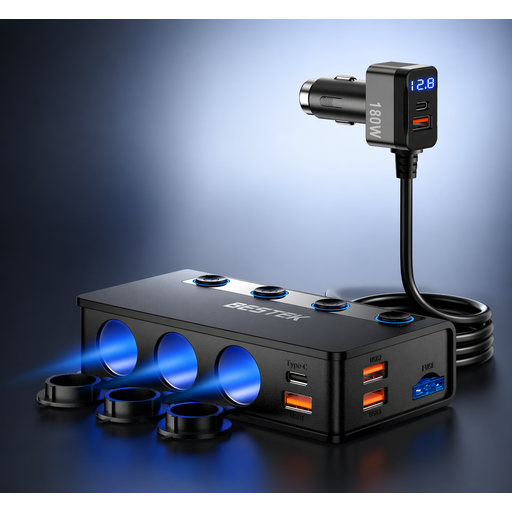
Why it stands out: Designed for families or professionals on the move, it transforms a simple cigarette lighter socket into a charging station capable of powering up to 9 devices, including tablets and dashcams.
It addresses a very specific need that wall chargers overlook. Its specifications are unambiguous: one 65W PD port, one 18W PD port, and four QC3.0 ports.
The inclusion of a 65W USB-C PD port is a rarity in car chargers. It allows you to efficiently charge a laptop during a trip, in addition to all your other devices.
We have curated a complete and up-to-date selection of products that meet our strict selection criteria and European safety standards.
1. Can a 100W charger damage my phone that only needs 20W? No. Thanks to the USB Power Delivery (PD) protocol, the charger and your device "negotiate" to agree on the charging power. The charger will only deliver the maximum power your phone can safely accept, which is 20W in this example. So there is no risk of overcharging.
2. Do I need a specific cable for fast charging? Yes, and this is a crucial point. To take advantage of power levels above 60W, you must use a USB-C cable certified to handle that power (look for a "100W" or "240W" rating on the cable or its packaging). Using a standard, uncertified cable will cap the charge at 60W, even if your charger is much more powerful.
3. What's the difference between Power Delivery (PD) and Quick Charge (QC)?Power Delivery (PD) is the universal charging standard for the USB-C ecosystem, adopted by the vast majority of manufacturers (Apple, Google, laptop makers...). Quick Charge (QC) is a proprietary technology from Qualcomm, commonly found on Android smartphones. Today, many modern chargers, especially multi-port models, are compatible with both protocols for maximum flexibility.